Displaying and resetting alarms. Alarm log with the latest 16 alarms.
Operating mode (heating, auto, cooling), temperatures, fan speed and software
version.
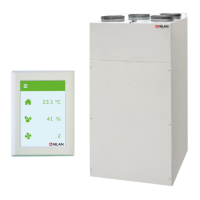
Main menu: Shows operating status. Press ESC to return to the main menu.
Select: Extraction, intake, ventilation and OFF. The function selected is activated
via switch or button. (See assembly instructions)
Same function as User selection. The menu is accessible when the option is
selected. (See assembly instructions)
Setting clock. If the unit has no power for more than 24 hours, the clock must be
set. Switch between summer and winter time manually.
Week program can be activated. ON/OFF If the week program is active "1, 2 or 3”
are shown in the main menu.
If the unit is selected with heater. Heater can be selected ON/OFF. Frost
prevention remains active in OFF.
Setting intake temperature for cooling via bypass damper.
Higher and/or lower fan speeds can be set in the event of high/low humidity.
Higher ventilation level can be set in the event of high CO
2
levels. Menu only
shown if CO
2
sensors are fitted.
Low ventilation level in the event of low outdoor temperature can be selected.
Default setting gives filter alarm with an interval of 90 days. Reset alarm in the
"SHOW ALARMS” menu.
Setting minimum temperatures for supply air.
Select language: English, German, French, Swedish, Danish, Norwegian, Finnish
The control unit is always in the main menu by default (menu in the heavy frame). Use ▲▼ to scroll
through the other menus.
6


 To Next Page
 Loading...