NEGATIVE IONS FUNCTION (OPTIONAL)
5
1. Do not put it near the TV with its power on.
2. Do not put an iron skewer into the negative ion discharge port.
3.Do not pour liquid, etc into the negative ion discharge port.
4.Do not put any object into ionizer opening.
3
WARNING
1 2
3
4 5 6
7
8
NOTE
The Cyclone Filter must
be used at all times to
retain optimum efficiency.
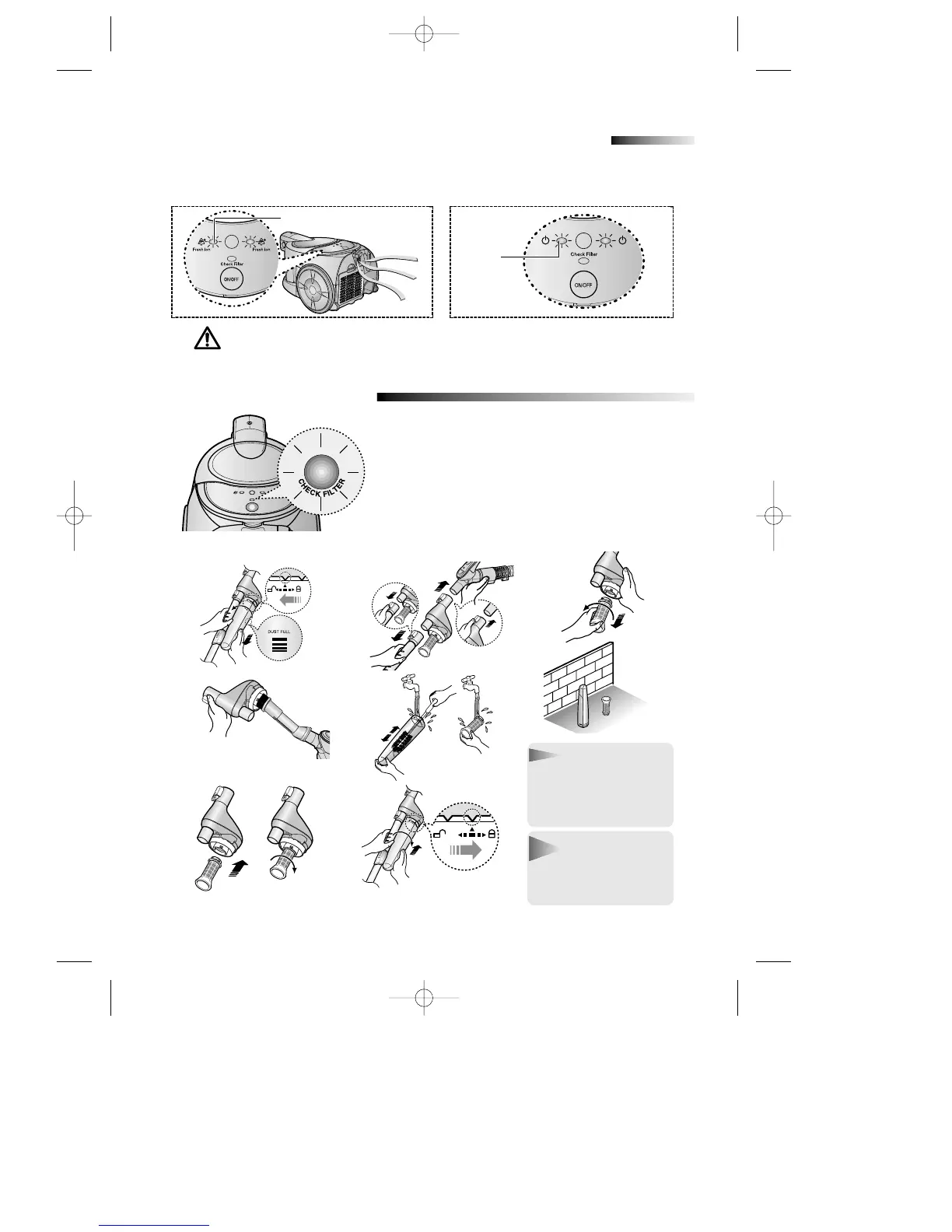
4-1 CLEANING THE CYCLONE FILTER (OPTIONAL)
4
INDICATOR LIGHTS
When the indicator light comes on, please empty
and clean the Cyclone Filter (4-1) and the Basket
filter (4-2) as shown in the following illustrations.
NOTE
Do not over fill Cyclonic
Filter. It must be emptied
when the dustreaches
Dust Full Level.
- Model with the negative ion function
When power is applied to the unit, the “GREEN”
LED turns on and negative ions come out.
GREEN
- Model without the negative ion function
When power is applied to the unit, the
”RED”LED turns on.
RED
DJ68-00316B(NILFISK)-EN 4/15/05 8:57 PM Page 5





 To Next Page