EasyManua.ls Logo

Ninja DCM201 - User Manual

Ninja DCM201
11 pages
Print Icon
To Next Page IconTo Next Page
Loading...
ninjakitchen.com
DCM200
Series
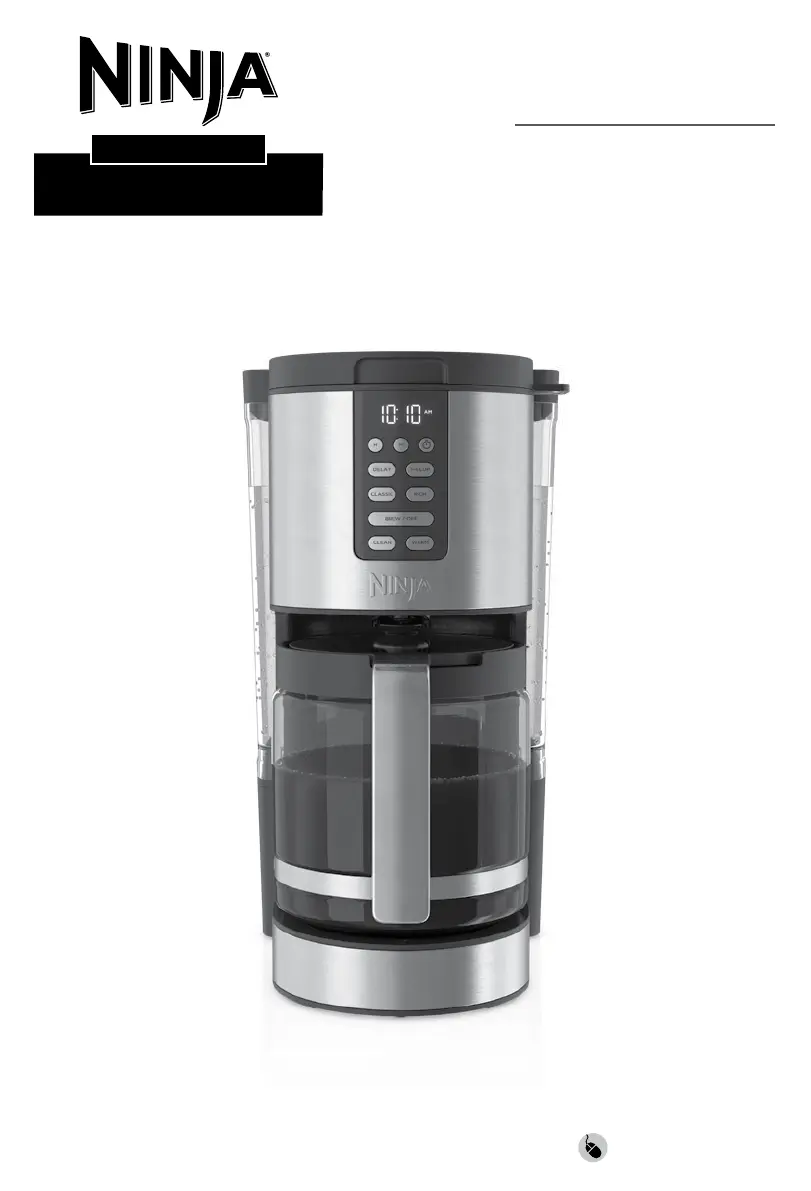
OWNER’S GUIDE
COFFEE MAKER
XL 14-CUP
PROGRAMMABLE

Questions and Answers

  • L
    Lawrence TerrellAug 15, 2025
    What to do if Ninja DCM201 brew will not start?
    • R
      Richard HerreraAug 15, 2025
      First, ensure the unit is powered on and the display is illuminated. If there are no lights, the machine is not getting power; try a different outlet. Also, check to make sure there is water in the water reservoir. Ensure the carafe is in place, as the brewer will not dispense coffee if it's not under the brew basket, which could lead to overflow. If the brew still does not start, it may be time to run a clean cycle.
  • J
    Jane RosalesAug 18, 2025
    What to do if Ninja DCM201 carafe overflowed?
    • S
      Sarah HancockAug 18, 2025
      The carafe may have overflowed because it was not empty prior to brewing, or the water level exceeded the Max Fill line on the water reservoir. Remember DO NOT add additional water to the reservoir after a brew or cleaning cycle has already started. To avoid overflows, make sure the carafe is empty before brewing and the water reservoir is not filled past the 14-Cup Line, as the carafe holds 70 fl. oz.
  • K
    keith01Aug 21, 2025
    Why is my Ninja DCM201 Coffee Maker coffee leaking?
    • R
      robertclarkAug 21, 2025
      If there is a small amount of water in the reservoir valve after removing the water reservoir, it can be easily removed with a dry cloth. If the leak is coming from the bottom of the brew basket, the removable filter holder valve may be clogged. Rinse the filter holder with water and press the valve repeatedly until the clog is cleared. If the leak is coming from the bottom of the coffee maker, call Customer Service at 1-877-646-5288.
  • M
    Michael SmithAug 25, 2025
    What to do if Ninja DCM201 Coffee Maker brew basket overflowed?
    • J
      James WattsAug 26, 2025
      Check that the carafe is in place with the lid secured. If the carafe is in place, the bottom of the filter holder may be clogged. This can happen with finely ground coffee or too many coffee grounds in the filter holder. Rinse the filter holder with water and press the valve repeatedly until the clog is cleared. Also, decaf coffee grounds absorb water differently, so use fewer scoops when using decaf grounds.
  • J
    Jerry EllisAug 28, 2025
    Why is my Ninja DCM201 Coffee Maker coffee too strong?
    • B
      Beverly CallahanAug 28, 2025
      For milder coffee, try the Classic Brew setting. If you want an even milder flavor, use fewer grounds in the filter.
  • P
    Pamela KentAug 31, 2025
    How to fix sediment in Ninja DCM201 coffee?
    • A
      andrea07Sep 1, 2025
      To reduce the amount of sediment in the brewed coffee, use a slightly coarser grind or use a paper filter. Also, using too many grounds can cause the filter holder to overflow. Once cooled, clean out the filter holder and refill using the appropriate amount of coffee (1 scoop per 2 cups).
  • L
    Lance WhiteSep 3, 2025
    Why is my Ninja DCM201 coffee too weak?
    • M
      Michelle MathisSep 3, 2025
      For stronger coffee, use the Rich Brew setting. If you want an even bolder flavor, you can add more coffee grounds to the filter.
  • T
    Tina WeaverSep 7, 2025
    Why is my Ninja DCM201 brew cycle too slow?
    • J
      jennifer66Sep 7, 2025
      A full carafe brew will take approximately 12–15 minutes. If a full carafe brew takes longer than expected, you may need to run a clean cycle.
  • C
    Connor PachecoSep 10, 2025
    How to stop Ninja DCM201 Coffee Maker paper filter from folding over?
    • D
      Donna Moody MDSep 12, 2025
      The unit is designed to take a #4 cone filter. Be sure you are using this size and shape, as larger sizes may fold over. Allow the filter holder to cool before handling. Be sure the paper filter is folded along its two seams and is pressed firmly into the filter holder. Alternatively, you can wet the sides of the paper filter to temporarily adhere it to the filter holder.

Summary

Important Safety Precautions

General Safety Guidelines

Covers safe usage for persons, electrical shock risk, and child supervision.

Control Panel and Features

Control Panel Overview

Details the digital clock, buttons for setting time, brew styles, and functions.

Key Operational Features

Highlights 1-4 Cup brew, brew styles, freshness timer, auto-off, and keep warm.

Brewing Your Coffee

Preparation and Setup Steps

Guide to placing the brewer, filling reservoir, adding filter and grounds.

Brewing Process

Instructions for selecting brew style and starting the brewing cycle.

Advanced Brewing Functions

Programming Delay Brew

Steps to set a future brew time using the DELAY button.

Troubleshooting Common Issues

Product Support and Warranty

One Year Limited Warranty

Details on warranty coverage, what is and isn't covered, and service.

Ninja DCM201 Specifications

General IconGeneral
BrandNinja
ModelDCM201
CategoryCoffee Maker
ProgrammableYes
Carafe TypeGlass
Auto Shut-OffYes
Permanent FilterYes
Brew StylesClassic, Rich
Water ReservoirRemovable
Keep Warm FunctionYes
ColorBlack

Related product manuals