32Copyright © 2005 Nokia. All rights reserved.
2. Your phone
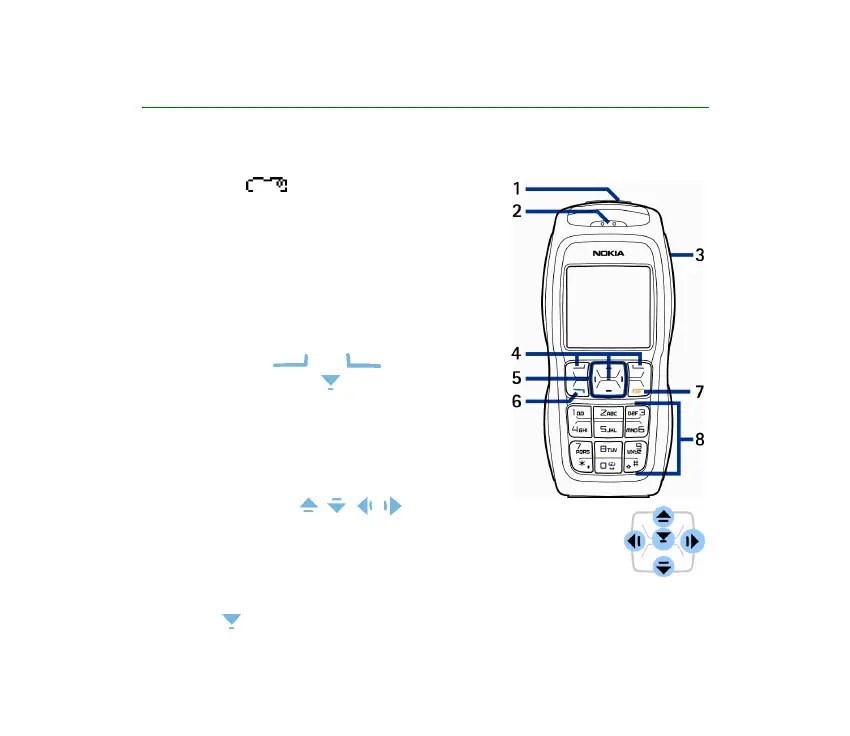
■ Keys and connectors
1. Power key
Switches the phone on and off. When the
keypad is locked, pressing the power key briefly
turns the phone’s display lights on for
approximately 15 seconds.
2. Earpiece
3. Loudspeaker
4. Selection keys and ,
middle selection key
The function of these keys depends on the
guiding text shown on the display above the
keys. See Standby mode on page 33.
5. 4-way scroll keys , , ,
Enables navigation through names, phone numbers, menus or
settings. The 4-way scroll key is also used to move the cursor up
and down, left and right when writing text, using the calendar,
and in some game applications. Pressing the key briefly in the
middle selects the menu item or confirms a selection. In standby mode,



 To Next Page