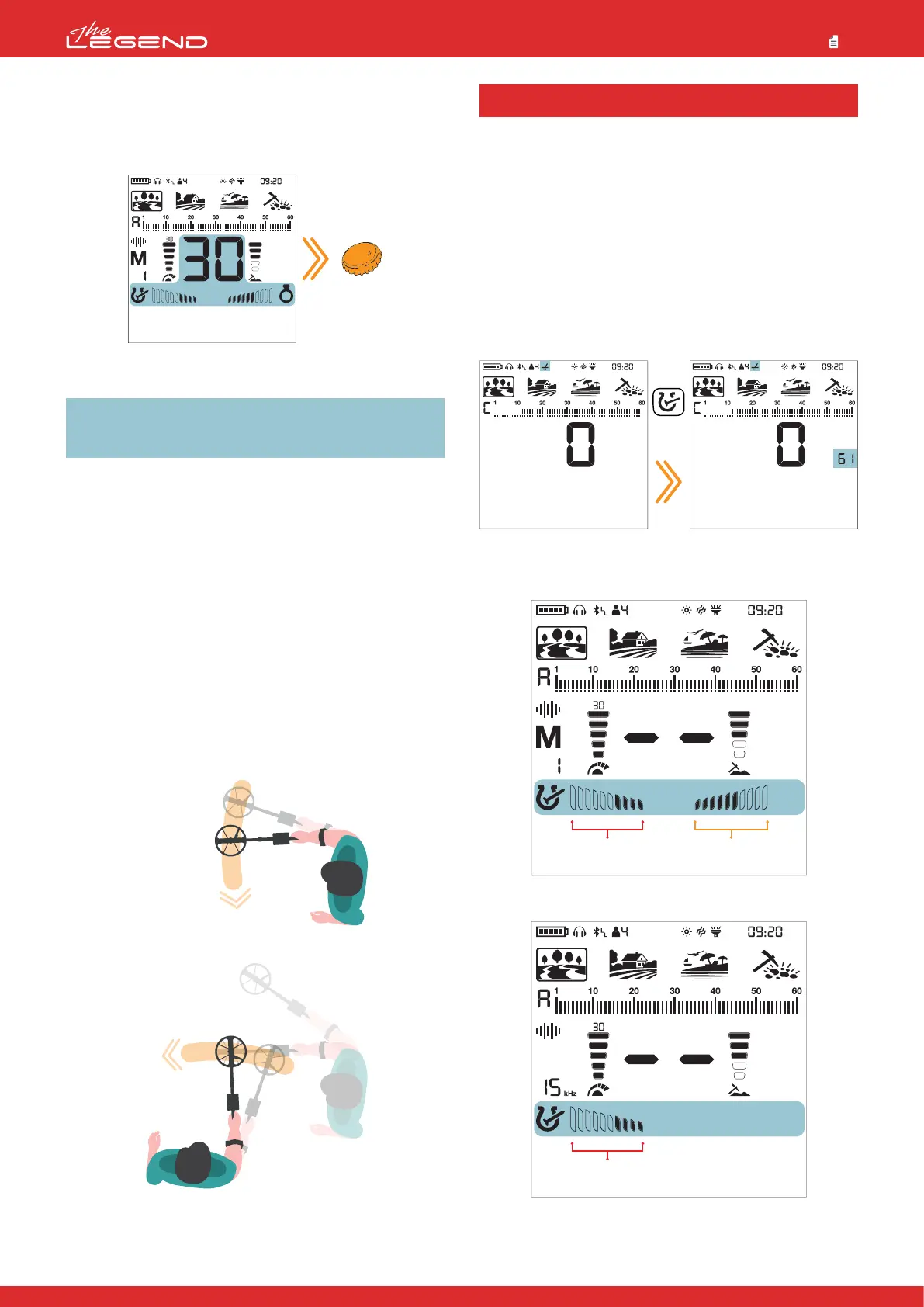
When discriminating metals as ferrous / non-ferrous, the
Target ID sometimes is not sufficient. FerroCheck™ shows
the ferrous/non-ferrous ratio of targets graphically on the
screen.
FerroCheck™ is a unique feature of The LEGEND that you will not
find on other detectors and it provides the user the
ferrous/non-ferrous ratio of the target signal to be able to identify
targets more easily.
Targets such as large iron, rusted nails, bottle caps contain both
ferrous and non-ferrous signals and these types of targets
cannot be discriminated by Target ID and audio response only.
These types of targets may generate a non-ferrous audio
response as well as a Target ID.
IMPORTANT! Until you get experienced with this feature, it is
recommended to dig out all targets. By comparing the targets
with the FerroCheck™ graphs, users can use this feature
more productively to identify targets.
Ferrous Target
Targets with ferrous signal only will be identified as 100% ferrous
both in Target ID and FerroCheck™ as shown below:
True Non-Ferrous Target
Targets with non-ferrous signal only will be identified as 100%
non-ferrous both in Target ID and FerroCheck™ as shown below:
False Non-Ferrous Target
When targets such as bottle caps -although they generate a
non-ferrous Target ID- are checked by the FerroCheck™ feature,
they are identified as alloy which has ferrous (iron) content as
shown below:
The target generates a non-ferrous ID. However, it has both
ferrous and non-ferrous signal.
IMPORTANT! For the FerroCheck™ feature to work, the
detector must receive a strong signal. Therefore, FerroCheck™
is designed to work with shallower targets.
Correct Usage of the FerroCheck™
The accuracy of the FerroCheck™ feature is directly related to
correct usage. Therefore, once you detect a target, if you want to
check whether the target is ferrous or non-ferrous with the
FerroCheck™, please pay close attention to the instructions below:
1. You MUST sweep the coil with a large angle over the target and
make wide scans. Make sure that the search coil leaves the signal
completely during the sweeps.
2. You must go around the target and swing the coil over it from
different angles, with long sweeps again.
3. The ferrous side does not need to fill up completely. More than
2 bars is enough to identify a target as an alloy containing iron
(not a true non-ferrous target).
Ground Mineralization refers to the naturally occurring minerals
in the ground that affect a metal detector’s performance. There
are two main types of ground mineralization: Iron particles and
salt such as saltwater beaches. This causes the ground to become
conductive. Both produce false signals that mask targets.
In the ground balance menu, press the Discrimination Button
to activate the mineralization indicator. Letters GI (Ground
Indicator) will appear on the left side. When you press the
discrimination button again, it will revert back to Ferro Check
and FC will appear.
The 'FC' or 'GI' indicators will be automatically cleared from the
screen after 2 seconds.
Left side of the mineralization bar shows iron particle
mineralization and the right side shows mineralization due to
salt.
The right side works in Multi frequency only!
MINERALIZATION INDICATOR
15
Press
once
Iron Mineralization Salt Mineralization
Iron Mineralization



 To Next Page