PARK
FIELD
BEACH
GOLDFIELD
3
3
3
1
Audio Gain (AG)Search Mode
In the Goldfield mode, the Number of Tones is 1 and cannot be
changed. In addition, the Tone Frequency is also not adjustable
in this mode. Therefore, these 2 settings will not be active in the
tone settings menu when the Goldfield mode is selected.
2. The tone settings menu will appear at the top with a plus (+) icon
on the left. Press the plus (+) button once.
3. Using the right and left buttons, select the Number of Tones
setting. The selected setting will be shown framed.
4. The current Number of Tones will be displayed on the screen.
Select the Number of Tones using the plus (+) or minus (-) buttons.
5. To go back to settings, press the Pinpoint & Accept/Reject
Button once. To go back to the main screen, press the Power &
Settings Button once.
1-Tone
The Target ID scale is not divided into any zones, hence there is
only 1 tone zone. The LEGEND generates the same tone volume
and tone frequency for all targets.
2-Tone
The Target ID scale is divided into 2 zones as ferrous and
non-ferrous. The default point that separates these 2 zones
vary based on the selected search mode (see below) and can
be changed using the Tone Break setting. The Tone Volume
and Tone Frequency can be adjusted for each zone.
4-Tone
The Target ID scale is divided into 4 zones. The Tone Volume
and Tone Frequency can be adjusted for each zone.
6-Tone
The Target ID scale is divided into 6 zones. The Tone Volume
and Tone Frequency can be adjusted for each zone.
Park
Goldfield
Beach
Field
4.1 Number of Tones
The LEGEND divides the Target ID scale into multiple
zones allowing the user to make different tone
adjustments for targets that fall in each zone.
By changing the Number of Tones , you can decide on how many
zones you will divide the ID scale into. Thanks to this feature, you
can assign the same tone for all targets or assign a different tone
for each Target ID.
You can set the Number of Tones as 1, 2, 4, 6, 60 or P (Tone Pitch).
The Number of Tones setting only affects the mode
currently selected; changes made in one mode do
not affect the others.
The Number of Tones for the Goldfield mode is 1 and cannot be
changed.
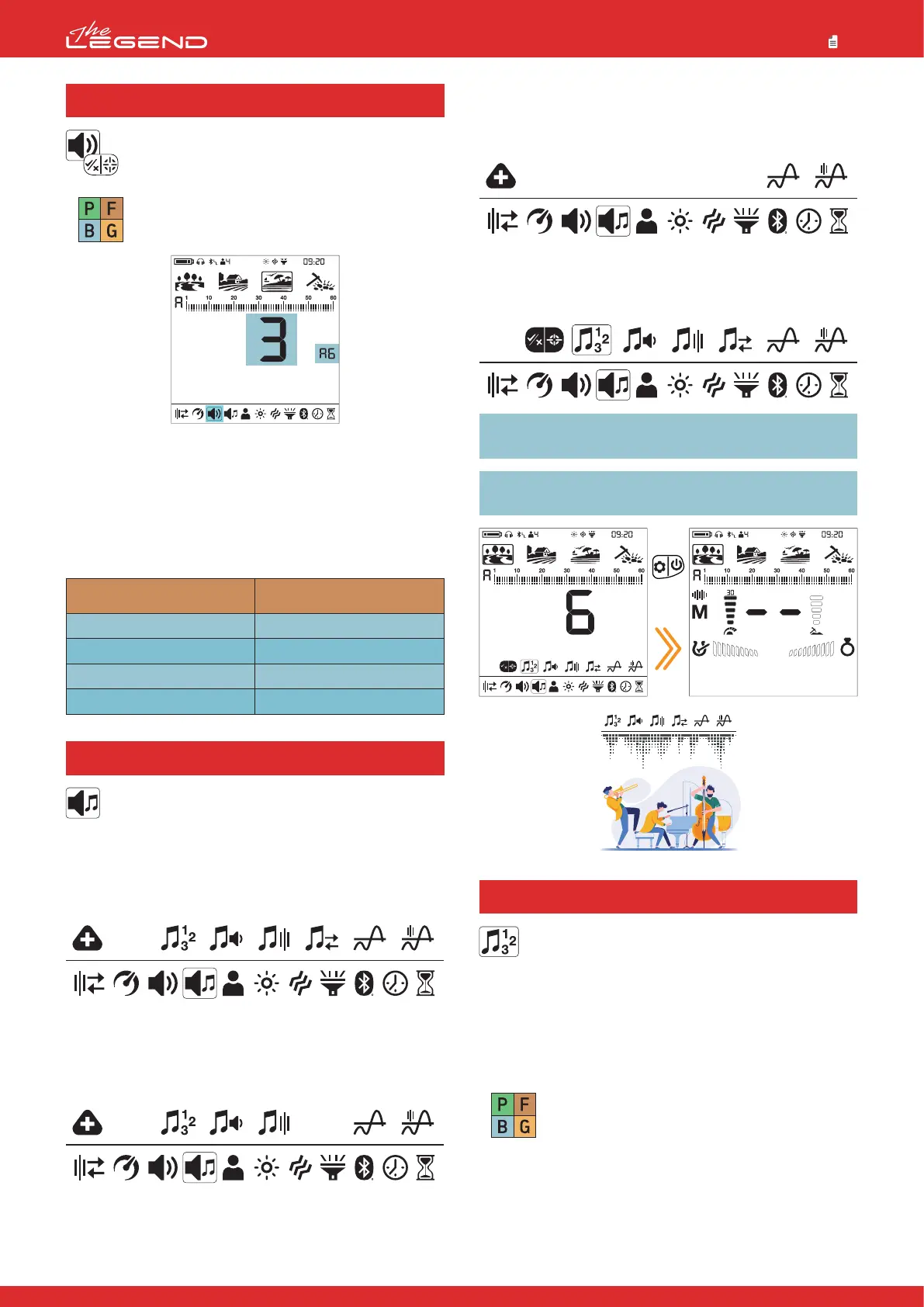
Adjusting the Number of Tones
1. Press the Power & Settings Button once. Select the tone setting
using the right and left buttons.
4. Tone Settings
These advanced tone settings offer various options to
modify the sounds The LEGEND generates for targets.
The tone setting offers 6 sub settings as follows: Number of
Tones , Tone Volume, Tone Frequency, Tone Break, Threshold Level,
Threshold Frequency.
Press the Power & Settings Button once. Select the tone setting
using the right and left buttons.
When tone is selected, you can see all the tone settings in the second
row over the settings. To the left of these settings, you will also see
the icons of buttons to guide you while adjusting these settings.
When the Number of Tones is 1, there is no tone break point, so
the Tone Break setting will not be selectable in the menu.
To go into the tone settings menu, press the plus (+) button once.
The selected setting will be shown framed. Using the right and left
buttons, you can navigate between the settings. You can go back to
the settings by pressing the Pinpoint & Accept/Reject Button once.
IMPORTANT! To go back to the main screen directly from the
tone settings menu, press the Power & Settings Button once.
IMPORTANT! Tone settings are not present in the Beast mode.
Settings will be as shown below:
20
3.1 Audio Gain (AG)
Audio Gain setting will increase the volume of weak
target responses.
The Audio Gain setting only affects the mode
currently selected; changes made in one mode do
not affect the others.
After selecting the volume, press the pinpoint button. Letters AG
will appear on the right side. You can adjust the AG using the plus
(+) and (–) buttons between 1-6. The default value is set to 3. Default
value 3 is the same as the previous versions of the LEGEND (v1.05,
v1.07) with no Audio Gain setting.
Audio Gain does NOT increase depth.
Default Audio Gain (AG) Settings
Park
Goldfield
Beach
Field
Press
once
60-Tone
Just like the 2-Tone, the Target ID scale is divided into 2 zones
as ferrous and non-ferrous. The default point that separates
these 2 zones varies based on the selected search mode (see
below) and can be changed using the Tone Break setting.
The Tone Volume and Tone Frequency can be adjusted for each
zone.
The difference between the 2-Tone and 60-Tone is that
60-Tone generates a separate tone with a different frequency
for each Target ID.
The device generates lower frequency tones for ferrous range
and mid to high frequency tones for non-ferrous metals.
For more information, please refer to Tone Frequency setting.



 To Next Page