Iron filter allows desired non-ferrous targets in trashy
sites, previously masked by iron, to be detectable.
Iron Filter (IF) setting ranges between 0-9 in the Park, Field and
Gold Field modes and between 1-9 in the Beach mode. The default
value is 8. Default value 8, is the same as the previous versions of
the LEGEND (v1.05, v1.07) with no Iron Filter setting.
Level 9 will become handy when trying to discriminate some
unwanted mid-conductors such as shotgun cartridges as iron.
Lower IF setting will increase the probability of ferrous targets to
be classified as non-ferrous targets and vice versa.
When the device is working in Multi frequency, select the
Recovery Speed setting and press the pinpoint button.
Letters "IF" (Iron Filter) will appear on the right side.
2. Recovery Speed
Low Recovery Speed
Medium Recovery Speed
High Recovery Speed
PARK
FIELD
BEACH
GOLDFIELD
5
5
6
5
Recovery SpeedSearch Mode
Park
Goldfield
Beach
Field
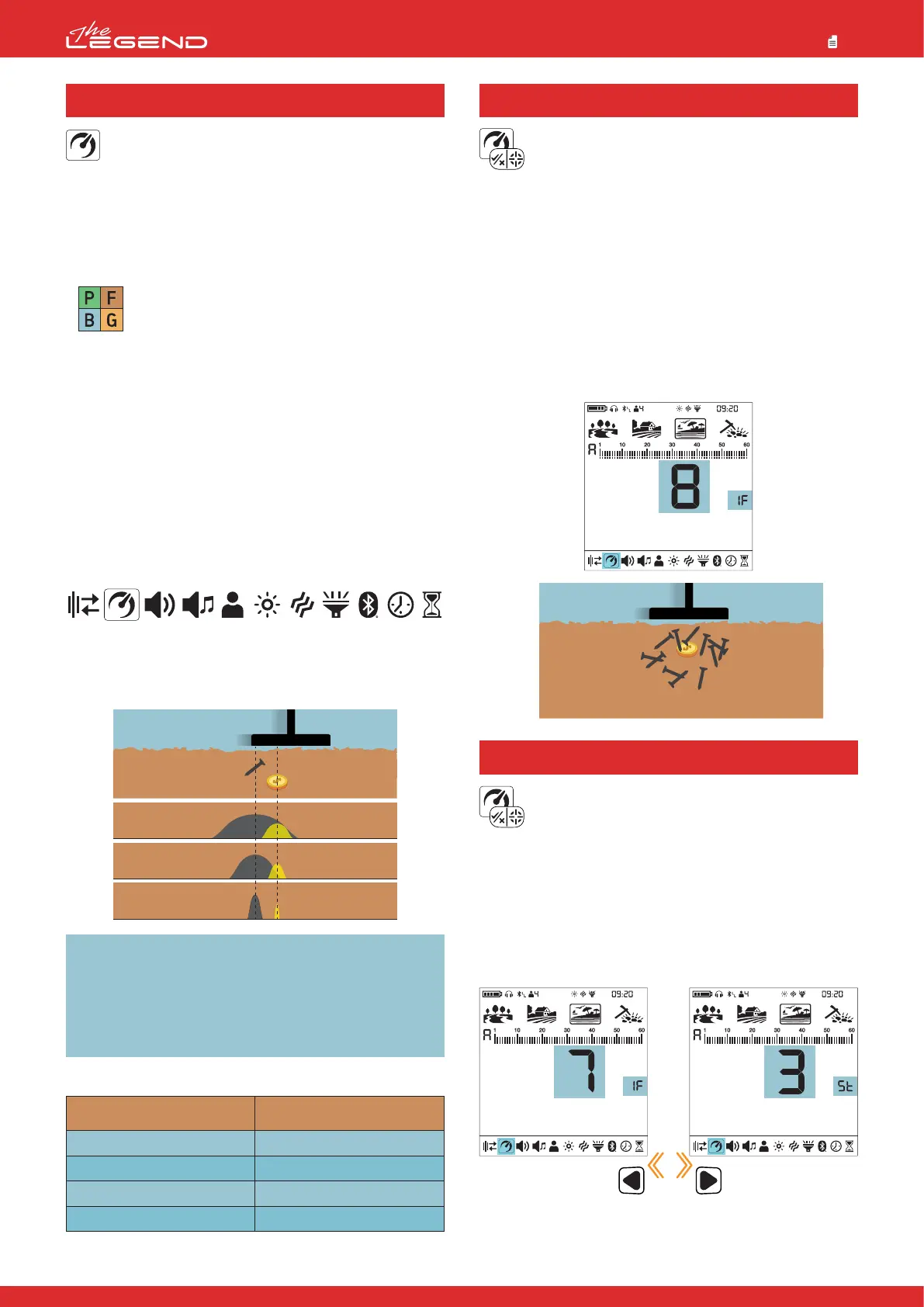
The Recovery Speed setting adjusts the speed of target
response.
It allows for separation between multiple targets in close proximity.
Recovery Speed setting enables you to detect smaller targets
among trash or ferrous targets.
The LEGEND Recovery Speed setting can be adjusted between 1
and 10 with 1 being the slowest and 10 being the fastest.
Recovery Speed setting only affects the mode
currently selected; changes made in one mode do
not affect the others.
When the Recovery Speed setting is set to a low number, the ability
of the device to detect targets in close proximity decreases but its
depth increases.
Similarly, a high Recovery Speed setting (for example 10) will
increase the ability of the device to detect targets in close
proximity but will decrease the depth.
It is recommended that you practice with different metals placed
close to each other before starting to use this setting.
Adjusting the Recovery Speed
1. Press the Power & Settings Button once. Select the Recovery
Speed setting using the right and left buttons. The current value
will be displayed on screen.
2. Change the value of the Recovery Speed using the plus (+) and
minus (-) buttons.
3. Press the Power & Settings Button once to go back to the main
screen.
IMPORTANT! Increasing the Recovery Speed allows for a faster
sweep rate with less chance of missing targets. Increasing
Recovery Speed at the same sweep rate will help to eliminate
ground noise but it will decrease detection depth.
If you encounter high levels of ground noise on beach sand or
underwater, try increasing the Recovery Speed.
Default Recovery Speed Settings
17
2.1 Iron Filter (IF)
Stability (St) setting is the fine tuning for the Iron Filter
(IF) setting.
Stability (St) setting ranges between 1-5 and the default value is
3.
When the IF is set to 8 or 9, the St setting will be inactive in the
Park, Field and Gold Field modes.
When the IF is set to any value below 8, the St setting can be
activated by pressing the right or left button and can be adjusted
by using the plus (+) and minus (-) buttons.
NOTE: The St setting in the beach mode is different than this St
setting!
2.2 Stability for Iron Filter



 To Next Page