Nomadic Cooling Co 15 NC-S
1
Install & Operations Guide Ver. 240411
REMOTE CONTROL OPERATION
The NC-S
1
includes an infrared remote
control. When setting the temperature, the
difference between ambient and target
temperature should be less than 37°F (3°C),
otherwise the AC unit will restart frequently,
which will increase power consumption.
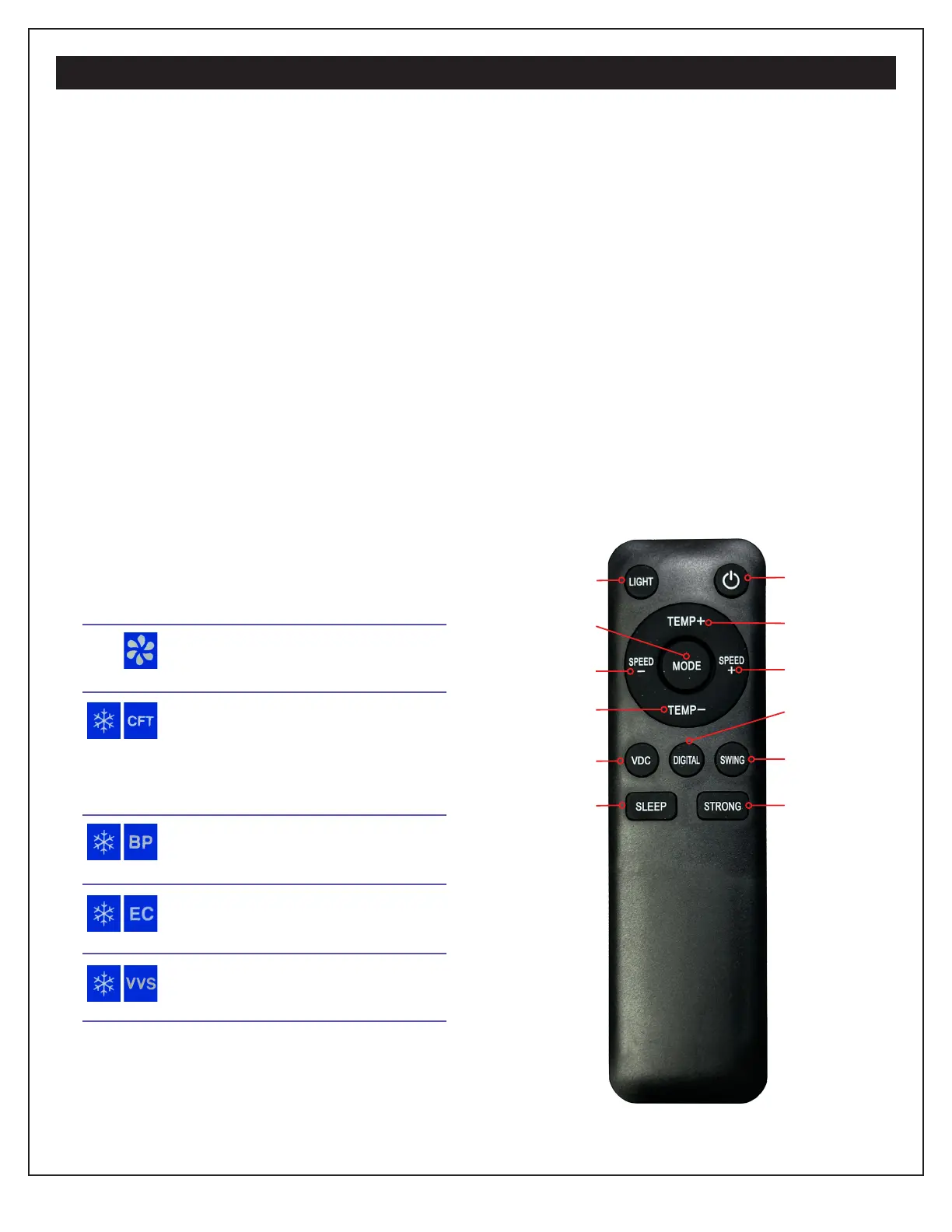
1. Power: Turns AC Unit On or Off
2. Light: Turns Backlit Dispay On or Off
3. Temp “+”: Temperature Increase 1°F
4. Temp “-”: Temperature Decrease 1°F
5. Speed “+”: Increase Air Speed by 1 level
6. Speed “-”: Decrease Air Speed by 1 level
7. Mode: Press to cycle through the
following controller modes:
Fan Only. Five speeds appear
on right side of dispay.
“Channel Forwarding Table”
Not used at this time. After 7
seconds on CFT, the unit will
cycle off and back on.
BP - Snowfake - Cold with
variable airflow speed.
ECO mode. Cooling and air-
flow set to lowest levels.
VVS - “STRONG” Cooling and
airflow set to highest levels.
Each mode allows fan speed adjustments
according to user preferences.
8. VDC: Not used at this time.
9. Digital: Toggles between F° and C°.
10. Swing: Swings the louver automatically,
distributing the air flow and current.
11. Sleep: Automatically puts the unit to
sleep once the target temperature is
reached. If the ambient temperature rises
above that target, it wakes up.
12. Strong: Used for fastest cooling effect.
(VVS mode with a quick press of a dedi-
cated remote button).
2. Light
1. Power
7. Mode
3. Temp “+”
6. “Speed” -
5. Speed “+”
4. Temp “-”
9. Digital
8. VDC
10. Swing
11. Sleep
12. Strong
Two (2) AAA batteries for remote are not included.



 To Next Page