DRAFT
NOT FOR PUBLIC RELEASE
45
www.norcold.com/cda N500/N510 ModelsRefrigerator Service Manual
Replacing Selector Switch - N500
1. Turn OFF refrigerator.
2. Unplug ac power cord.
3. Disconnect 12 Vdc supply.
4. Disconnect LP gas supply.
5. Remove screws from back mounting flange (if
present).
6. Remove retaining screws located on the front of
breaker (will need to open door to remove).
7. Remove refrigerator from enclosure.
8. Remove wiring shroud (four screws).
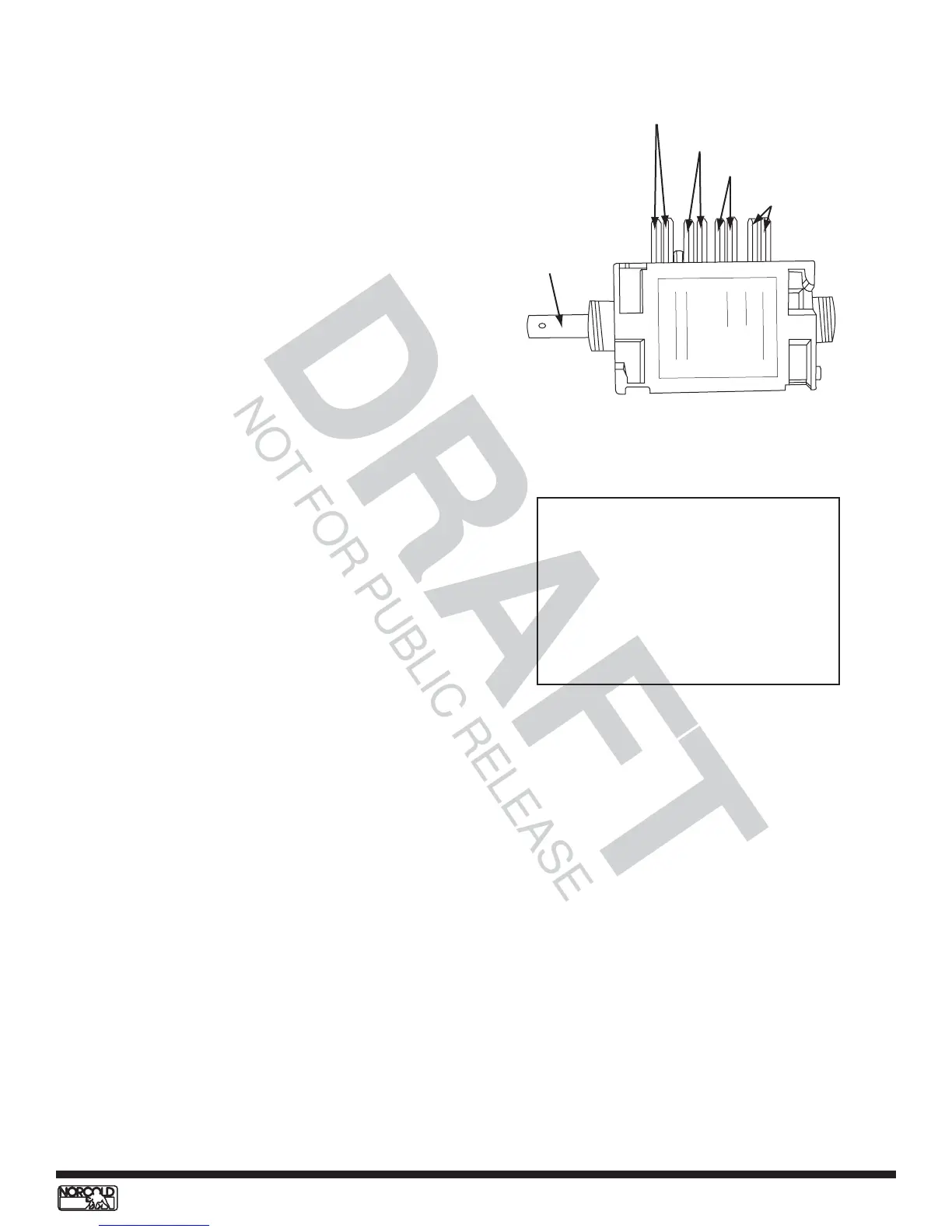
9. Mark selector switch wiring for ease of reinstallation.
See Figure 40.
10. Remove selector switch knob.
11. Remove retaining nut from front of selector switch
assembly.
12. Remove selector switch by pulling from back.
13. Remove wiring from selector switch and transfer to
replacement selector switch. See diagram on switch
housing and Table 2 for wiring placement.
14. Replace switch assembly into controls.
15. Install retaining nut.
16. Replace selector switch knob.
17. Replace wiring shroud.
18. Install refrigerator in enclosure.
19. Install front breaker retaining screws.
20. Install back mounting flange screws.
21. Reconnect RV LP gas supply.
22. Reconnect 12 Vdc power supply.
23. Plug in ac power cord.
24. Place refrigerator in service.
Figure 40. Selector switch wiring
Table 2. Selector switch wiring chart
Terminals
Wiring Assignment
1a - 1b
2a - 2b
3a - 3b
4a - 4b
110 - 250 Vac
Thermocouple
Relighter
12 Vdc at 20 amps
(3-ways)
Knob pin
1a/1b - 110 - 250 Vac
2a/2b - Thermocouple
3a/3b - Relighter
4a/4b - 12 Vd


 To Next Page