DRAFT
NOT FOR PUBLIC RELEASE
46
www.norcold.com/cda
N500/N510 Models
Refrigerator Service Manual
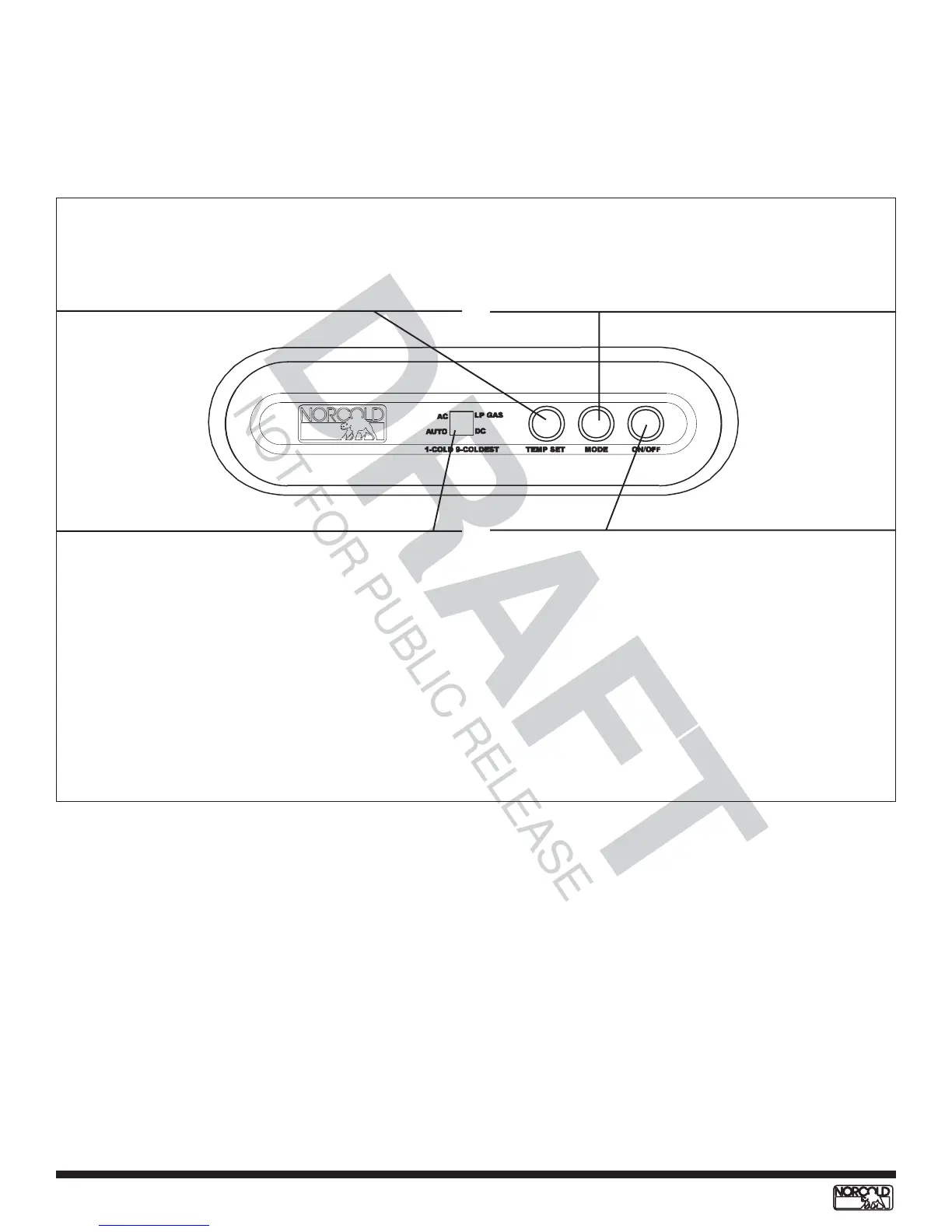
7-Segment LED Display
T Provides visual verification of operation mode,
food cabinet temperature setting, fault code
verification, and operational and diagnostic
information.
• LP manual mode operation, LED aside “LP
GAS” displayed.
• AC manual mode operation, LED aside “AC”
displayed.
• AUTO mode operation, LED aside “AUTO” and
LED aside available energy source segment
(“AC,” ”LP GAS,” or “DC”) displayed.
• DC manual mode operation selected (3-ways),
LED aside “DC” displayed.
Figure 41. N510 Controls
N510 Controls
All N510 model controls operate on 12 Vdc. The
controls and their functions are shown in Figure 41.
ON/OFF Switch
T Press and hold for two seconds to turn
refrigerator ON.
T Press and hold for two seconds to turn
refrigerator OFF.
MODE Switch
T Press and hold to change operation mode
(AUTO, AC, LP and DC [3-way models only]).
T Operation mode verified by the 7-segment
LED.
TEMP SET Switch
T Press and release to verify food cabinet
temperature setting (1=cold/5=coldest).
T Press and hold to set or change temperature
setting in food cabinet.


 To Next Page