DRAFT
NOT FOR PUBLIC RELEASE
53
www.norcold.com/cda N500/N510 ModelsRefrigerator Service Manual
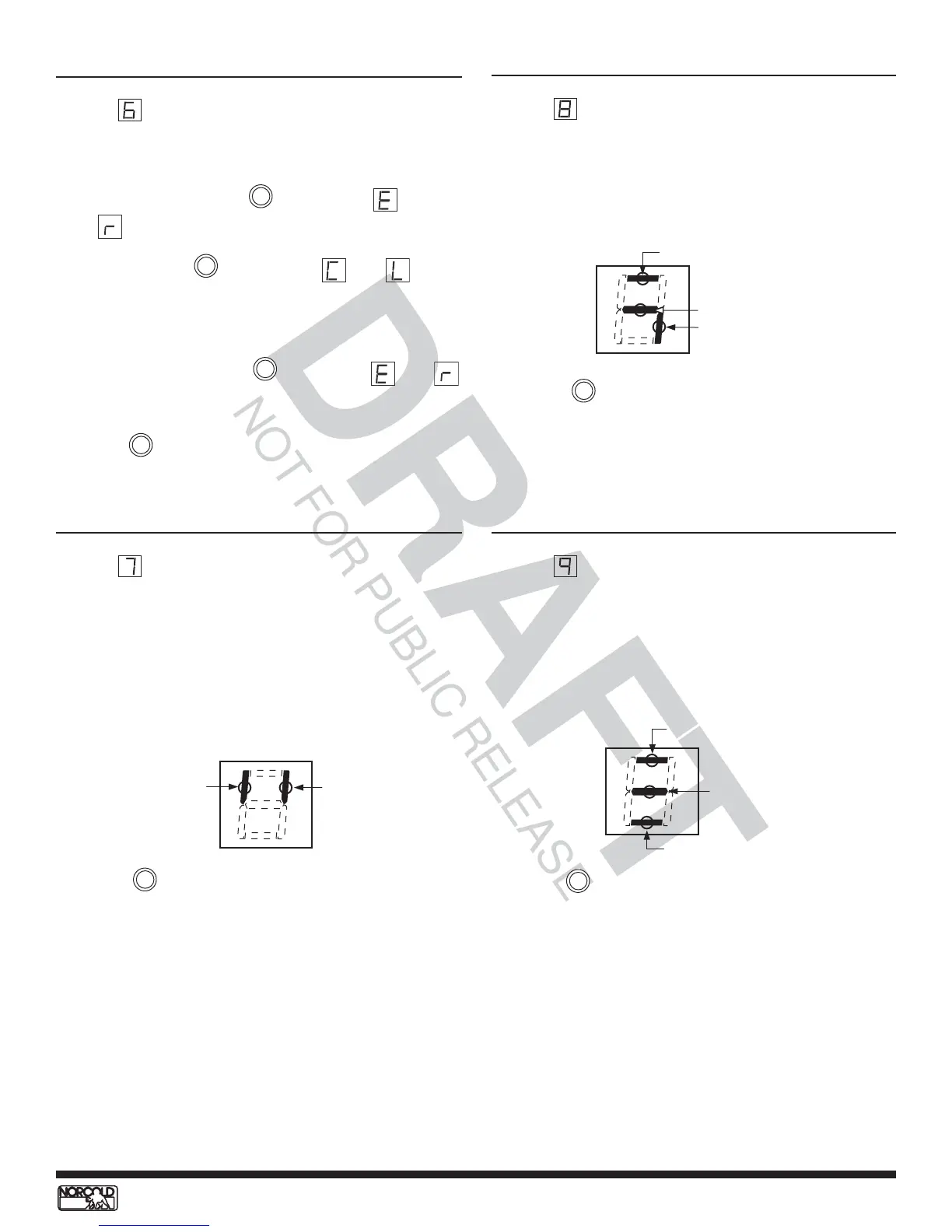
1
7
4
DC voltage normal
DC voltage higher than 15.4 volts
DC voltage lower than 10.5 volts
1
4
6
AC power to ac heater
DC power to gas valve
DC power to ignition circuit
2 3
Sensing burner flame
Thermistor sensing
fin temperature
Screen Power Board DC Voltage Status
Screen 9 display power board dc voltage status using
lighted LED segments. The illustration below provides dc
voltage status and assigned LED segments. If dc voltage
at the power board within normal range (10.5 to 15.4
Vdc), LED segment 4 will be on.
Screen Power Board Inputs
Screen 7 displays "live" power board inputs using lighted
LED segments. The illustration below provides "live" inputs
information and assigned LED segments. If a power
board input is active or "live", its assigned LED will
light.
Screen Power Board Outputs
Screen 8 display "live" power board outputs using lighted
LED segments. The illustration below provides "live"
outputs information and assigned LED segments. If the
power board output is active or "live", the assigned
LED will light.
Press the button to bring up screen 8.
Press the button to bring up screen 9.
Press the button to return to screen 1.
MODE
MODE
MODE
Screen Erase Fault History Data
Screen 6 provides a way to erase stored fault history from
memory. To erase stored fault history:
1. Press and hold the button when
and
display.
2. Release the button when
and
display.
3. Wait five seconds.
4. Press and hold the button until
and
display again.
Press the button to bring up screen 7.
MODE
TEMP SET
TEMP SET
TEMP SET


 To Next Page