EasyManua.ls Logo

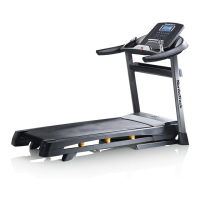
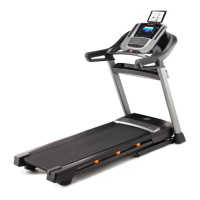
NordicTrack C 990 - User Manual

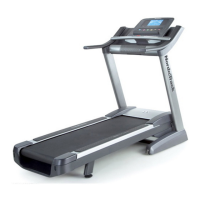
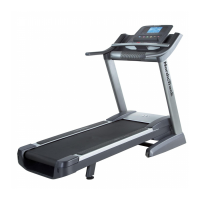
NordicTrack C 990
44 pages
Print Icon
To Next Page IconTo Next Page
Loading...
990
Serial Number
Decal
Model No. NTL19814.0
Serial No.
Write the serial number in the space
above for reference.
CAUTION
Read all precautions and instruc-
tions in this manual before using
this equipment. Save this manual
for future reference.
USER’S MANUAL
www.nordictrack.com
ACTIVATE YOUR
WARRANTY
To register your product and
activate your warranty today, go
to www.nordictrackservice.com/
registration.
CUSTOMER CARE
For service at any time, go to
www.nordictrackservice.com.
Or call 1-800-TO-BE-FIT
(1-800-862-3348)
Mon.–Fri. 6 a.m.–6 p.m. MT
Sat. 8 a.m.–12 p.m. MT
Please do not contact the store.

Questions and Answers

  • H
    hillcynthiaAug 18, 2025
    What to do if NordicTrack C 990 Treadmill power turns off during use?
    • S
      ssmithAug 18, 2025
      If your NordicTrack Treadmill turns off during use, check the power switch and reset it if it has tripped by waiting five minutes before pressing it back in. Ensure the power cord is securely plugged in; if it is, unplug it, wait five minutes, and plug it back in. Also, try removing and reinserting the key from the console.
  • S
    Sara LopezAug 20, 2025
    How to fix NordicTrack Treadmill walking belt slowing down?
    • T
      Theresa RamirezAug 20, 2025
      If the walking belt on your NordicTrack Treadmill slows down when you walk on it, make sure that the walking belt is properly tightened. When correctly tightened, you should be able to lift each edge of the walking belt 2 to 3 inches (5 to 7 cm) off the walking platform.
  • C
    Cassandra MartinAug 23, 2025
    What to do if my NordicTrack C 990 power does not turn on?
    • M
      matthewhamiltonAug 23, 2025
      If your NordicTrack Treadmill power does not turn on, ensure the power cord is plugged into a surge suppressor that is connected to a properly grounded outlet. Also, check that the key is correctly inserted into the console. Finally, inspect the power switch; if it's tripped (protrudes), wait five minutes, then press it back in to reset.
  • C
    Cassandra PerezAug 26, 2025
    How to fix incline if it does not change correctly on NordicTrack C 990?
    • B
      Brooke MurphyAug 26, 2025
      If the incline on your NordicTrack Treadmill does not change correctly, hold down the Stop button and the Speed increase button, insert the key into the console, and then release the Stop button and the Speed increase button. If the incline system does not begin calibrating, press the Stop button again, and then press the Incline increase or decrease button again.
  • A
    Amy RodriguezAug 28, 2025
    How to fix NordicTrack C 990 if the power does not turn on?
    • W
      Wayne MayAug 28, 2025
      If your NordicTrack Treadmill doesn't turn on, ensure the power cord is plugged into a surge suppressor and that the surge suppressor is plugged into a properly grounded outlet. Also, make sure that the key is inserted into the console. If the switch has tripped, wait five minutes, and then press the switch back in to reset it.
  • J
    Jennifer OdonnellAug 30, 2025
    How to fix off-center or slipping walking belt on NordicTrack C 990?
    • J
      Jasmine HaynesAug 30, 2025
      If the walking belt on your NordicTrack Treadmill is off-center or slips, and it has shifted to the left, use the hex key to turn the left idler roller screw clockwise 1/2 turn. If the walking belt has shifted to the right, turn the left idler roller screw counterclockwise. You can also turn both idler roller screws clockwise 1/4 of a turn using the hex key.
  • G
    Gregory RobertsSep 2, 2025
    Why does NordicTrack C 990 console display stay lit after removing the key?
    • J
      Joshua HarrisonSep 2, 2025
      If the console displays on your NordicTrack Treadmill remain lit after you remove the key, the demo mode is likely turned on. To turn off the demo mode, hold down the Stop button for a few seconds.
  • K
    Kevin JohnsonSep 4, 2025
    How to stop NordicTrack C 990 walking belt from slipping?
    • A
      amandajohnsonSep 5, 2025
      If the walking belt slips when you walk on your NordicTrack Treadmill, use the hex key to turn both idler roller screws clockwise, 1/4 of a turn.
  • J
    James RaySep 7, 2025
    What to do if NordicTrack Treadmill will not connect to the wireless network?
    • W
      william03Sep 7, 2025
      If your NordicTrack Treadmill will not connect to the wireless network, ensure that the wireless settings on your console and the settings for your wireless network are correct.
  • A
    Amanda PittsSep 9, 2025
    How to center NordicTrack C 990 walking belt?
    • D
      Donna BryantSep 9, 2025
      If the walking belt on your NordicTrack Treadmill is not centered, and has shifted to the left, use the hex key to turn the left idler roller screw clockwise 1/2 of a turn. If the walking belt has shifted to the right, turn the left idler roller screw counterclockwise 1/2 of a turn.

Summary

Safety and Precautions

Warning Decal Placement

Locates warning decals on the treadmill and provides instructions for obtaining replacements.

Important Precautions

Essential safety instructions and guidelines for safe operation and user protection.

Product Overview and Assembly

Before You Begin and Parts

Introduces the treadmill, its parts, and preparation steps before assembly or use.

Part Identification Chart

Identifies small parts used for assembly with illustrations and key numbers.

Assembly Instructions

Detailed, step-by-step guide for assembling the treadmill, including required tools.

Treadmill Operation and Features

Connecting Power and Console Setup

Guides on connecting the power cord, using a surge suppressor, and initial console setup.

Manual and Programmed Workouts

Explains manual mode and various programmed workouts like onboard, set-a-goal, pulse, and iFit.

Console Features and Settings

Covers console diagram, features, settings, connectivity, sound system, and adjustments.

Usage, Maintenance, and Support

Folding, Moving, and Cushioning

Instructions for folding, moving, adjusting cushioning, and using the tablet holder.

Maintenance and Troubleshooting

Procedures for cleaning, routine maintenance, and resolving common treadmill operational issues.

Exercise Guidelines and Parts Information

Provides exercise intensity recommendations, workout guidelines, suggested stretches, and part ordering information.

NordicTrack C 990 Specifications

General IconGeneral
FoldingYes
BluetoothYes
Cooling FanYes
Incline0 – 12%
Speed0 - 12 mph
Display7"
Weight Capacity300 Lbs.
Programs32
AudioDual 2" speakers

Related product manuals