EasyManua.ls Logo

NordicTrack E10.0 - User Manual

NordicTrack E10.0
28 pages
Print Icon
To Next Page IconTo Next Page
Loading...
Serial Number
Decal



Write the serial number in the space
above for reference.

-






08457 089 009
053 92 36102
www.iconsupport.eu
csuk@iconeurope.com

ICON Health & Fitness, Ltd.
c/o HI Group PLC
Express Way
CASTLEFORD
WF10 5QJ
UNITED KINGDOM

1800 993 770
australiacc@iconfitness.com

ICON Health & Fitness
PO Box 635
WINSTON HILLS NSW 2153
AUSTRALIA
Question and Answer IconNeed help?

Do you have a question about the NordicTrack E10.0 and is the answer not in the manual?

Summary

CUSTOMER SERVICE

United Kingdom Customer Support

Contact details for customer service in the UK.

Australia Customer Support

Contact details for customer service in Australia.

WARNING DECAL PLACEMENT

General Warning Decals

Information on warning decals, including general safety and operational warnings.

Heavy Load & Upright Stability Warnings

Specific warnings regarding user weight and upright stability.

IMPORTANT PRECAUTIONS

Essential Safety Precautions

Critical safety advice for using the elliptical, including physician consultation and proper setup.

BEFORE YOU BEGIN

Product Introduction and Parts Diagram

Overview of the elliptical and a labeled diagram of its components.

ASSEMBLY

Product Registration and Rear Stabilizer

Steps for product registration and attaching the rear stabilizer.

Front Stabilizer and Upright Securing

Attaching the front stabilizer and raising/securing the upright.

Upper Body Arms and Final Tightening

Attaching upper body arms and ensuring all parts are tightened.

HOW TO USE THE ELLIPTICAL

Plugging in the Power Cord

Instructions on how to connect the power cord to the elliptical and outlet.

HOW TO MOVE THE ELLIPTICAL

Moving the Elliptical

Steps to fold the upright and move the elliptical using its wheels.

HOW TO ADJUST THE POSITIONS OF THE PEDALS

Adjusting Pedal Positions

How to adjust pedal positions using the pedal handle.

HOW TO LEVEL THE ELLIPTICAL

Leveling the Elliptical

Use leveling feet to eliminate rocking motion.

HOW TO EXERCISE ON THE ELLIPTICAL

Mounting and Dismounting

Instructions for safely getting on and off the elliptical.

HOW TO STORE THE ELLIPTICAL

Storing the Elliptical

Procedures for folding and storing the elliptical, noting weight requirement.

CONSOLE DIAGRAM

Console Button Layout

Overview of the console buttons and their functions.

MAKE YOUR FITNESS GOALS A REALITY WITH IFIT.COM

iFit.com Features and Benefits

How to use iFit.com for personalized workouts and tracking.

FEATURES OF THE CONSOLE

Console Features Overview

Details manual mode, onboard workouts, iFit compatibility, and sound system.

HOW TO TURN ON THE POWER

Powering On the Elliptical

Instructions on connecting the power cord and turning on the console.

HOW TO USE THE MANUAL MODE

Using Manual Mode

Steps to start, adjust resistance/incline, and follow progress.

Display Information Guide

Explains various data displayed on the console during workouts.

HOW TO USE AN ONBOARD WORKOUT

Using Onboard Workouts

How to select, start, and follow onboard programmed workouts.

HOW TO USE A SET-A-GOAL WORKOUT

Using Set-a-Goal Workouts

How to set goals for calories, distance, or time and complete workouts.

HOW TO USE AN IFIT WORKOUT

Using iFit Workouts

Requirements and steps to select and start iFit workouts.

HOW TO USE THE SOUND SYSTEM

Using the Sound System

Connect MP3/CD player to console for audio playback.

THE OPTIONAL CHEST HEART RATE MONITOR

Optional Chest Heart Rate Monitor

Benefits and purpose of the optional chest heart rate monitor.

HOW TO CHANGE CONSOLE SETTINGS

Changing Console Settings

Guide to navigating and modifying settings like demo mode, units, contrast, and voice.

MAINTENANCE AND TROUBLESHOOTING

General Maintenance and Console Troubleshooting

Tips for maintaining the elliptical and resolving console issues.

Calibrating Incline System

Steps to calibrate the incline frame if it's not functioning properly.

Adjusting Reed Switch

Procedure to adjust the reed switch for correct console feedback.

HOW TO ADJUST THE DRIVE BELT

Adjusting Drive Belt

Steps to tighten the drive belt if pedals slip.

EXERCISE GUIDELINES

Exercise Intensity and Zones

How to use heart rate to find proper exercise intensity for fat burning and aerobic goals.

Workout Guidelines

Recommendations for warming up, training zone duration, and cooling down.

Exercise Frequency

Guidelines on how often to exercise for maintaining or improving fitness.

PART LIST

Component Identification

List of all parts with key numbers, quantities, and descriptions.

ORDERING REPLACEMENT PARTS

Ordering Replacement Parts

Instructions on how to order replacement parts, including required information.

RECYCLING INFORMATION

Product Recycling and Disposal

Guidelines for environmentally responsible disposal of the electronic product.

Overview

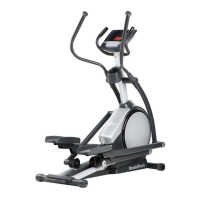
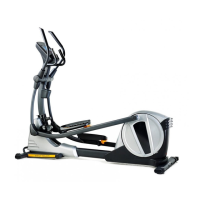
This document is the user's manual for the NordicTrack E 10.0 Power Incline elliptical, Model No. NTEVEL99014.0. It provides comprehensive information on assembly, operation, maintenance, and troubleshooting for the device.

Function Description:

The NordicTrack E 10.0 elliptical is a home exercise equipment designed to provide effective and enjoyable workouts. It features a power incline system, adjustable resistance levels, and various workout programs to cater to different fitness goals. The elliptical allows for a continuous, low-impact motion, engaging both upper and lower body muscles. It is equipped with a console that displays workout feedback, monitors heart rate, and offers iFit compatibility for personalized training experiences. The power incline feature allows users to adjust the incline of the frame, varying the motion of the pedals and targeting different muscle groups.

Important Technical Specifications:

  • Model Number: NTEVEL99014.0
  • User Weight Capacity: Not to exceed 330 lbs / 150 kgs
  • Dimensions:
    • Length: 6 ft. 2 in. (188 cm)
    • Width: 2 ft. 1 in. (64 cm)
  • Weight: 181 lbs. (82 kg)
  • Power Requirement: The elliptical must be earthed and connected to a grounded circuit. It uses a power cord with an equipment-earthing conductor and an earthing plug.
  • Heart Rate Monitor: Handgrip heart rate monitor and optional chest heart rate monitor compatible.
  • iFit Compatibility: Supports wireless iFit modules for personalized workouts, Google Maps integration, workout tracking, and competition features.
  • Resistance System: Adjustable resistance levels controlled via console buttons.
  • Incline System: Power incline, adjustable via console buttons.
  • Pedal Adjustment: Each pedal can be adjusted to several positions.

Usage Features:

  • Console Display: The console displays various workout information including Time, Distance, Calories (Cals.), Calories per Hour (Cals./Hr), Incline, Pulse, Resistance, RPM (revolutions per minute), Stride, Speed, and My Trail. It features multiple display tabs accessible via the Display button.
  • Manual Mode: Allows users to manually adjust pedal resistance and frame incline during a workout.
  • Onboard Workouts: Offers a selection of pre-programmed workouts that automatically adjust resistance and incline.
  • Set-A-Goal Workouts: Enables users to set calorie, distance, or time goals for their workouts.
  • iFit Mode: When an iFit module is inserted, users can download personalized workouts, create their own, track results, compete with others, and access Google Maps workouts. An audio coach feature is available during some iFit workouts.
  • Heart Rate Monitoring: Users can measure their heart rate by holding the handgrip heart rate monitor contacts or using an optional chest heart rate monitor.
  • Fan: Integrated fan with high, low, and auto speed settings. The fan automatically adjusts speed in auto mode based on pedaling speed and turns off if pedals are stationary for about thirty seconds.
  • Sound System: Allows connection of an MP3 player or CD player via a 3.5 mm audio cable to play music or audio books through the console speakers.
  • Storage Position: The elliptical can be folded into a storage position to save space. This requires two persons and the ability to safely support 100 lbs (45 kg).
  • Leveling Feet: Adjustable leveling feet beneath the rear stabilizer to ensure stability on uneven surfaces.
  • Safety Precautions: Emphasizes reading the manual, consulting a physician before starting exercise, proper placement of the elliptical, wearing appropriate clothing and athletic shoes, and keeping children and pets away. It also warns against misuse, improper power cord connection, and over-exercising.

Maintenance Features:

  • Regular Inspection: Users are advised to inspect and properly tighten all parts regularly and replace worn parts immediately.
  • Cleaning: The elliptical should be cleaned with a damp cloth and mild soap. Liquids should be kept away from the console, and the console should be kept out of direct sunlight to prevent damage.
  • Console Troubleshooting: Provides guidance for issues such as the console not turning on (check power cord), lines appearing on the display (adjust contrast level), and inaccurate heart rate readings (ensure proper hand placement and clean contacts).
  • Incline System Calibration: Instructions are provided to manually calibrate the incline system if it is not functioning properly. This involves entering a test mode and using the incline buttons.
  • Reed Switch Adjustment: Steps are outlined to adjust the reed switch if the console does not display correct feedback. This involves removing covers, locating the reed switch and magnet, and adjusting their position.
  • Drive Belt Adjustment: Instructions are given for adjusting the drive belt if the pedals slip. This involves removing various covers and adjusting the idler screw.
  • Recycling Information: The manual includes information on proper disposal of the electronic product at authorized recycling facilities to preserve the environment.

The manual also includes an exploded drawing and a parts list to assist with identifying and ordering replacement parts. It stresses the importance of registering the product online for warranty activation, customer service, and updates.

NordicTrack E10.0 Specifications

General IconGeneral
BrandNordicTrack
ModelE10.0
CategoryElliptical Trainer
LanguageEnglish

Related product manuals