EasyManua.ls Logo

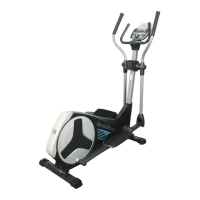
NordicTrack E4.0 Elliptical - User Manual

NordicTrack E4.0 Elliptical
32 pages
Print Icon
To Next Page IconTo Next Page
Loading...
Serial Number
Decal
CAUTION
Read all precautions and instruc-
tions in this manual before using
this equipment. Keep this manual
for future reference.
Model No. NTEVEL75910.3
Serial No.
Write the serial number in the
space above for reference.
USER’S MANUAL
www.iconeurope.com
CUSTOMER SERVICE
UNITED KINGDOM
Call: 08457 089 009
From Ireland: 053 92 36102
Website: www.iconsupport.eu
E-mail: csuk@iconeurope.com
Write:
ICON Health & Fitness, Ltd.
c/o HI Group PLC
Express Way
CASTLEFORD
WF10 5QJ
UNITED KINGDOM
AUSTRALIA
Call: 1800 993 770
E-mail: australiacc@iconfitness.com
Write:
ICON Health & Fitness
PO Box 635
WINSTON HILLS NSW 2153
AUSTRALIA

Other manuals for NordicTrack E4.0 Elliptical

Questions and Answers

  • J
    Johnny WatersJul 30, 2025
    What to do if the pedals slip on my NordicTrack E4.0 Elliptical?
    • A
      andreathomasJul 30, 2025
      If the pedals slip on your NordicTrack Elliptical Trainer even at the highest resistance, you may need to adjust the drive belt. To do this, you must remove the left pedal, the top shield cover, and the rear shield cover. Unplug the power adapter first. Follow the instructions to remove these parts, then loosen the Pivot Screw. Tighten the Drive Belt Adjustment Screw until the Drive Belt is tight, then tighten the Pivot Screw. Finally, reattach the left shield, rear shield cover, top shield cover, and the left pedal. Plug the power adapter back in.
  • K
    Kathleen ManningAug 14, 2025
    Why is my NordicTrack E4.0 Elliptical console not displaying correct feedback?
    • Z
      zlawrenceAug 14, 2025
      If your NordicTrack Elliptical Trainer console isn't displaying the correct feedback, you may need to adjust the reed switch. To do this, first unplug the power adapter. Then, remove the right disc cover and the right pedal disc. Rotate the Pulley until the Magnet is aligned with the Reed Switch. Slide the Reed Switch slightly toward or away from the Magnet and retighten the screw. Rotate the right Pedal Disc out of the way. Plug the power adapter back in and rotate the Pulley for a moment. Repeat these steps until the console displays the correct feedback. Finally, reattach the right pedal disc and the right disc cover.

Summary

CUSTOMER SERVICE

WARNING DECAL PLACEMENT

IMPORTANT PRECAUTIONS

General Safety Guidelines

Essential safety precautions and warnings for using the elliptical.

BEFORE YOU BEGIN

Elliptical Component Identification

Familiarize yourself with the parts of the elliptical using diagrams.

PART IDENTIFICATION CHART

ASSEMBLY

Assembly Preparation and Requirements

Details on required personnel, tools, and initial setup for assembly.

Product Registration

Instructions to register your product online for warranty and support.

ASSEMBLY: Attaching Frame Stabilizers

ASSEMBLY: Installing Upright and Wire Harness

ASSEMBLY: Connecting Console and Handlebar

ASSEMBLY: Attaching Upper Body Arms

ASSEMBLY: Greasing and Attaching Pedal Arms

ASSEMBLY: Installing Covers

ASSEMBLY: Attaching Leg Covers and Pedals

ASSEMBLY: Installing Shield Covers and Power

HOW TO USE THE ELLIPTICAL

Power Adapter Connection

Instructions for connecting the power adapter to the elliptical and outlet.

Moving the Elliptical

Guidelines for safely moving the elliptical with the help of another person.

Leveling the Elliptical

Steps to adjust leveling knobs to ensure the elliptical is stable.

HOW TO EXERCISE ON THE ELLIPTICAL

CONSOLE DIAGRAM

Console Features Overview

Explains the various features and workout modes available on the console.

HOW TO TURN ON THE POWER

HOW TO USE THE MANUAL MODE

Manual Mode Operation

Guide to using the manual workout mode and understanding display metrics.

HOW TO USE A PRESET WORKOUT

HOW TO USE A HEART RATE WORKOUT

HOW TO USE A WATTS WORKOUT

HOW TO USE AN IFIT WORKOUT

HOW TO USE THE SOUND SYSTEM

Connecting Audio Devices

Instructions for connecting MP3 players or CD players to the console.

Optional Chest Heart Rate Monitor

Information about the optional chest heart rate monitor for continuous tracking.

MAINTENANCE AND TROUBLESHOOTING

General Maintenance and Cleaning

Guidelines for inspecting, cleaning, and maintaining the elliptical.

Console Troubleshooting

Basic troubleshooting steps for console-related issues.

Adjusting the Drive Belt

Procedures for adjusting the drive belt if pedals slip.

Adjusting the Reed Switch

EXERCISE GUIDELINES

Exercise Intensity and Training Zones

Guidance on determining proper exercise intensity based on heart rate.

Workout Structure

Recommendations for warm-up, training, and cool-down periods.

Exercise Frequency

Advice on workout frequency for maintaining or improving fitness.

PART LIST

EXPLODED DRAWING A

EXPLODED DRAWING B

ORDERING REPLACEMENT PARTS

RECYCLING INFORMATION

NordicTrack E4.0 Elliptical Specifications

General IconGeneral
BrandNordicTrack
ModelE4.0 Elliptical
CategoryElliptical Trainer
LanguageEnglish

Related product manuals