EasyManua.ls Logo

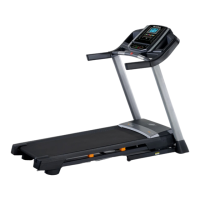
NordicTrack S 30 - User Manual

NordicTrack S 30
36 pages
Print Icon
To Next Page IconTo Next Page
Loading...
USER’S MANUAL
Model No. NETL99019.2
Serial No.
Write the serial number in the space
above for reference.
CAUTION
Read all precautions and
instructions in this manual before
using this equipment. Save this
manual for future reference.
Serial
Number
Decal
CUSTOMER SERVICE
UNITED KINGDOM
Call: 0330 123 1045
From Ireland: 053 92 36102
Website: iconsupport.eu
E-mail: csuk@iconeurope.com
Write:
ICON Health & Fitness, Ltd.
Unit 4, Westgate Court
Silkwood Park
OSSETT
WF5 9TT
UNITED KINGDOM
AUSTRALIA
Call: 1800 993 770
E-mail: australiacc@iconfitness.com
Write:
ICON Health & Fitness
PO Box 635
WINSTON HILLS NSW 2153
AUSTRALIA
iconeurope.com

Questions and Answers

  • K
    kimberlyramirezAug 3, 2025
    How to fix NordicTrack S 30 Treadmill when the power does not turn on?
    • J
      Jason RobertsAug 3, 2025
      If your NordicTrack Treadmill isn't powering on, ensure the power cord is plugged into a grounded outlet. If you need an extension cord, use a 3-conductor, 14-gauge (2 mm[2]) cord no longer than 5 ft. (1.5 m). Also, make sure the key is properly inserted into the console. Try removing and reinserting the key to ensure a proper connection. If it still doesn't run, please see the front cover of this manual.
  • M
    Matthew NormanAug 7, 2025
    What to do if the displays of the NordicTrack Treadmill console do not function properly?
    • C
      Christine PorterAug 7, 2025
      If the displays on your NordicTrack Treadmill console aren't working right, remove the key and unplug the power cord. Locate the Reed Switch (97) and the Magnet (98) on the left side of the Pulley (49). Turn the Pulley until the Magnet is aligned with the Reed Switch.
  • M
    Mrs. Mary Mccall MDAug 12, 2025
    What to do if NordicTrack S 30 walking belt slips when walked on?
    • S
      Shawn TorresAug 12, 2025
      If the walking belt on your NordicTrack Treadmill slips when you walk on it, use the hex key to turn both idler roller screws clockwise, 1/4 of a turn. The walking belt should be correctly tightened, and you should be able to lift each edge of the walking belt 2 to 3 in. (5 to 7 cm) off the walking platform. Make sure to keep the walking belt centered. Then, plug in the power cord, insert the key, and walk on the treadmill for a few minutes. Repeat until the walking belt is properly tightened.
  • R
    Robert MedinaAug 18, 2025
    Why does my NordicTrack S 30 walking belt slow down when I walk on it?
    • T
      Tim BartonAug 18, 2025
      If your NordicTrack Treadmill walking belt slows down when you walk on it, it might be overtightened. Remove the key and unplug the power cord. Use the hex key to turn both idler roller screws counterclockwise, 1/4 of a turn. When correctly tightened, you should be able to lift each edge of the walking belt 2 to 3 in. (5 to 7 cm) off the walking platform. Keep the walking belt centered. Plug in the power cord, insert the key, and walk on the treadmill for a few minutes. Repeat until the walking belt is properly tightened.
  • C
    Charles WangAug 23, 2025
    How to center the walking belt on a NordicTrack S 30?
    • J
      James MosesAug 23, 2025
      To center the walking belt on your NordicTrack Treadmill, if the belt has shifted to the left, use the hex key to turn the left idler roller screw clockwise 1/2 of a turn. If it has shifted to the right, turn the left idler roller screw counterclockwise 1/2 of a turn. Be careful not to overtighten the walking belt. Then, plug in the power cord, insert the key, and walk on the treadmill for a few minutes. Repeat until the walking belt is centered.
  • N
    Nicholas SmithAug 27, 2025
    Why do the console displays remain lit on my NordicTrack Treadmill after removing the key?
    • G
      Gary RuizAug 27, 2025
      The console on your NordicTrack Treadmill might be in display demo mode, which is designed for store displays. If the displays stay lit after you remove the key, the demo mode is active. To turn off the demo mode, see THE SETTINGS MODE.

Summary

Customer Service

Warning Decal Placement

Important Precautions

Before You Begin

Part Identification Chart

Assembly

How to Use the Treadmill

How to Plug in the Power Cord

Steps for connecting the treadmill's power cord to an outlet.

Features of the Console

How to Turn On the Power

How to Use the Manual Mode

How to Use an Onboard Workout

How to Connect Your Tablet to the Console

How to Connect Your Heart Rate Monitor to the Console

The Settings Mode

How to Use the Sound System

The Optional Chest Heart Rate Monitor

How to Use the Tablet Holder

How to Adjust the Cushions

How to Fold and Move the Treadmill

How to Fold the Treadmill

Instructions for folding the treadmill for storage.

How to Move the Treadmill

Instructions for safely moving the folded treadmill.

How to Lower the Treadmill for Use

Steps to unfold the treadmill from storage position.

Maintenance and Troubleshooting

Maintenance

Routine care to ensure optimal performance and longevity.

Troubleshooting

Solutions for common problems and issues with the treadmill.

Exercise Guidelines

Exercise Intensity

Guidance on setting exercise intensity based on heart rate zones.

Workout Guidelines

Recommendations for warm-up, training, and cool-down periods.

Exercise Frequency

Advice on workout frequency for maintaining fitness.

Part List

Ordering Replacement Parts

Recycling Information

NordicTrack S 30 Specifications

General IconGeneral
BrandNordicTrack
ModelS 30
CategoryTreadmill
LanguageEnglish

Related product manuals