9
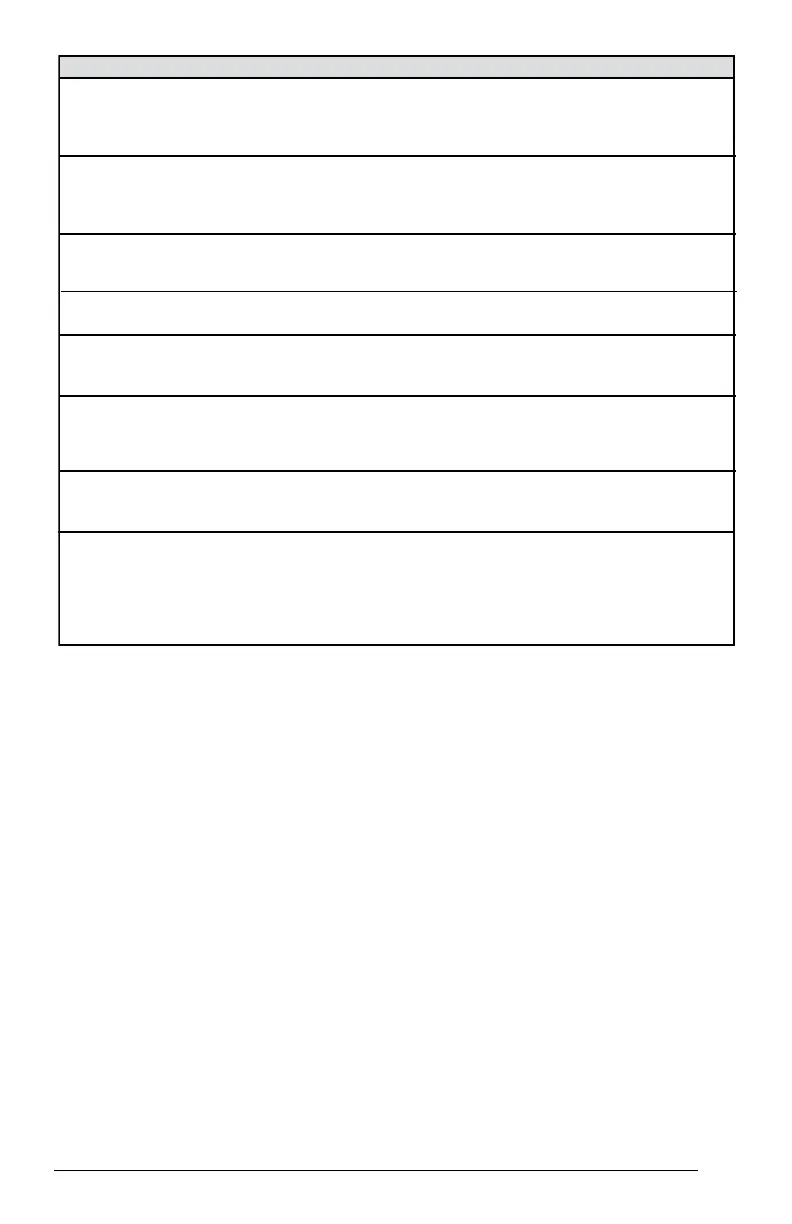
Table 2. Module Wiring Troubleshooting
Miswired Module Indication Recommended Troubleshooting Action
Green LED is not on, Determine if both R and C module terminals are
module does not power up connected. Verify voltage is present at module’s R and
C terminals. Review 24VAC Power Wiring (page 4) for
R and C wiring.
Green LED intermittent, Determine if R and Y terminals are wired in reverse.
module powers up only Verify module’s R and C terminals have a constant
when compressor runs source. Review 24VAC Power Wiring (page 4) for R
and C wiring.
TRIP LED is on but system Verify Y terminal is connected to 24VAC at contactor
and compressor check OK coil. Verify voltage at contactor coil falls below 0.5VAC
when off.
TRIP LED and ALERT LED Verify R and C terminals are supplied with 19-28VAC.
flashing together
ALERT Flash Code 3Verify Y terminal is connected to 24VAC at contactor coil.
(Compressor Short Cycling) Verify voltage at contactor coil falls below 0.5VAC when
displayed incorrectly off.
ALERT Flash Code 5, 6 or 7 Check that compressor run and start wires are through
(Open Circuit, Open Start Circuit module’s current sensing holes. Verify Y terminal is
or Open Run Circuit) displayed connected to 24VAC at contactor coil. Verify voltage at
incorrectly contactor coil falls below 0.5VAC when off.
ALERT Flash Code 6 (Open Check that compressor run and start wires are routed
Start Circuit) displayed for Code 7 through the correct module sensing holes.
(Open Run Circuit) or vice versa
ALERT Flash Code 8 Determine if module’s Y terminal is connected. Verify Y
(Welded Contactor) terminal is connected
to 24VAC at contactor coil. Verify
displayed incorrectly 24VAC is present across Y and C when thermostat demand
signal is present. If not, R and C are reverse wired. Verify
voltage at contactor coil falls below 0.5VAC when off.




 To Next Page