Operator’s manual
Optima 51 / M51 / M56 / M57T / 60T
30
Dynapôle Ludres/Fléville, 166 rue Ampère/BP 60093 - 54714 LUDRES - FRANCE - Tél.+33 (0)3 83 25 69 60 - Fax. +33 (0)3 83 26 12 85
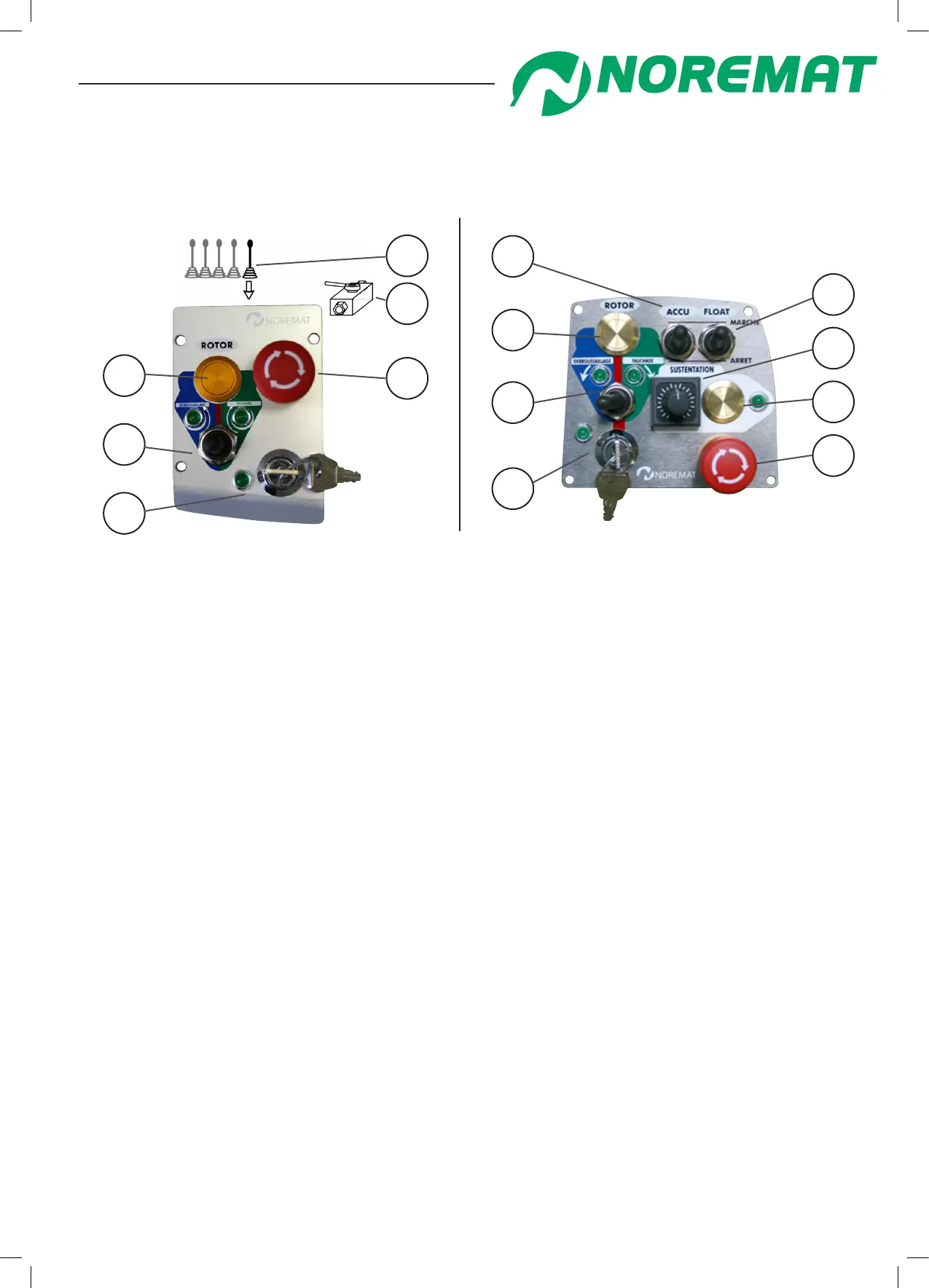
3. Identication of controls
Electric controls
Mixed controls
B
A
D
G
H
F
E
C
gure 2.13
Low-pressure controls
gure 2.12
E
F
B
D
A
C
A. Key to switch on machine :
The key activates all electric controls and functions of the machine.
B. Rotor direction switch :
-mowing (to the right), rotor rotation clockwise.
-mulching (to the left), rotor rotation anti-clockwise.
C. Rotor engagement push-button switch :
The push-button switch allows rotor engagement after you have selected the required direction.
D. Emergency stop button :
pushing the button activates the emergency stop. If this is activated, turn the red button to release it.
E. Accumulator switch :
The switch allows the opening of the accumulator isolating valve so that it can act as a damper
for the rst arm movement especially when working on uneven terrain.
F. Float switch :
This switch activates the ‘oat’ function of the mowing head so that it can follow undulations
in the ground.
G. Sustentation switch :
Switches on the sustentation option : This allows the mowing head to follow the prole
of the terrain without exerting signicant pressure on the ground.
The function is stopped automatically if the joystick is moved forward or backwards.
H. Adjustment of sustentation pressure :
This potentiometer allows the adjustment of the pressure exerted by the cutting head
on the ground when activated.
Operation and maintenance



 To Next Page