Northstar Explorer 660 Installation and Operation Manual30
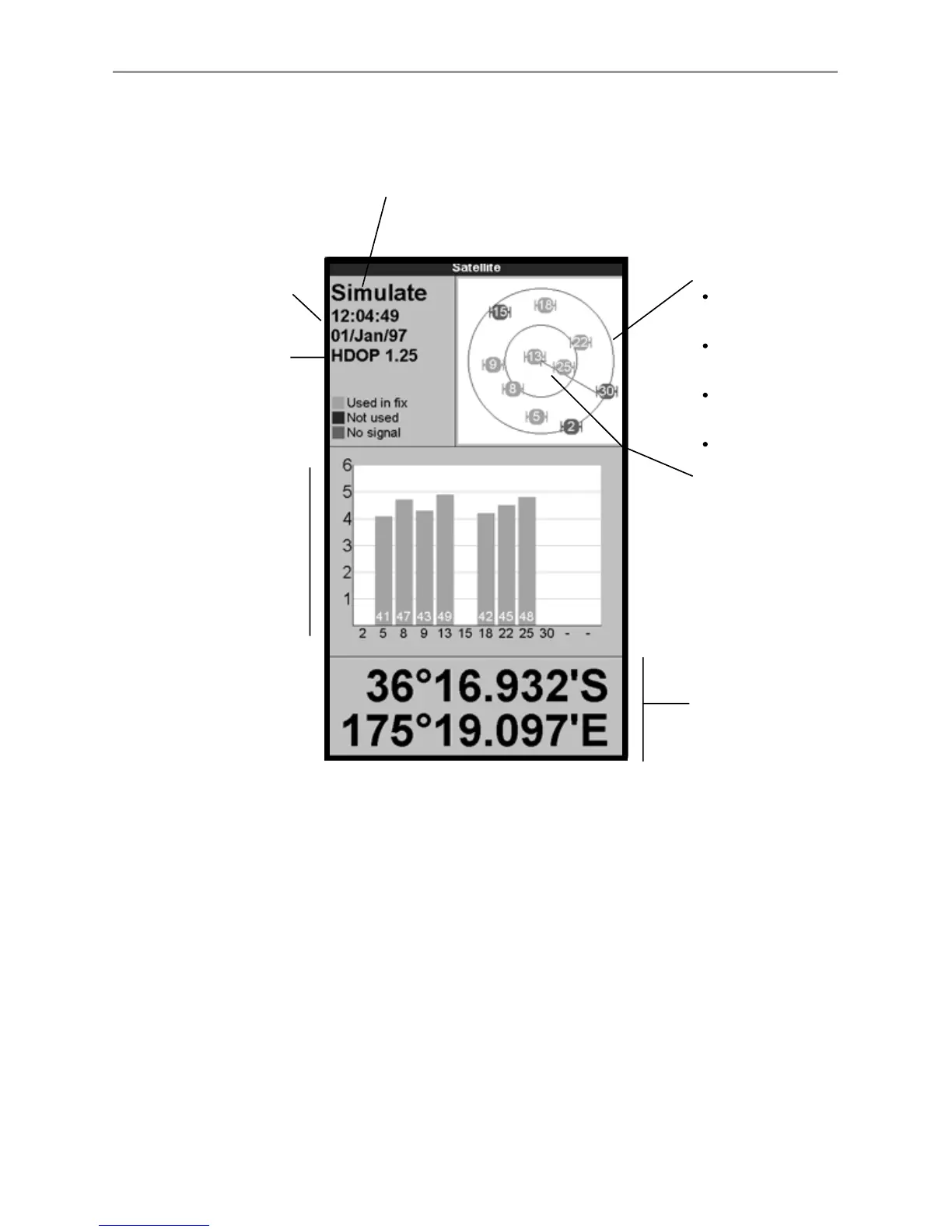
The satellite display has information about the GPS satellites and GPS position.
To go to the satellite display, press DISPLAY, select Other, then select Satellite.
7-1 Satellite display
Time and date from GPS
satellites. Time is local
time (UTC [GMT] plus
local offset, see section
15-12)
Boat position
HDOP: The error in the
GPS position caused by
satellite geometry. A low
value indicates a more
precise fix, a high value a
less precise fix
Status of GPS antenna, for example Acquiring, GPS fix,
No GPS. If the unit is in GPS Simulate mode it displays GPS
Simulation (see section 2-5)
Positions of visible
GPS satellites:
Outer circle is
horizon
Inner circle is 45°
elevation
Centre is directly
above
North is at top of
display
If the boat is moving,
COG is a line from
centre
Signal strengths of up
to twelve visible GPS
satellites. The higher
the bar the stronger
the signal
The satellite display shows:



 To Next Page