MCTRL4K User‘s Manual
-10-
Advanced Settings
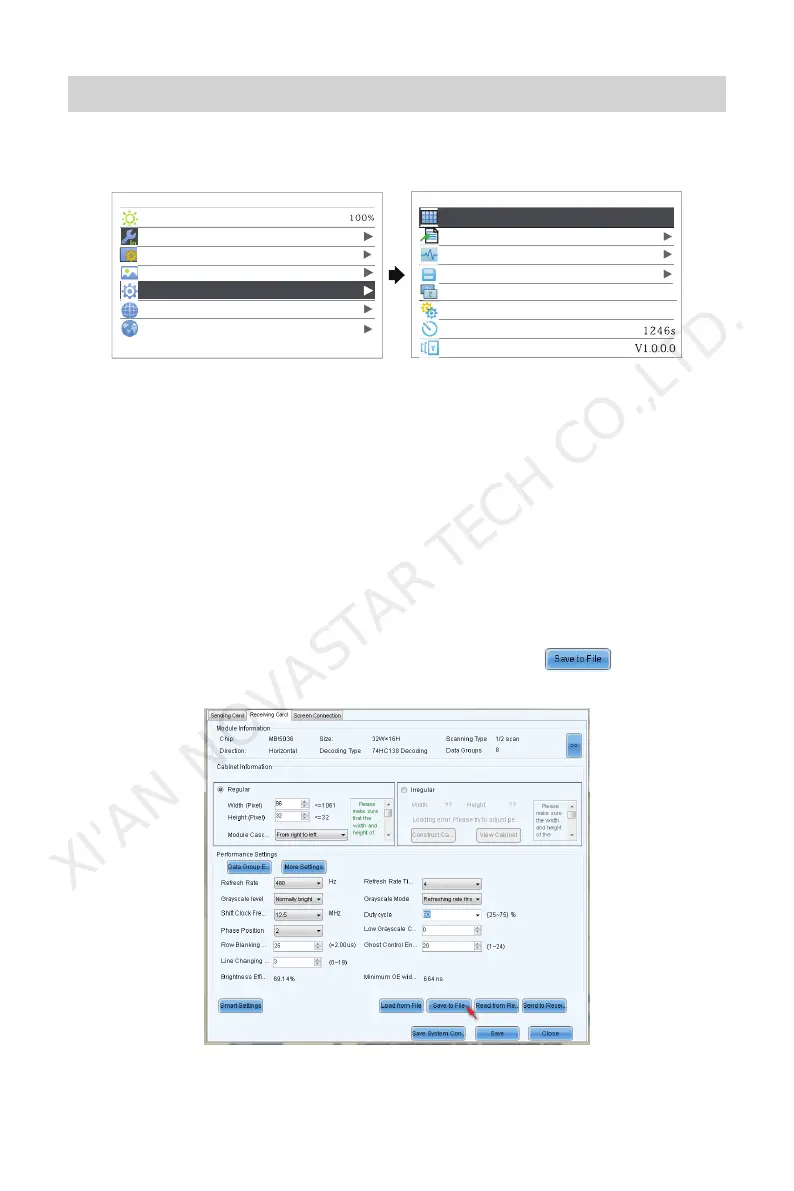
Advanced Settings includes settings of multiple main functions as shown in the
figure below. Following chapters will introduce the details of each function.
Main
Brightness
Input Settings
Screen Settings
Display Control
Advanced Settings
Communication Settings
Language
Advance Settings
MAP Function
Load Cabinet Files
Alarm Threshold
Save to Hardware
Redundancy
Primary
Factory Reset
Return to Home Screen
Hardware Version
Enable
MAP Function
When Map Function is enabled, each of the cabinets will display the port number
and Ethernet port number they belong to. It is easy and convenient for users to
know about the data flow mode and load.
Load Cabinet Files
Connect the controller to PC and run NovaLCT-Mars on the PC. Import the cabinet
configuration files saved before.
1 ) Save cabinet configuration files
After the configuration of receiving card is completed, click
to save
cabinet configuration files(.rcfg) to local files on PC.
XI'AN NOVASTAR TECH CO.,LTD.



 To Next Page