User's Manual of Led Display Video Controller VX4S/VX4
www.novastar-led.com 9
9.2 Step2: Screen settings
The precondition of Screen setting in shortcut is that the screen must be regular rectangle (not special-
shaped), cabinet must be regular rectangle and the size of each cabinet are identical.
Step 1 The screen being power-on, if the cabinet is in normal display, enter into step 2); if the cabinet
is in abnormal display, first load the cabinet file, and save it to the receiving card; see detailed
operation in 9.7 Advanced Settings .
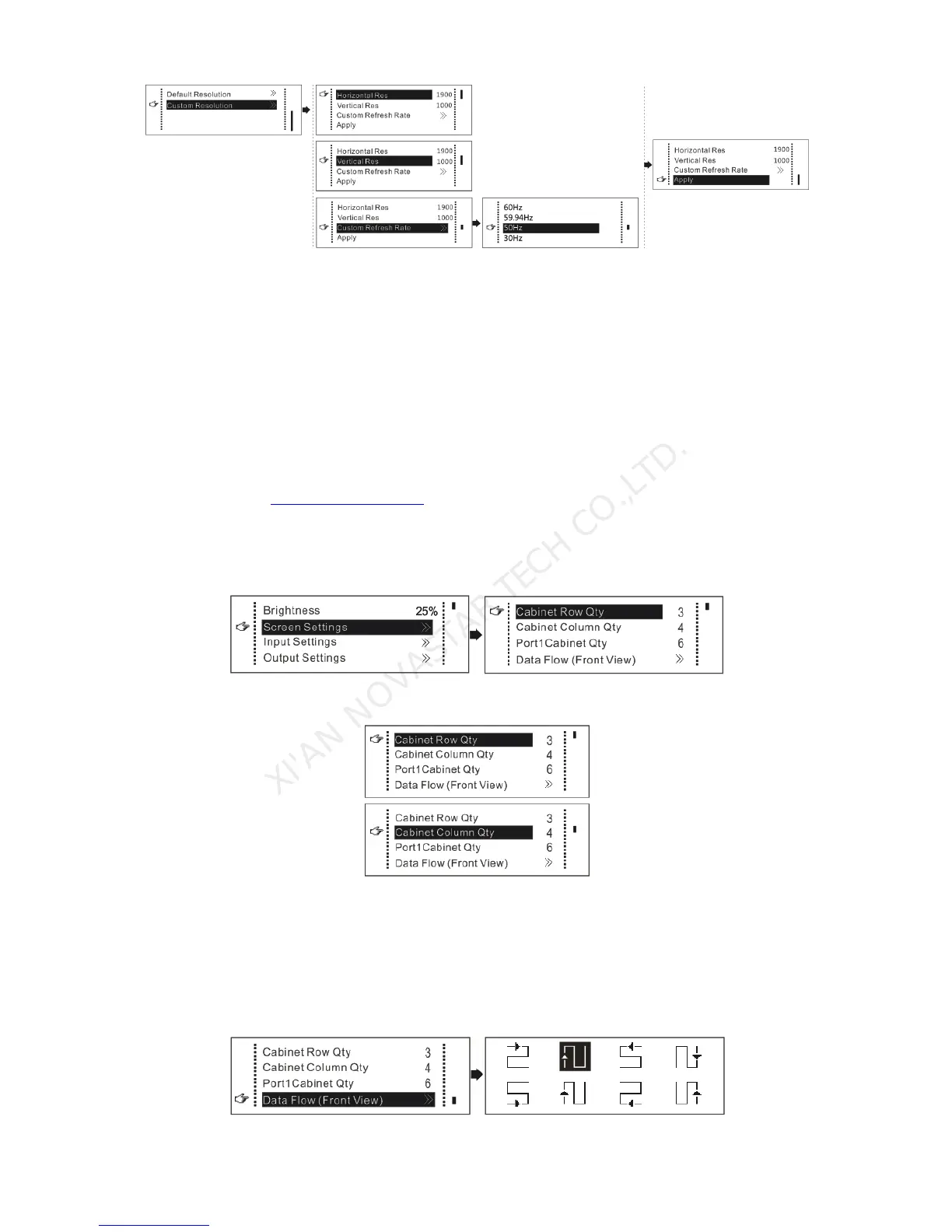
Step 2 Return to the “Screen Settings” submenu. Rotate the button to switch to submenus of other
options respectively to perform configurations, as shown in the following figures:
Step 3 Set Cabinet Row Qty and Cabinet Column Qty according to the actual situation of the screen.
Step 4 Set Port1 Cabinet Qty. The device has some limitations on the cabinet quantity of ports. For
details, see precautions for screen settings a).
Step 5 Set the Data Flow(Front View). Pay attention to precautions for screen settings c), d) and e)
below.



 To Next Page