ML0042 October 15, 2019 - 66 - Copyright 2019 Bitronics, LLC
5.6 Performing set-up through the web page interface
This section will assume you are able to use the factory default IP address of
192.168.0.171 to connect to the web page using an HTML web server. If this is not
the case you may need to refer to section 3.5.1 (Network settings) and the previous
section (Navigating the M66X’s setup menu from the Front panel) to change your
network configuration settings.
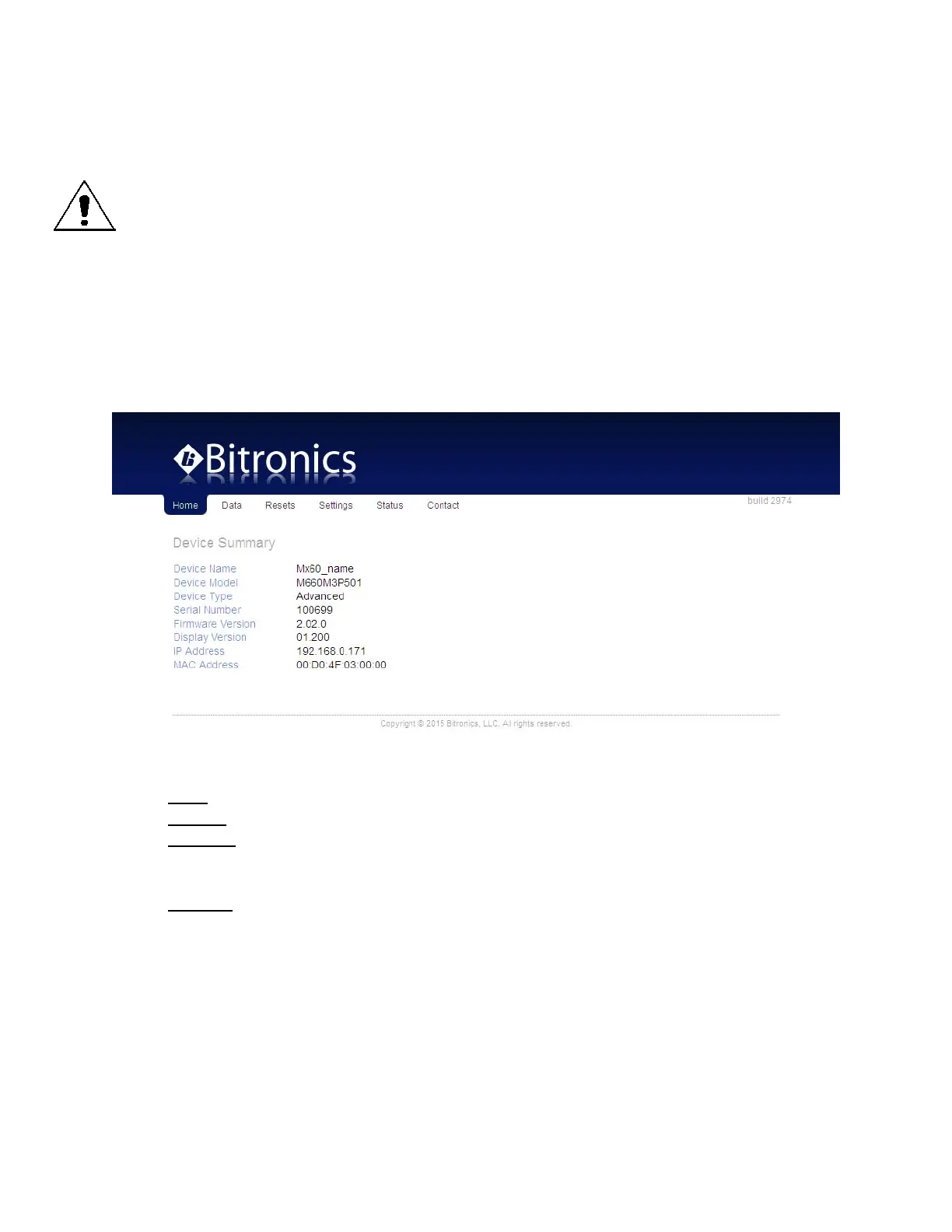
Enter the M66X’s IP address into your internet browser to connect with the M66X web
page interface. Internet browsers supported are Firefox, Internet Explorer, Safari and
Google Chrome. The Home page screen should appear as shown below.
Home page:
From the home screen you can select from the following tabs:
Data – This page displays current data measurements
Resets – This page allows certain quantities to be reset
Settings – This page allows the user to change the configuration settings. Making
M66X configuration changes require the unit to be rebooted.
Configuration settings for the M66X are stored in flash memory.
Contact – This page indicates how to contact Bitronics
NOTE: Some screen shots shown below may not exactly match the appearance of
those from your actual meter.


 To Next Page