
 Need help?
Do you have a question about the Novation LaunchPad Mini and is the answer not in the manual?
Product overview and capabilities of the Launchpad Mini controller.
Highlights essential functionalities and specifications of the Launchpad Mini.
Lists the items included with the Launchpad Mini package.
Step-by-step guide for setting up the Launchpad Mini on macOS.
Step-by-step guide for setting up the Launchpad Mini on Windows.
Guide to using Launchpad Mini with Ableton Live software.
Instructions for using Launchpad Mini with music software other than Ableton Live.
Guidance for resolving common issues encountered with the Launchpad Mini.
Details navigational buttons and mode selectors (Session, Custom).
Explains Scene Launch and Stop/Solo/Mute buttons for performance control.
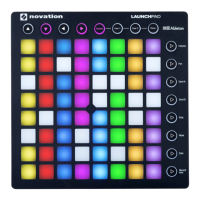
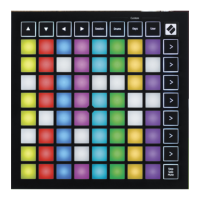
Description of the main 8x8 grid of pads on the Launchpad Mini.
Information about the USB-C socket and Kensington lock slot.
Introduction to the different operational modes of the Launchpad Mini interface.
How Session Mode controls the Session View within Ableton Live.
Detailed explanation of the Stop, Solo, and Mute button functions for track management.
Guide to playing notes and melodies using Keys Mode on Launchpad Mini.
Guide to triggering drum sounds using Drum Mode on Launchpad Mini.
Instructions for creating and customizing modes using Novation Components.
Step-by-step guide to configuring custom modes using Novation Components software.
Overview of the Launchpad Mini's settings and setup menu options.
Configuring LED brightness, feedback options, and sleep mode.
Overview of Legacy, Live, and Programmer modes for Launchpad Mini operations.
Specifics and functionalities of the Launchpad Mini Legacy Mode.
Overview of bootloader functions: brightness, feedback, storage, and device ID.
Managing mass storage device behaviour and device IDs in bootloader.
Reference for MIDI mappings and note numbers in custom and programmer modes.
Information regarding trademarks, disclaimers, and copyright notices.
The Launchpad Mini is a compact and portable grid controller designed primarily for use with Ableton Live, offering a tactile and visual experience for music production and performance. It brings Ableton Live's Session View to your fingertips with full RGB color, allowing for quick clip launching, beat creation, and melody composition.
The core function of the Launchpad Mini is to act as a grid controller for music software, particularly Ableton Live. It features an 8x8 grid of 64 RGB LED back-lit pads, which serve as the primary interface for interaction. The device is USB bus-powered, making it a plug-and-play solution that is both compact and lightweight.
The Launchpad Mini operates in four main modes: Session, Drums, Keys, and User. These modes offer different functionalities, allowing the device to adapt to various aspects of music creation and performance.
In Session Mode, the Launchpad Mini controls Ableton Live's Session View, which is a grid of clips, tracks (columns), and scenes (rows). The 8x8 pad grid provides a direct view of your clips in Session View. Pads are used to play corresponding clips, with their colors matching the on-screen representation. When a clip is queued, the pad flashes green, and when playing, it pulses green. Empty clip slots appear dim red when a track is record-armed, and pressing them initiates recording. Scene Launch Buttons on the right-hand side of the grid allow for triggering horizontal rows of clips, enabling the arrangement of song structures.
The bottom row of pads in Session Mode can be cycled through three track control functions using the Stop/Solo/Mute Button: Stop, Solo, and Mute. Initially, this row shows clips. Pressing the Stop/Solo/Mute button cycles through these functions. In "Stop" mode, brightly lit red pads indicate playing clips that can be stopped, while dim red pads show tracks with no playing clips. In "Solo" mode, brightly lit blue pads indicate soloed tracks, and dim blue pads show non-soloed tracks. In "Mute" mode, brightly lit yellow pads indicate unmuted (audible) tracks, and dim yellow pads show muted tracks.
Keys Mode transforms the 8x8 grid into a chromatic keyboard, presenting four octaves of notes stacked vertically. This allows users to play melodies and harmonies with an instrument loaded into a MIDI track in Ableton Live. The lowest pitch is at the bottom, and the highest at the top, covering a range from C2 to C6.
Drum Mode is designed for playing Ableton Live's Drum Rack. The grid is divided into four 4x4 groups of pads, each corresponding to a section of a drum rack, providing a total of 64 drum rack slots. This mode enables users to lay down beats and percussion with a drum kit loaded into a MIDI track.
Custom Modes offer deep customization of the 8x8 grid, turning it into a personalized control surface. In Custom Modes, each pad can be assigned to act as a MIDI Note, a MIDI CC (control change), or a Program Change message. Pads can behave as toggles, triggers, or momentary switches. Full rows and columns of pads can also function as faders, which can be assigned CC values and configured as unipolar or bipolar, positioned either horizontally or vertically. Pads within a Custom Mode can have "On" and "Off" colors, allowing for visual feedback when pressed or toggled.
Getting started with the Launchpad Mini is streamlined through an "Easy Start Tool," which provides a step-by-step guide for setup and software download. When plugged into a computer, the device can automatically launch this tool, either through a desktop icon on Mac or by accessing a drive on Windows. Google Chrome users may also see a pop-up to access the easy start process directly.
The device is designed for seamless integration with Ableton Live. Once Live is installed and the Launchpad Mini is plugged in, it is automatically detected and enters Session Mode, ready for use. For users of other music production software, the Launchpad Mini can also function as a general MIDI controller, with support information available online.
Navigation within Session Mode is facilitated by dedicated navigational buttons (up, down, left, right arrows) that allow users to move the red outline in the Session View grid, indicating the currently visible area on the Launchpad Mini.
The Launchpad Mini's settings and setup menu allow users to customize various preferences, including LED brightness, velocity, aftertouch, and fader behavior. This menu is accessed by holding the Session button briefly. The top four rows of pads display "LED" to indicate the menu topic, and the top four Scene Launch buttons are used to navigate different pages of settings.
LED Settings provide control over LED brightness (8 levels), internal and external LED feedback, and MIDI destination. LED feedback determines whether pads light up when pressed (internal) or when MIDI is received externally (external). MIDI Destination toggles whether MIDI data is sent to both USB MIDI ports or only the second. An "LED Sleep" function allows users to turn off all LEDs on the device, conserving power or reducing visual distraction, with any button press waking the device.
The Launchpad Mini supports Legacy, Live, and Programmer Modes. Live mode is the default, offering normal functionality. Legacy mode makes the entire surface unlit and accessible via MIDI messages, matching the layout of previous Launchpad generations. Programmer mode also makes the surface unlit, with each pad and button sending a specified MIDI message when pressed, and allows for external lighting via MIDI messages. These modes can be switched via the settings menu.
A Bootloader Menu is accessible by holding "Capture MIDI" while plugging in the device. This menu allows for changing LED brightness, LED feedback, mass storage device availability (MSD Mode), and device ID. MSD Mode, enabled by default, makes the Launchpad Mini appear as a mass storage device, providing access to the Easy Start Tool. Disabling it prevents the device from appearing as a drive. Device ID allows multiple Launchpad Mini units to be used independently with Ableton Live, each with its own Session Ring. The bootloader menu also displays the Bootloader and Application versions and allows for a normal boot-up.
For troubleshooting and support, users are directed to the Novation website for getting started guides and a help center. Firmware updates are recommended to ensure the latest features and fixes, which can be performed using Novation Components, an online hub or standalone desktop app.
In case of an electrostatic discharge (ESD) affecting normal operation, the device can be reset by simply removing and replugging the USB cable.
The Novation Components platform is central to managing Custom Modes. It allows users to create, edit, and back up their personalized Custom Modes. This platform is accessible via a Web MIDI-enabled browser (like Google Chrome or Opera) or through a standalone desktop application. The platform also provides Custom Mode templates for users to explore. Custom Modes are compatible between Launchpad Mini and Launchpad X devices.
 General
| Connectivity | USB |
|---|---|
| Type | MIDI controller |
| Grid | 8x8 RGB LED pads |
| Pads | 64 RGB Backlit Pads |
| Compatibility | Ableton Live |
| Dimensions | 180mm x 180mm x 14.2mm |
| Software | Ableton Live Lite |
| Power | USB bus powered |
| Controls | Buttons |

![Preview: Novation Launchpad Mini [MK3]](https://data.easymanua.ls/products/284351/200x200/novation-launchpad-mini-mk3.webp)


 To Next Page

