EN-5
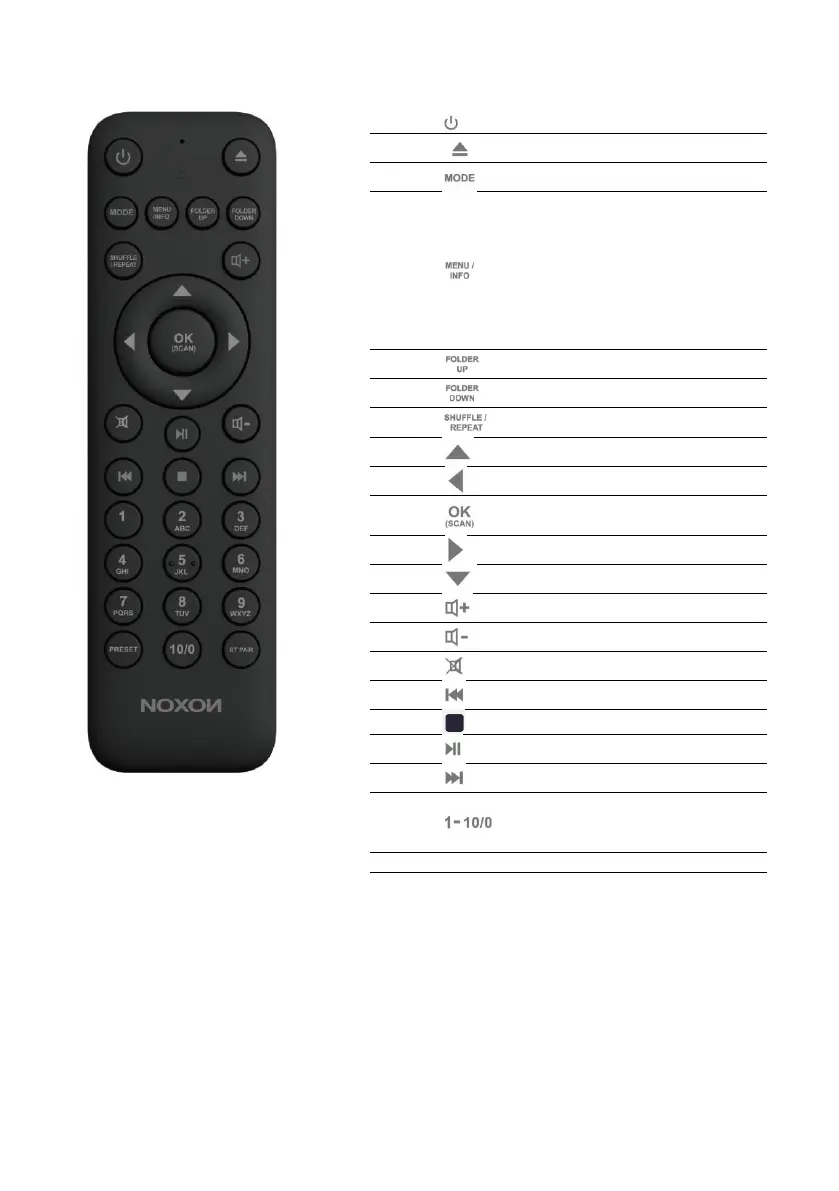
Remote Control
Device power on/off; alarm off
Open/Close mode selection
Display FM mode info
(Name, PTY, RT, frequency)
Display DAB mode info
(Station, track, artist, etc.)
Display CD/USB mode info
(Track, artist, etc.)
Press and hold to open/close
menu
Move up the folder for CD
Move down the folder for CD
Music: random/repeat selection
Move up; FM: Set frequency
Confirm entry; FM: Scan;
Playing: album in full screen
Move down; FM: Set frequency
Select track; hold to scan down
Select track; hold to scan up
Number buttons: retrieve saved
favourite stations;
hold down to save the station
Select favourite stations
Press and hold to BT
discoverable under BT mode


 To Next Page