61
TRX Series II - Installation - Startup - Maintenance Instructions
Part 9 - Controls
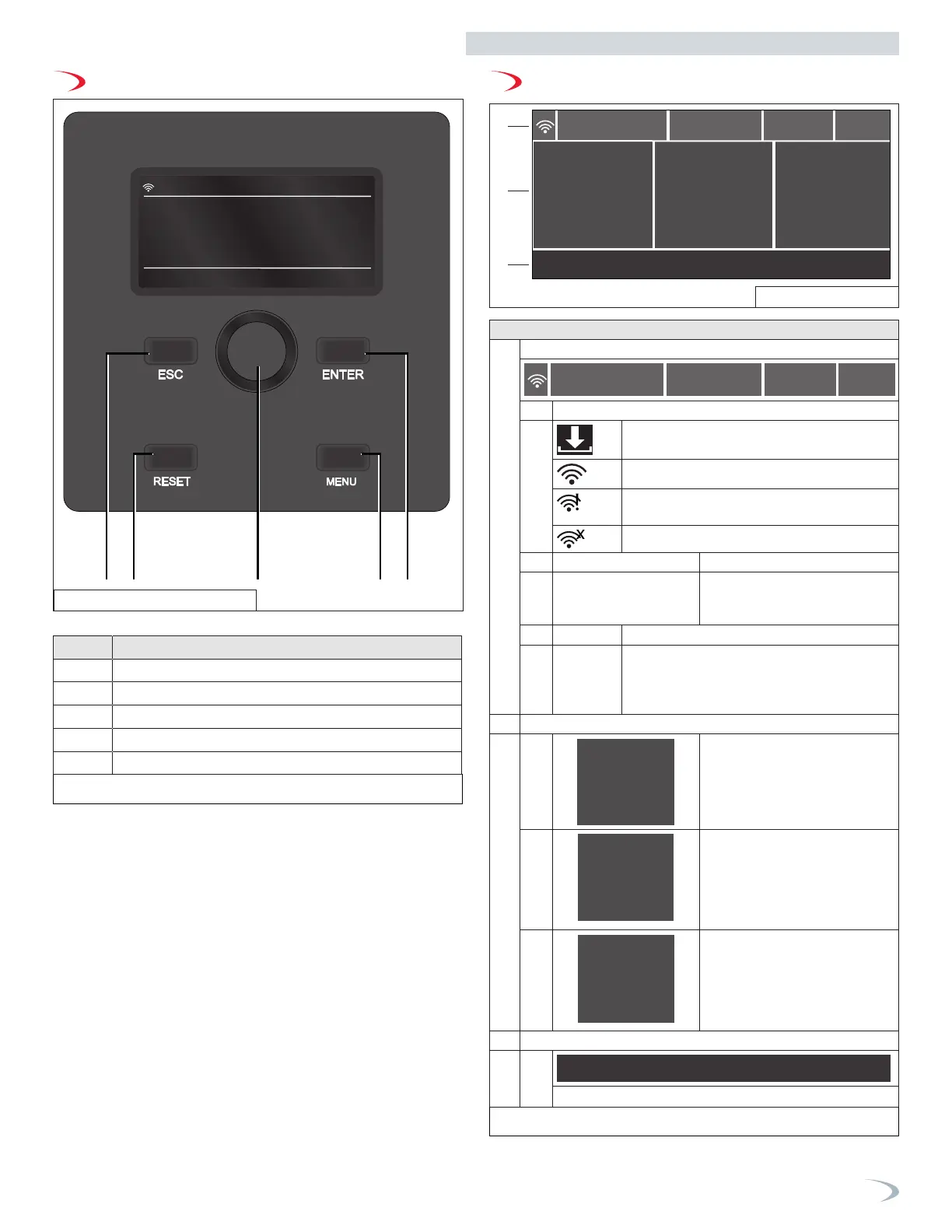
Table 24 - Control Descriptions
Table 25 - Display Descriptions
A. Control Overview B. Display Overview
Item # Description
1 ESC - back/exit
2 RESET - resets lockouts
3 Dial - use to navigate inside each menu
4 MENU - enters the main menu
5 ENTER (or OK) - confirms selection
Description
1 General Information
10/20/2023
Single Boiler
66°F17 psi
20:35
a. WiFi Status
WIFI Upgrade
WiFi Active
WIFI connected to the local network, but without
access to the server
WIFI not configured
b.
10/20/2023 20:35
Date and Time
c. Single Boiler Boiler configuration
(Single Boiler, Manager, or
Follower #)
d. 17 psi Boiler water pressure
e. 66 °F Outdoor temperature (a flashing house with
thermometer icon will appear if AUTO Function
(Outdoor Reset) - is enabled while no outdoor
temperature reading is available)
2 Boiler working mode
2a
Outlet:
Target 180°
158 °F
Boiler Outlet temperature and
Target, or DHW temperature and
Target
2b
Status
Demand
Run
Central Heating
Burner Status
Demand type
2c
F.Signal 125
100 %
Power:
Burner power (%) and flame
signal
3 Additional details
3a
Outdoor Reset
Working mode, functional, or error details
10/20/2023
Single Boiler 17 psi
Status
Demand
Outlet:
Run
Central Heating
Outdoor Reset
F.Signal 125Target 180°F
158 °F 0 %
Power:
66°F
20:35
10/20/2023
Single Boiler
Status
Demand
Outlet:
Run
Central Heating
Outdoor Reset
F.Signal 125
Target 180°
158 °F
100 %
Power:
66°F17 psi
20:35
1
2
3
1. General Information
A. Status connettività
B. Date and Time
C. Tipologia installazione (singola o cascade)
D. Water pressure (psi)
E. Outdoor temperature
2. Boiler working data
A. 2a Temperature (CH or DHW or Tank) set and detected
B. Boiler Status Burning demand
C. Boiler power (%) and ionization flame signa or Press Reset in Fault status
3. Addional details
A. Text error
B. Functional details
C. Working mode details
Figure 75 - Control Panel
Figure 76 - Display



 To Next Page