70
420012001500 - 03182024 - Rev. 04
Part 9 - Controls
6. User Menu - Time Program
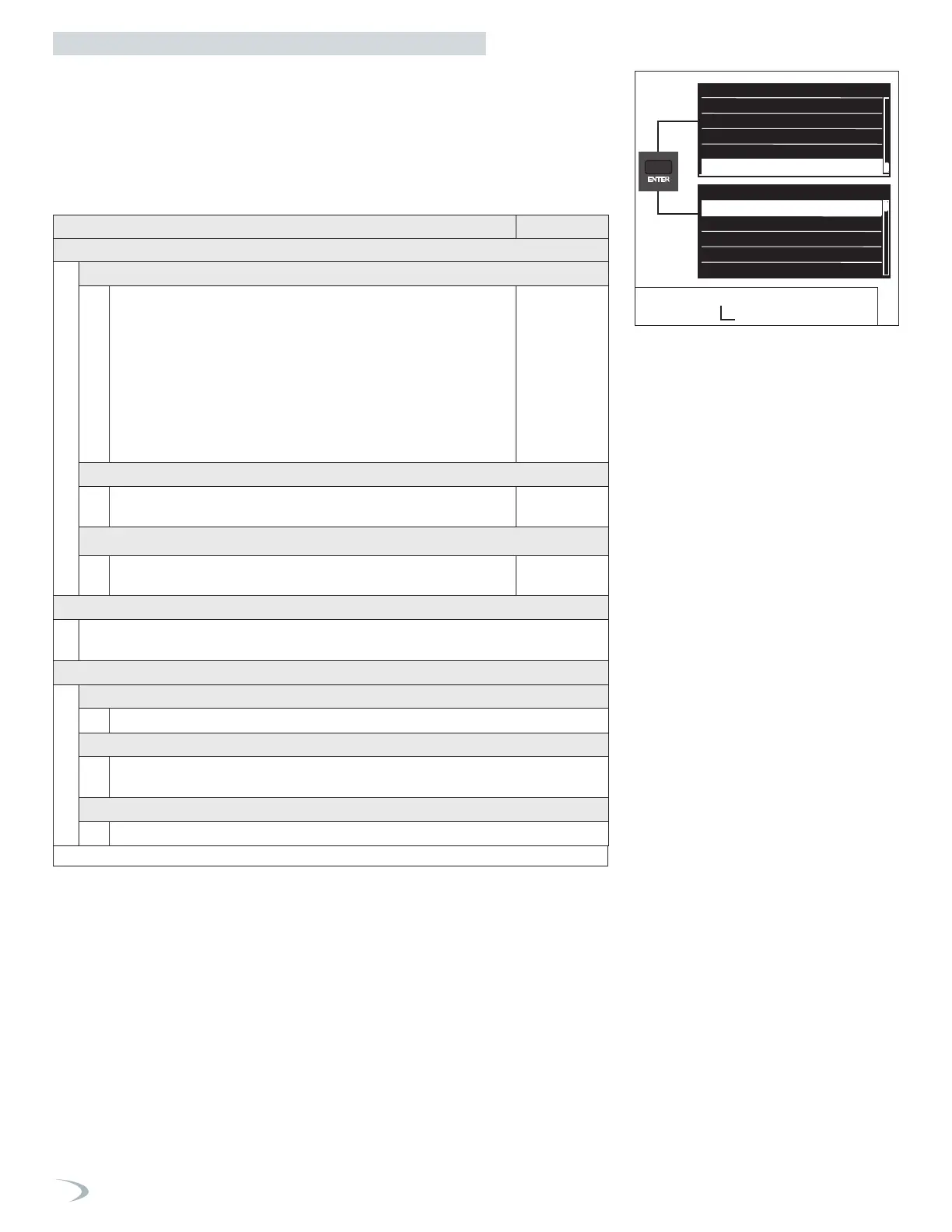
Navigate the Time Program menu as follows:
1. From the User Menu select “Time Program” and press ENTER.
2. Turn the dial to highlight the option you wish to select and press ENTER.
3. Press ESC to return to the previous screen.
Screen Settings
International System
US System
Set to
International System
Screen Settings
System unit of measurament
Screen brightness
Language
Time & Date
CH Setup
DHW Setup
Time program
Operating Mode
Time Program
Zone 1
Zone 2
View/Edit Schedule
Zone 1
Operating mode
Room Setpoint (Comfort) 66.0
Room Setpoint (Reduced) 61.0
Zone 1
Operating mode
Room Setpoint (Comfort) 66.0
Room Setpoint (Reduced) 61.0
Zone 1
Operating mode
Room Setpoint (Comfort) 66.0
Room Setpoint (Reduced) 61.0
Operating mode
3
Maximum value
Minimum value
3
0
Room Setpoint (Comfort)
66 °F
Maximum value
Minimum value
86 °F
50 °F
Room Setpoint (Reduced)
61 °F
Maximum value
Minimum value
86 °F
50 °F
Screen Settings
International System
US System
Set to
International System
Screen Settings
System unit of measurament
Screen brightness
Language
User Menu
Time & Date
CH Setup
DHW Setup
Time program
Operating Mode
Time Program
Zone 1
Zone 2
View/Edit Schedule
Zone 1
Operating mode
Room Setpoint (Comfort) 66.0
Room Setpoint (Reduced) 61.0
Zone 1
Operating mode
Room Setpoint (Comfort) 66.0
Room Setpoint (Reduced) 61.0
Zone 1
Operating mode
Room Setpoint (Comfort) 66.0
Room Setpoint (Reduced) 61.0
Operating mode
3
Maximum value
Minimum value
3
0
Room Setpoint (Comfort)
66 °F
Maximum value
Minimum value
86 °F
50 °F
Room Setpoint (Reduced)
61 °F
Maximum value
Minimum value
86 °F
50 °F
Figure 87 - User Menu
Time Program Menu
Table 33 - Time Program
Menu Option | Description (Range Default
ZONE 1
ZONE MODE (4.0.4)
Allows the user to select the type of schedule for the selected zone:
Off (0) – disabled, boiler ignores zone 1 demand.
Always Comfort (1) – temperature is always maintained at the Comfort
setpoint.
Always Reduced (2) – temperature is always maintained at the Reduced
setpoint.
Time Program (3) – temperature setpoint toggles between the Comfort
and Reduced setpoints according to the defined time program (see View/
Edit Schedule).
Only applicable when using an NTI Room Sensor.
Always
Comfort
ROOM SETPOINT (COMFORT) (4.0.0)
Room temperature setpoint for selected zone during Comfort time period.
Only applicable when using an NTI Room Sensor. (50-86°F)
66°F
ROOM SETPOINT (REDUCED) (4.0.1)
Room temperature setpoint for CH zone 1 during Reduced time period.
Only applicable when using an NTI Room Sensor. (50-86°F)
61°F
ZONE 2
Same options as Zone 1 menu but dedicated to Zone 2.
Note: parameter numbers for Zone 2 start with “5”.
VIEW/EDIT SCHEDULE
FREE TIME PROGRAMMING
The user can create a custom time program for each zone. See Page 65
WIZARD TIME PROGRAMMING
The display steps the user through creating a custom time program for each zone.
See Page 66
PRESET PROGRAMS
The user can choose from five predefined time programs. See Page 67


 To Next Page
 Loading...