71
TRX Series II - Installation - Startup - Maintenance Instructions
Part 9 - Controls
6a. User Menu - Time Program - View/Edit Schedule
International System
US System
Set to
International System
Set to
International System
Screen Settings
System unit of measurament
Screen brightness
Language
Set to
International System
Set to
International System
User Menu
Time & Date
CH Setup
DHW Setup
Time program
Operating Mode
Time Program
Zone 1
Zone 2
View/Edit Schedule
Scheduling
Scheduling
CH Setup
DHW Setup
View/Edit Schedule
Free Time Programming
Wizard time programming
Preset programs
Scheduling
Free Time Programming
Wizard time programming
Preset programs
Scheduling
Free Time Programming
Wizard time programming
Preset programs
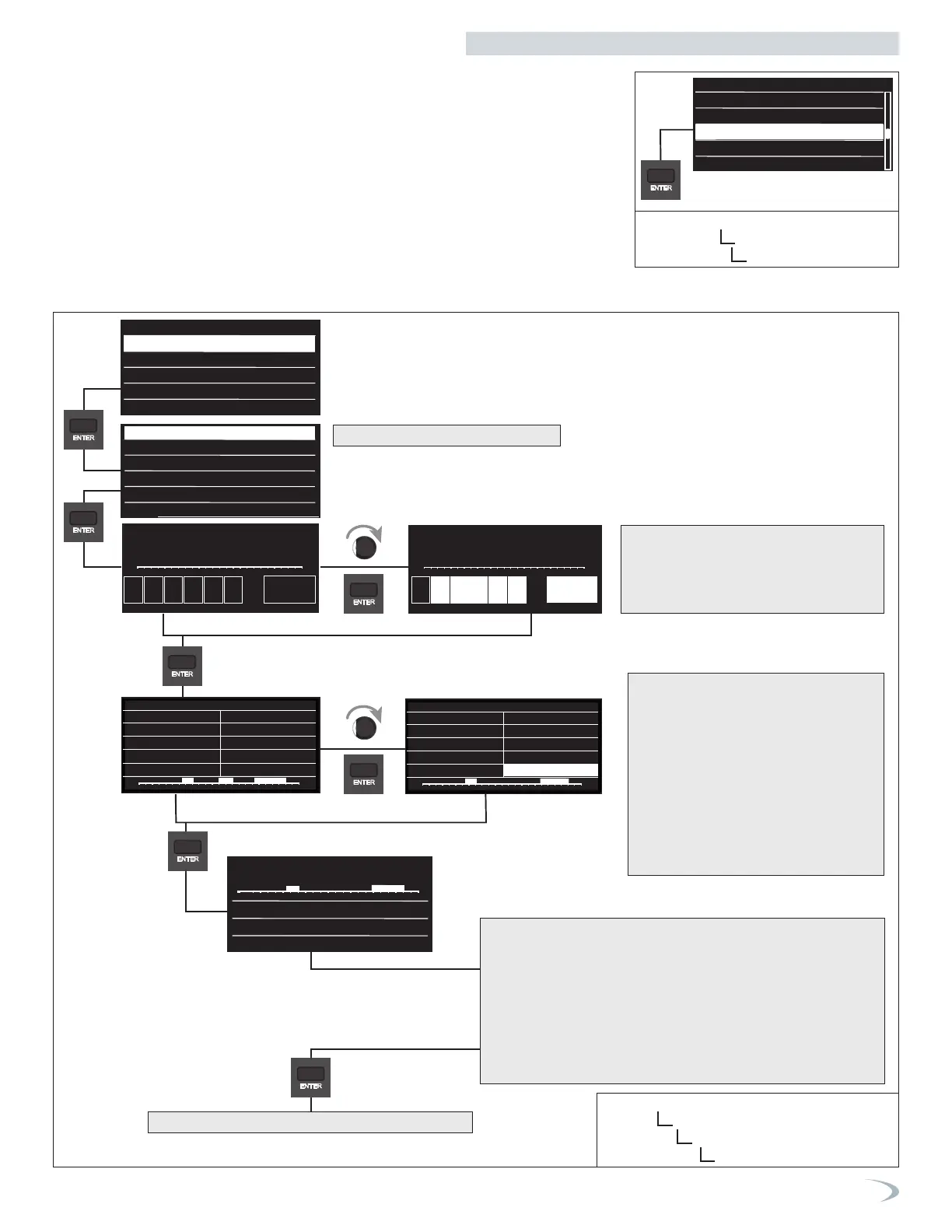
6b. User Menu - Time Program - View/Edit Schedule - Free Time Programming
Navigate the Free Time Programming menu as follows:
1. From the View/Edit Schedule menu select “Free Time Programming” and press ENTER.
2. Turn the dial to highlight the zone you wish to select and press ENTER.
3. Proceed with setting the time program as illustrated below.
Screen Settings
International System
US System
Set to
International System
Set to
International System
Screen Settings
System unit of measurament
Screen brightness
Language
Set to
International System
Set to
International System
User Menu
Time & Date
CH Setup
DHW Setup
Time program
Operating Mode
Time Program
Zone 1
Zone 2
View/Edit Schedule
Scheduling
Scheduling
CH Setup
DHW Setup
View/Edit Schedule
Free Time Programming
Wizard time programming
Preset programs
Scheduling
Free Time Programming
Wizard time programming
Preset programs
Scheduling
Free Time Programming
Wizard time programming
Preset programs
Scheduling
Free Time Programming
Wizard time programming
Preset programs
Zone 1
Zone 2
All zone
Set time program
Select days with the same time program?
00
Su Mo Tu We Th Fr Sa Save
02 04 06 08 10 12 14 16 18 20 22 24
00
Su Mo Tu We Th Fr Sa Save
02 04 06 08 10 12 14 16 18 20 22 24
Comfort days time programming
Add period
Start End00:00 00:00
00 02 04 06 08 10 12 14 16 18 20 22 24
Save
Comfort days time programming
Add period
Start End06:00 08:00
Start End18:00 22:00
00 02 04 06 08 10 12 14 16 18 20 22 24
Save
00
02 04 06 08 10 12 14 16 18 20 22 24
Mo Tu We Th Fr
Days remaining
Exit
Modify
Select days with the same time program?
Scheduling
Free Time Programming
Wizard time programming
Preset programs
Zone 1
Zone 2
All zone
Set time program
Select days with the same time program?
00
Su Mo Tu We Th Fr Sa Save
02 04 06 08 10 12 14 16 18 20 22 24
00
Su Mo Tu We Th Fr Sa Save
02 04 06 08 10 12 14 16 18 20 22 24
Comfort days time programming
Add period
Start End00:00 00:00
00 02 04 06 08 10 12 14 16 18 20 22 24
Save
Comfort days time programming
Add period
Start End06:00 08:00
Start End18:00 22:00
00 02 04 06 08 10 12 14 16 18 20 22 24
Save
00
02 04 06 08 10 12 14 16 18 20 22 24
Mo Tu We Th Fr
Days remaining
Exit
Modify
Select days with the same time program?
Scheduling
Free Time Programming
Wizard time programming
Preset programs
Zone 1
Zone 2
All zone
Set time program
Select days with the same time program?
00
Su Mo Tu We Th Fr Sa Save
02 04 06 08 10 12 14 16 18 20 22 24
00
Su Mo Tu We Th Fr Sa Save
02 04 06 08 10 12 14 16 18 20 22 24
Comfort days time programming
Add period
Start End00:00 00:00
00 02 04 06 08 10 12 14 16 18 20 22 24
Save
Comfort days time programming
Add period
Start End06:00 08:00
Start End18:00 22:00
00 02 04 06 08 10 12 14 16 18 20 22 24
Save
00
02 04 06 08 10 12 14 16 18 20 22 24
Mo Tu We Th Fr
Days remaining
Exit
Modify
Select days with the same time program?
Scheduling
Free Time Programming
Wizard time programming
Preset programs
Zone 1
Zone 2
All zone
Set time program
Select days with the same time program?
00
Su Mo Tu We Th Fr Sa Save
02 04 06 08 10 12 14 16 18 20 22 24
00
Su Mo Tu We Th Fr Sa Save
02 04 06 08 10 12 14 16 18 20 22 24
Comfort days time programming
Add period
Start End00:00 00:00
00 02 04 06 08 10 12 14 16 18 20 22 24
Save
Comfort days time programming
Add period
Start End06:00 08:00
Start End18:00 22:00
00 02 04 06 08 10 12 14 16 18 20 22 24
Save
00
02 04 06 08 10 12 14 16 18 20 22 24
Mo Tu We Th Fr
Days remaining
Exit
Modify
Select days with the same time program?
Scheduling
Free Time Programming
Wizard time programming
Preset programs
Zone 1
Zone 2
All zone
Set time program
Select days with the same time program?
00
Su Mo Tu We Th Fr Sa Save
02 04 06 08 10 12 14 16 18 20 22 24
00
Su Mo Tu We Th Fr Sa Save
02 04 06 08 10 12 14 16 18 20 22 24
Comfort days time programming
Add period
Start End00:00 00:00
00 02 04 06 08 10 12 14 16 18 20 22 24
Save
Comfort days time programming
Add period
Start End06:00 08:00
Start End18:00 22:00
00 02 04 06 08 10 12 14 16 18 20 22 24
Save
00
02 04 06 08 10 12 14 16 18 20 22 24
Mo Tu We Th Fr
Days remaining
Exit
Modify
Select days with the same time program?
Scheduling
Free Time Programming
Wizard time programming
Preset programs
Zone 1
Zone 2
All zone
Set time program
Select days with the same time program?
00
Su Mo Tu We Th Fr Sa Save
02 04 06 08 10 12 14 16 18 20 22 24
00
Su Mo Tu We Th Fr Sa Save
02 04 06 08 10 12 14 16 18 20 22 24
Comfort days time programming
Add period
Start End00:00 00:00
00 02 04 06 08 10 12 14 16 18 20 22 24
Save
Comfort days time programming
Add period
Start End06:00 08:00
Start End18:00 22:00
00 02 04 06 08 10 12 14 16 18 20 22 24
Save
00
02 04 06 08 10 12 14 16 18 20 22 24
Mo Tu We Th Fr
Days remaining
Modify
Select days with the same time program?
Select zone if necessary
Turn the dial and press ENTER to select the
days.
Turn the dial to select SAVE and press
ENTER.
Press ENTER and turn the dial set the start of the
heating period corresponding
to the flashing value. Press ENTER to confirm.
Press ENTER and turn the dial to set the end time
of the comfort period. If you want to add new time
periods, turn the dial and select Add period, press
ENTER.
Repeat the above procedure to set the start and
end times for each comfort period added.Once
programming is complete, turn the dial and select
Save.
Press the ENTER to confirm.
The display reverts to showing the previous screen.
Turn the dial to select:
- Days remainingif there are any days which have not yet been
programmed, then repeat the steps described above.
or
Turn the dial to select:
- Modify to change any previously programmed periods.
or
Turn the dial to select:
- Exit to exit schedule programming.
Figure 88 - User Menu
Time Program Menu
View/Edit Schedule
Figure 89 - User Menu
Time Program Menu
View/Edit Schedule
Free Time Programming
Navigate the View/Edit Schedule as follows:
1. From the Time Program menu turn the dial to highlight the “View/Edit Schedule” option and
press ENTER.
2. Press ESC to return to the previous screen.


 To Next Page
 Loading...