73
TRX Series II - Installation - Startup - Maintenance Instructions
Part 9 - Controls
The end user can choose from five predefined time programs to heat
according to his wishes.
When a time program is activated, the boiler will operate in the
desired time periods to maintain the room temperature at comfort
temperature level. Outside these periods, the boiler operates at a
reduced temperature level.
Preset Programs - ON time slots
Family
Program
Su
07:00 – 22:00
Mo-Th
05:30 – 22:00
Fr-Sa
05:30 – 23:00
Sa
05:30 – 23:30
No Lunch
Program
Su
07:00 – 23:30
Mo-Th
06:00 – 08:00 16:00 – 22:00
Fr
06:00 – 08:00 15:00 – 23:00
Sa
07:00 – 23:30
Midday
Program
Su
06:00 – 23:00
Mo-Th
06:00 – 08:00 11:30 – 13:00 17:00 – 22:00
Fr
06:00 – 08:00 11:30 – 23:00
Sa
06:00 – 23:00
Always
active
All
days
00:00 – 24:00
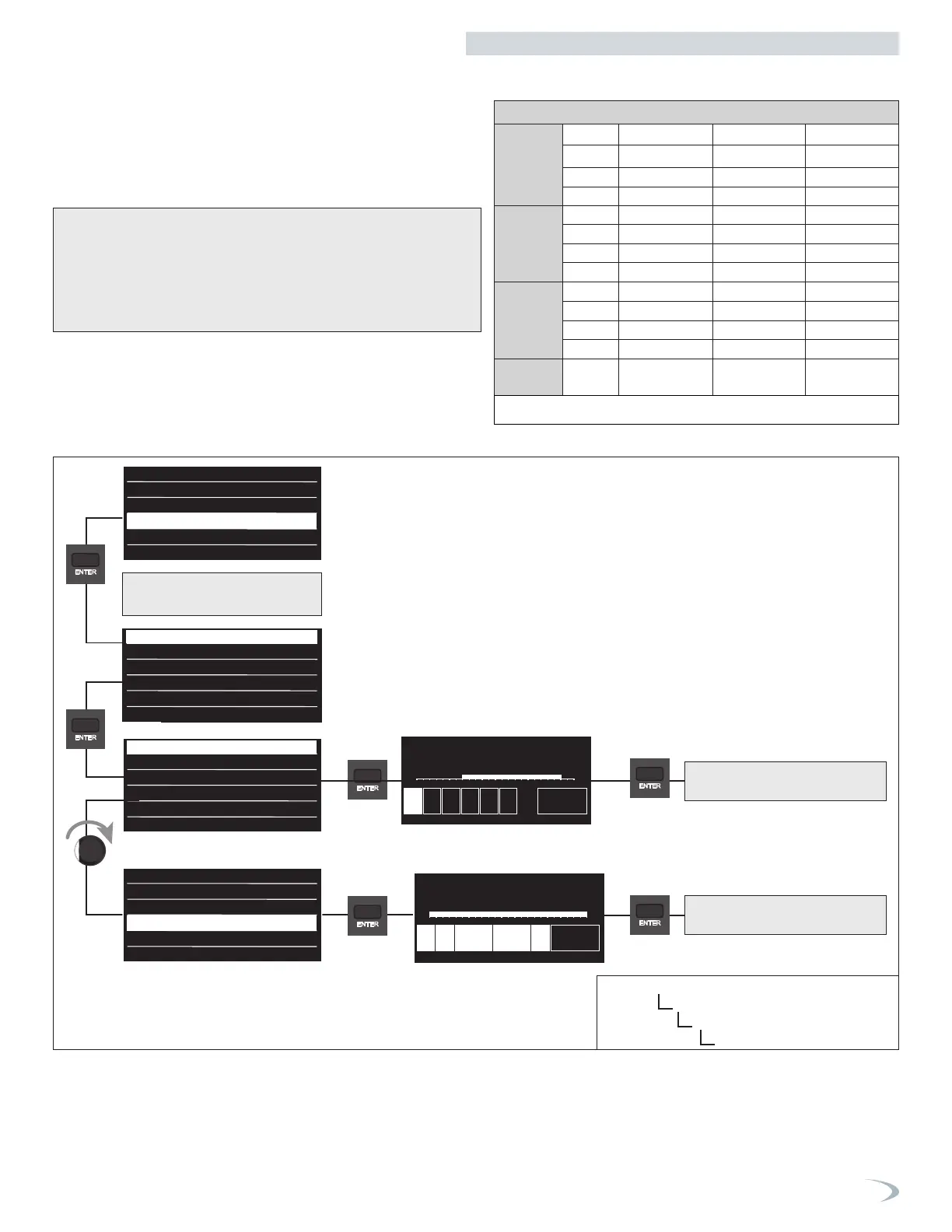
6d. User Menu - Time Program - View/Edit Schedule - PRESET Programs
Scheduling
Free Time Programming
Wizard time programming
Preset programs
Zone 1
Zone 2
All zone
Set time program
Select days with the same time program?
00
Su Mo Tu We Th Fr Sa Save
02 04 06 08 10 12 14 16 18 20 22 24
00
Su Mo Tu We Th Fr Sa Save
02 04 06 08 10 12 14 16 18 20 22 24
Comfort days time programming
Add period
Start End00:00 00:00
00 02 04 06 08 10 12 14 16 18 20 22 24
Save
Comfort days time programming
Add period
Start End06:00 08:00
Start End18:00 22:00
00 02 04 06 08 10 12 14 16 18 20 22 24
Save
00
02 04 06 08 10 12 14 16 18 20 22 24
Mo Tu We Th Fr
Days remaining
Exit
Modify
Select days with the same time program?
Select zone if necessary
only for CH setup
Navigate the Preset Programs menu as follows:
1. From the View/Edit Schedule menu select “Preset Programs” and press
ENTER.
2. Turn the dial to highlight the zone you wish to select and press ENTER.
3. Proceed with setting the time program as illustrated below.
Free Time Programming
Wizard time programming
Preset programs
No lunch
Family
Midday
Always active
No lunch
Family
Midday
Always active
Family
00
Su Mo Tu We Th Fr Sa Save
02 04 06 08 10 12 14 16 18 20 22 24
Always Active
00
Su Mo Tu We Th Fr Sa Save
02 04 06 08 10 12 14 16 18 20 22 24
View/Edit Schedule
Free Time Programming
Wizard time programming
Preset programs
No lunch
Family
Midday
Always active
No lunch
Family
Midday
Always active
Family
00
Su Mo Tu We Th Fr Sa Save
02 04 06 08 10 12 14 16 18 20 22 24
Always Active
00
Su Mo Tu We Th Fr Sa Save
02 04 06 08 10 12 14 16 18 20 22 24
View/Edit Schedule
Free Time Programming
Wizard time programming
Preset programs
No lunch
Family
Midday
Always active
No lunch
Family
Midday
Always active
Family
00
Su Mo Tu We Th Fr Sa Save
02 04 06 08 10 12 14 16 18 20 22 24
Always Active
00
Su Mo Tu We Th Fr Sa Save
02 04 06 08 10 12 14 16 18 20 22 24
View/Edit Schedule
Free Time Programming
Wizard time programming
Preset programs
No lunch
Family
Midday
Always active
No lunch
Family
Midday
Always active
Family
00
Su Mo Tu We Th Fr Sa Save
02 04 06 08 10 12 14 16 18 20 22 24
Always Active
00
Su Mo Tu We Th Fr Sa Save
02 04 06 08 10 12 14 16 18 20 22 24
View/Edit Schedule
Free Time Programming
Wizard time programming
Preset programs
No lunch
Family
Midday
Always active
No lunch
Family
Midday
Always active
Family
00
Su Mo Tu We Th Fr Sa Save
02 04 06 08 10 12 14 16 18 20 22 24
Always Active
00
Su Mo Tu We Th Fr Sa Save
02 04 06 08 10 12 14 16 18 20 22 24
The display reverts to showing the
previous screen.
The display reverts to showing the
previous screen.
Table 34 - Time Program - Preset Program
Figure 91 - User Menu
Time Program Menu
View/Edit Schedule
Preset Programs


 To Next Page
 Loading...