78
420012001500 - 03182024 - Rev. 04
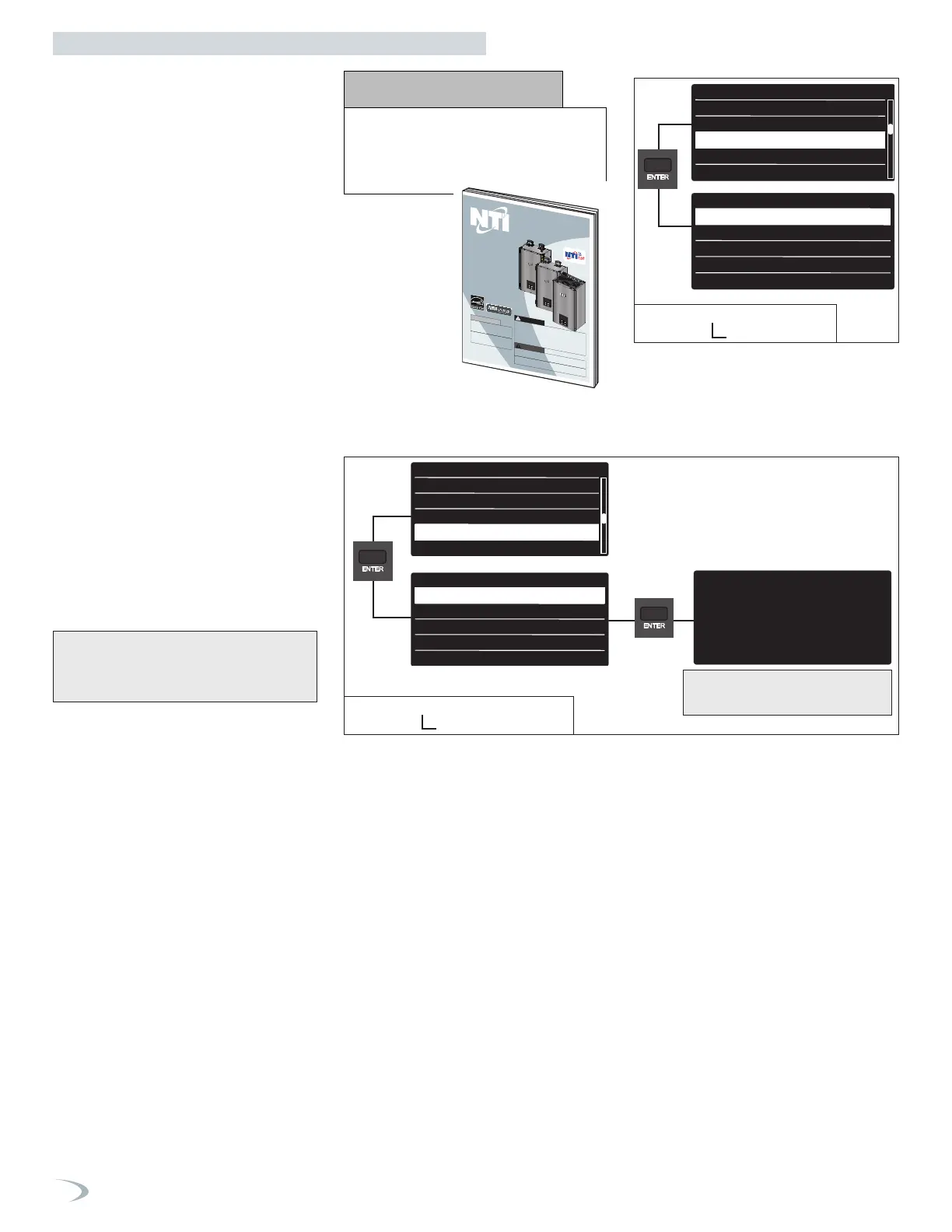
To navigate the Restore/Backup menu
proceed as follows:
1. From the Tech Menu, turn the dial to
highlight “Restore/Backup” and press
ENTER.
2. Press ENTER to select “Reset PCB to Factory
Default Settings”.
3. Press ENTER to restore the factory settings,
or ESC to return to the previous screen
without restoring the factory settings.”
To navigate the Restore/Backup menu
proceed as follows:
1. From the Tech Menu, turn the dial to
highlight “Cascade Setup” and press ENTER.
2. Scroll to the option you wish to select and
press ENTER; repeat for subsequent menus
as necessary.
3. Modify the setting by turning the dial, press
ENTER to save the value. Note: pressing
ESC exits the screen without saving the
new value.
4. Press ESC to return to the previous screen.
Resets the PCB setting to the values originally set on
the PCB at the factory. Note: if it is a replacement
PCB the settings will be reset to the default settings of
a replacement PCB.”
4. Restore/Backup
3. Cascade Setup
CH setup
DHW setup
Cascade Setup
Restore/Backup
Burner Run Hours Harmonization 0
Emergency Setpoint 113
BMS Control
Cascade Setup
Boiler Address
Tech Menu
CH setup
DHW setup
Cascade Setup
Restore/Backup
Burner Run Hours Harmonization 0
Emergency Setpoint 113
Boiler Address
Figure 94 - Tech Menu
Cascade Setup
Press ENTER to restore the factory setting.
Press ESC to return to the previous screen.
CH setup
DHW setup
Cascade Setup
Restore/Backup
BMS Control
Restore/Backup
Reset PCB to Factory Default Settings
Do you really want to perform the reset?
If you press OK button, the reset command
will be executed otherwise, by way ESC,
the previous page is shown
2.8.0 Reset PCB to Factory Default Settings
Tech Menu
CH setup
DHW setup
Cascade Setup
Restore/Backup
BMS Control
Restore/Backup
Reset PCB to Factory Default Settings
Do you really want to perform the reset?
If you press OK button, the reset command
will be executed otherwise, by way ESC,
the previous page is shown
2.8.0 Reset PCB to Factory Default Settings
Tech Menu
CH setup
DHW setup
Cascade Setup
Restore/Backup
BMS Control
Restore/Backup
Reset PCB to Factory Default Settings
Do you really want to perform the reset?
If you press OK button, the reset command
will be executed otherwise, by way ESC,
the previous page is shown
2.8.0 Reset PCB to Factory Default Settings
Figure 95 - Tech Menu
Restore/Backup
In the case of cascade installation,
read the manual "Cascade System
Installation" before accessing the
menu.
NOTICE
Residential Condensing Gas Boiler
Heat Exchanger Bears
the ASME “H” Stamp
CASCADE SYSTEM
INSTALLATION
This document is provided in addition to other documentation and does
not replace the installation manual. This document must only be used
by a qualified installer / service technician. Read all instructions in the
installation manual before installing.
Then, if installing a Cascade System, read these instructions. Only then
proceed with installation. Perform steps in the given order. Failure to do
so could result in substantial property damage, severe personal injury, or
death.
DANGER
Improper installation, adjustment, alteration, service, or maintenance
could void product warranty and cause property damage, severe personal
injury, or death.
California Proposition 65 Warning: This product contains chemicals known
to the State of California to cause cancer, birth defects, or other reproductive
harm.
WARNING
The manufacturer reserves the right to make
product changes or updates without notice
and will not be held liable for typographical
errors in literature.
The surfaces of these products contacted by
potable (consumable) water contain less
than 0.25% lead by weight as required by
the Safe Drinking Water Act, Section 1417.
NOTICE
TRX
FTVN
TRX
FTVN
Series ii
Series ii
Part 9 - Controls


 To Next Page
 Loading...