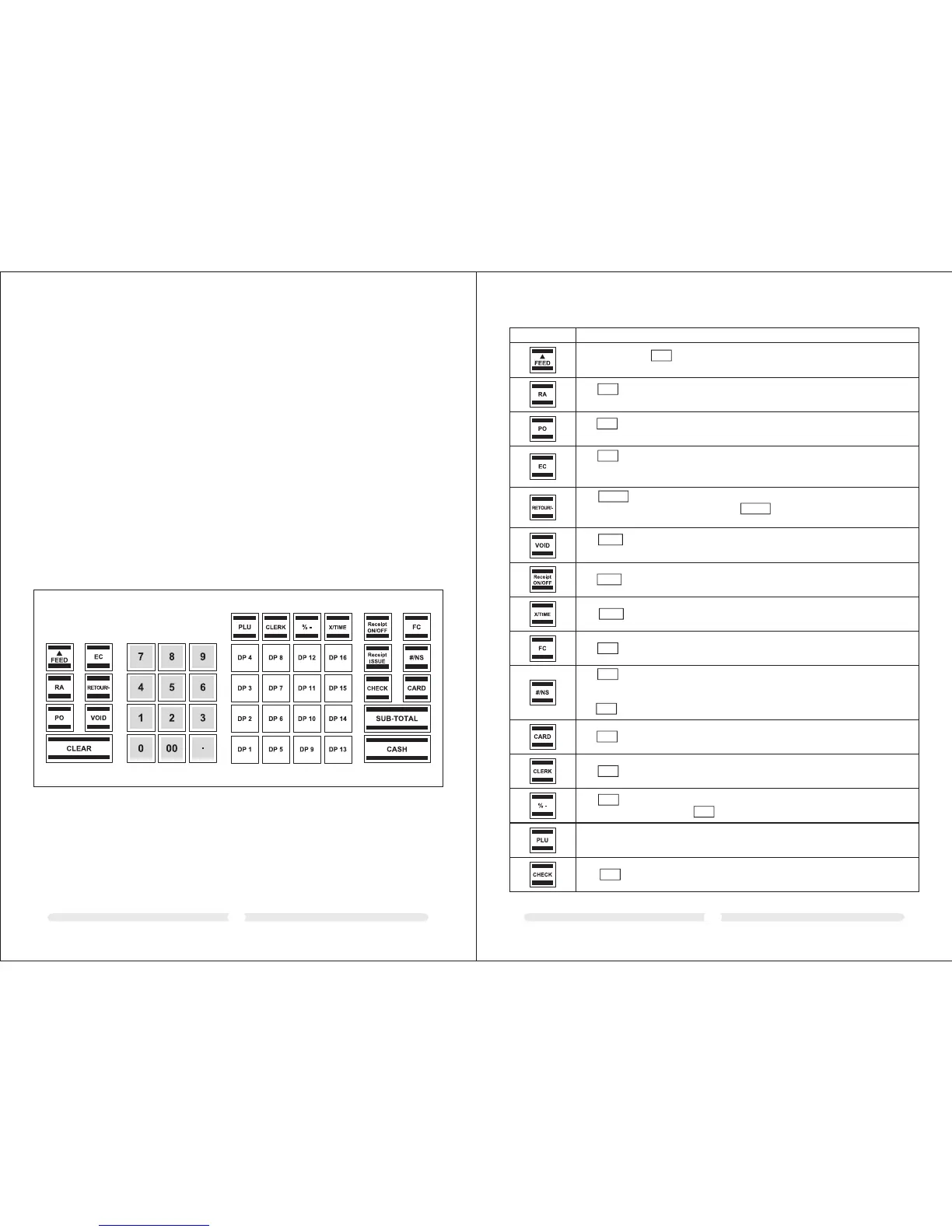
0605
5.2 Keyboard description
KEY
Explanation
FC
The key is used for converting amounts into a foreign currency.
The (NS = No Sale) is used for operations in which entries should not be added. It
can be use to print a maximally 7 digit number on the receipt. The entry does not affect
other sales totals.
The key is used to open the cash drawer.
#/NS
#/NS
CARD
The key is used for transactions made with a credit card.
The key is used to complete the cancellation of an item within a registration which has
not yet been concluded. The void total is recorded in the financial report.
VOID
The key is used to subtract an amount from the total amount of a sale. The
financial report records the (-) key total. The key is used for refund ansactions.
The refund total is recorded in the financial report.
RETOUR/-
RETOUR/-
The key is used to cancel an incorrect registration immediately after it has been
entered.
The error correct total is recorded in the financial report.
EC
The is used to record amounts removed from the cash drawer.
The total amount registered appears separately in the financial report.
PO
The key is used to record payments made into the cash register.
The total amount received on account is recorded in the financial report.
RA
Press and hold the key to continue feeding the receipt or journal paper until the key
is released.
FEED
The key is used to switch printout of the receipt off or on.
Receipt
ON/OFF
The key is used repeat (multiply) entries for departments or refunds.
X/TIME
The key is used to register a clerk.
CLERK
The key is used to subtract a percentage from a PLU or the total amount of a sale. The
total amount registered by the key is recorded in the financial report.
% -
% -
PLU (Price Look-Up) key.
5 Keyboard
In its standard form, the cash register leaves the factory with English labels on the
keyboard.
It is possible to apply labels in different languages on the keys. Keyboard sheets in
various languages are enclosed with the cash register for this purpose.
5.1 Changing the key labels
Proceed as follows:
1. Remove the transparent cap from the key.
If it is easier for you, carefully remove the entire key beforehand.
2. Replace the existing key label with a new label.
3. Replace the transparent cap back on the key.
If you removed the entire key, replace the key carefully back on the keyboard.
The key is used for transactions made with a cheque.
CHECK



 To Next Page