REG
X
Z
LOCK
PRG
PRG
10.00
1
0
0 0
1009
REG
X
Z
LOCK
PRG
0.02
7.000
Example 2: VAT rate 2 is 7%
Refer to instructions
in Example 1.
2
7
0
0 0
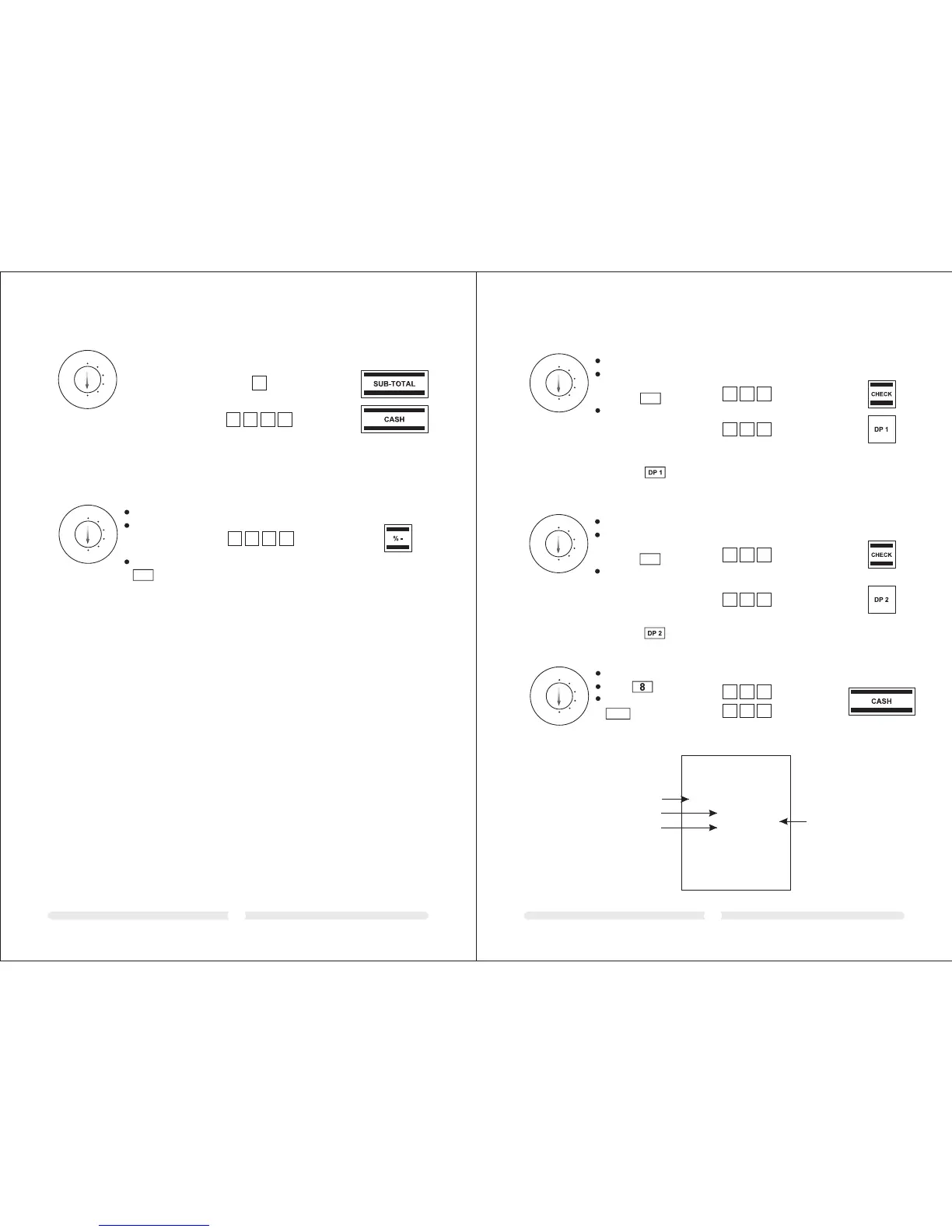
6.4 Programming a percentage discount
You can enter a discount value from 0.00 to 99.99%.
Example: 10% discount
Set the key to PRG
Enter the discount
value as 4 -digits
(10% = 1000).
Confirm by pressing
% -
Input Display Confirm by pressing
Input Display Confirm by pressing
6.5 Programming departments (DP)
Eight departments can be programmed for the sixteen departments.
On leaving the factory, Departments 1 to 8 are already assigned VAT rate 1 at 19% and Departments
9 to 16 are assigned VAT rate 2 at 7%.
All the departments are set up as an itemised department with free pricing.
If these settings correspond with those you need, no adjustments to the programme are necessary at
this point.
Department status (3-digit)
1st digit
Itemised department
Single item department
2nd + 3rd digit
No VAT 00
VAT rate 1
VAT rate 2
VAT rate 3
VAT rate 4
Price entry
Free pricing
Fixed price
6.5.1 Programming department status and fixed price
0
1
00
01
02
03
04
000
Enter the price with the number of decimal places
REG
X
Z
LOCK
PRG
Input Display Confirm by pressing
Example 1: DP1 should be set-up as an itemised department at VAT rate 1 (19%) and without a fixed
price.
Set the key to PRG
Enter status S1 and S2 as
3 digits and confirm by
pressing
Enter fixed price or free
pricing Assign the progra
-mmed settings to the dep
-artment by pressing the
corresponding DP key, in
this case:
CHECK
0.01
0
0 1
0
0 0
0.00
Example 2: DP2 should be set-up as an itemised department at VAT rate 2 (7%) and with a fixed price
of 5.00 (system option 1 in default setting: 2 decimal places).€
REG
X
Z
LOCK
PRG
Set the key to PRG
Enter status S1 and S2 as
3 digits and confirm by
pressing
Enter fixed price or free
pricing Assign the progra
-mmed settings to the dep
-artment by pressing the
corresponding DP key, in
this case:
CHECK
Input Display Confirm by pressing
0.02
0
0 2
5
0 0
5.00
6.5.2 Printing the department programme
REG
X
Z
LOCK
PRG
Set the key to PRG
Press 6 times
Confirm by pressing
CASH
Input Display Confirm by pressing
8888.88
8
8 8
8
8 8
Example printout:
SYSTE SETTING DUMP REPORT
************* ***********
************* ***********
NAME
PRICE 100.00
TAX NO 01
STATUS 00
PRG
DEPARTMEN T-02
NAME
PRICE 100.00
STATUS 00
TAX NO 01
PRG
DEPARTMEN T-01
Department no.
Fixed price
Status
Tax rate



 To Next Page