19
Display Functions with Key U (15)
In
sert key U (15) to enable (Fig. 1-2, no. 9)
nhook the filter holder from the unit and fill
ith one or two measures of ground coffee,
ccording to the filter being used. Use the
ress supplied to push down the coffee and
move any residues from around the edge
f the filter (this guarantees a better gasket
rip, as well as less wear). Insert the filter
y pressing the button for the dose of cof-
e desired, the pump and solenoid valve
ill be activated and the coffee will be deli-
ered. This operation is indicated by the
ghting up of the relative led. When the
ose is equal to the set value, delivery
lease Note: During pauses, leave the filter
older inside the unit, so that it remains
arm. The delivery units have a temperature
alance function that runs using a hot water
irculation system, in order to guarantee
aximum thermal endurance during use.
he hot water solenoid valve is activated and
elivery is started by pressing the correct
utton. This operation is indicated by the
ghting up of the relative led. When delivery
me is equal to the set value, the system
self will close the solenoid. Hot water can
e delivered at the same time as coff e e .
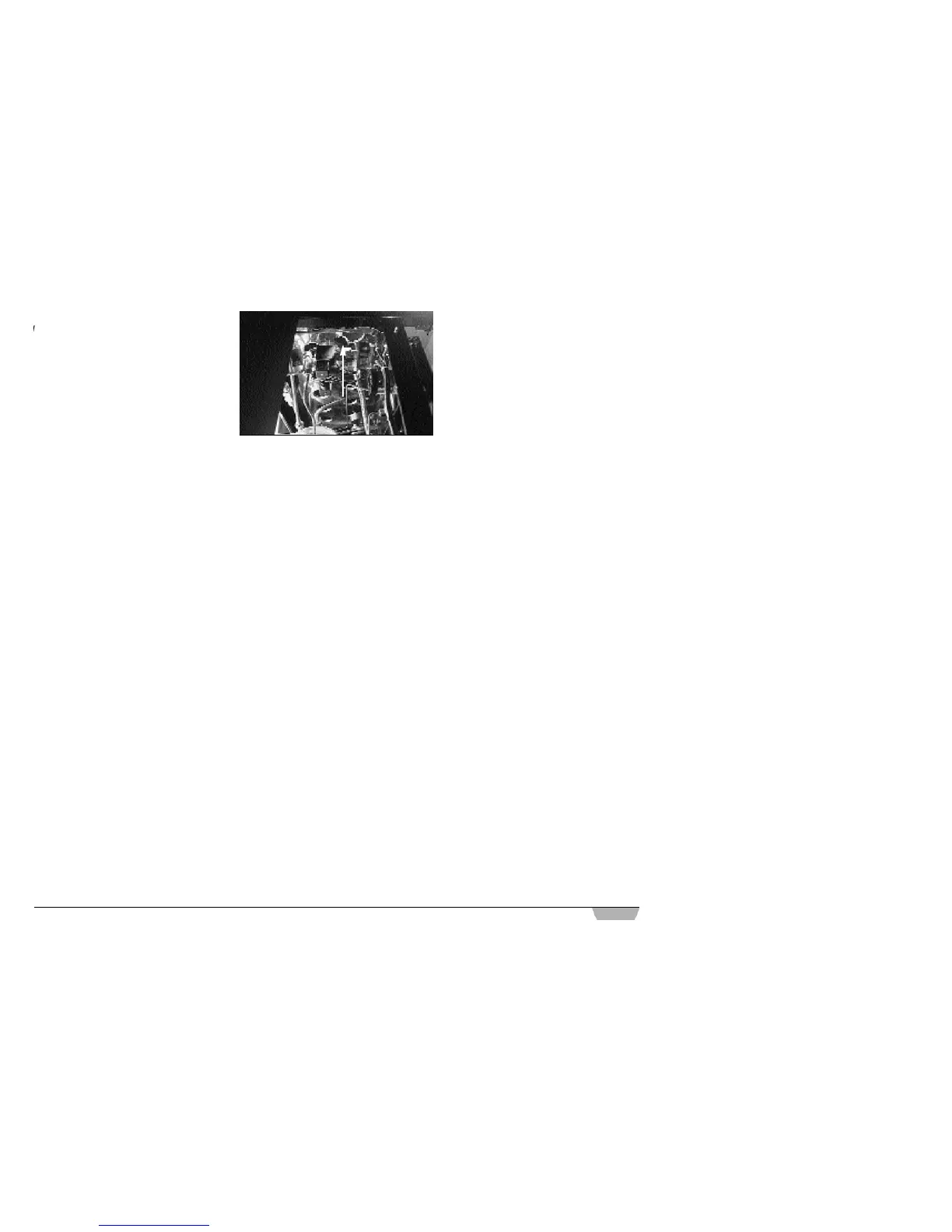
lease Note: The “Program Vip Plus”
odel is equipped with a hot water mixer to
nable the temperature regulation of the
ater being released and to maximize the
erformance of the system. The mixer is
gulated by first removing the left hand
anel of the machine and turning the regi -
ter knob. Tightening this knob will increase
mperature (Fig. 10).
Programming Coffee Doses
Insert key U to enable.
By pressing ▼, the display will read P R O-
GRAM DOSES. If ENTER is then pressed,
the display will read PROGRAM DOSES
S E L E C T. All leds for programmable keys
will begin to flash (except those of the conti-
nuous delivery keys). If the key is pressed
for the amount of coffee to be programmed
(the led stays lit), the display will read
VOLUME C.C. followed by the amount
already programmed and which can be
varied using the ▼▲ keys.
To set a new dose, press the key once
more and delivery will commence. In the
meantime, the other selection leds will swit-
ch off. Press STOP when the required cof-
fee dose has been delivered.
The display will show the new dose, which
can still be modified using the ▼▲ keys. By
passing on to the next selection stage or
pressing ENTER, the programmed dose led
will switch off. To exit press RESET.
Note: coffee grounds absorb water.
Programming Hot Water Doses
Insert key U than enter in P R O G R A M
DOSES, SELECT mode.
If you press the H. WATER key (the led will
stay lit) the display will read SECONDS f o l-
lowed by the time already programmed and
which can be varied using the ▼ ▲ keys. To
set a new dose, press the key once more and
delivery will commence. Press the H. WAT E R
key when the required dose has been delive-
red. The display will show the new dose,
which can still be modified using the ▼ ▲
keys. By passing on to the next selection
stage or pressing ENTER, the programmed
dose led will switch off. If the RESET key is
pressed and if no modifications have been
made to the doses, the machine will return to
the normal state: PROGRAM DOSES
S E L E C T. Press▲ to exit or remove key.
Dose Transfer
To transfer the values for programmed
doses (PROGRAM DOSES SELECT ) ,
press ▼ , the display will read D O S E S
T R A N S F E R , SELECT GROUP (the conti-
nuous delivery leds for the 2nd, 3rd and 4th
units will begin to flash). If one or more of
the CONTINUOUS keys are selected (the
led will stay lit), the values programmed for
unit 1 will be transferred to the other units.
To confirm this selection and return to PRO-
GRAM DOSES SELECT, press ENTER (to
quit without saving the selection, press
RESET, ▲ or remove key).
Standard Doses
To restore standard dose values, (in
DOSES TRANSFER, SELECT GROUP) ,
press ▼. The display will read D E FA U LT
SETTING, SELECT G R O U P (the conti-
nuous delivery leds for the 2nd, 3rd and 4th
units will begin to flash). If one or more of
the CONTINUOUS keys are selected (the
led will stay lit) the standard doses will be
reset for the selected units.
To confirm this selection and return to PRO-
GRAM DOSES SELECT, press ENTER.
All selections can be programmed for a
max. delivery time of 2 minutes. After this
time the display will flash ERROR.
To pass on to the next page, press RESET
and ▼. Press s to return to the previous page.
Fig. 10












 To Next Page