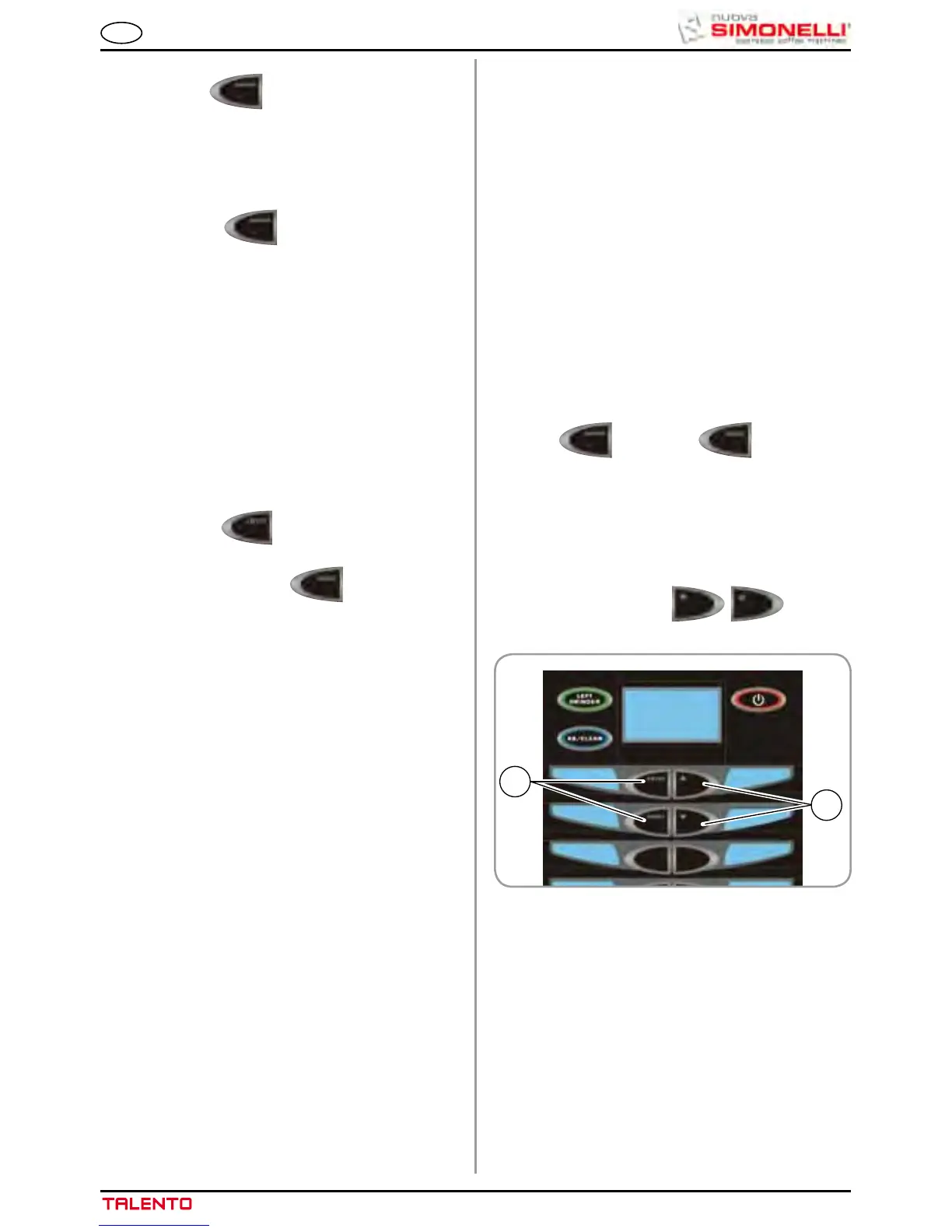
Fig. 21
57
EN
8. SPECIAL MACHINE
SCALING FUNCTIONS
This operation may only be performed by a Specialist
Technician.
To check machine charges, solenoid valves, heating
elements and motors, with the machine switched
off, OFF, hold down the,
, keys for
8 seconds.
8.2 TEST
8.1 RESET DATA
With this function it is possible to remove incor-
rect operating data and to return to Standard
Programming settings (see PRESET VALUES).
To reset the machine parameters and return to
standard settings, with the machine switched off,
OFF, hold down the three keys:
, ENTER
and RESET for 8 seconds.
Press ENTER
to confirm the setting.
4.18 CHANGING THE PASSWORD
It is possible to set a new password to access the
programmable functions in technical mode.
Pressing ENTER
it is possible to enter the
sub menu.
Enter the new password using a combination of 4 keys:
NEW PASSWORD XXXX
Confirm the password set previously:
CONFIRM PASSWORD XXXX
5. SAVE DATA
Pressing ENTER is possible to store all data
set during the programming stage in the machine’s
memory. Pressing RESET
it is possible to
quit the programming mode without saving.
KEY
1 DATA RESET
2 TEST
1
2
Fig. 22












 To Next Page