10
Console Operation
Item
Number
Name Description
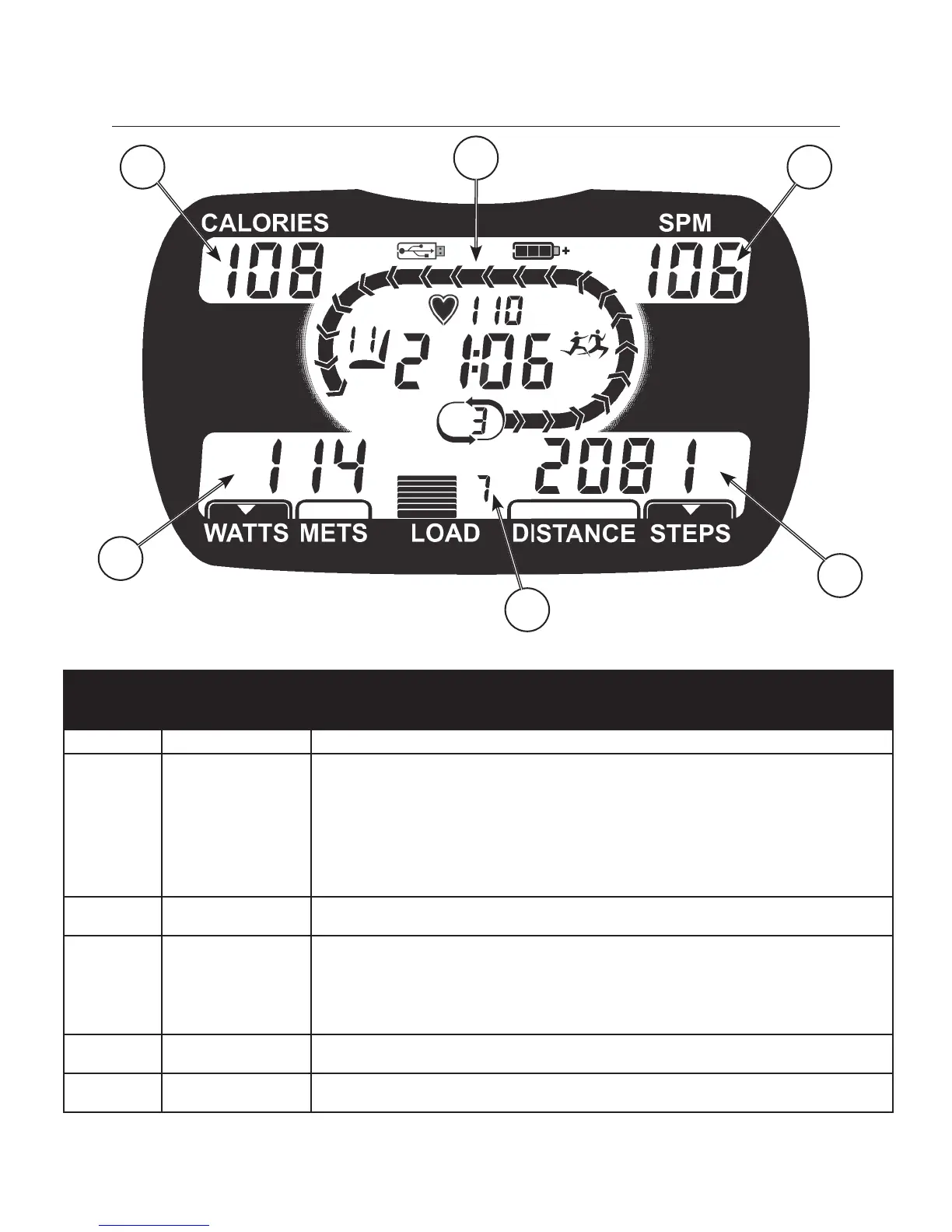
1 CALORIES DISPLAY The quantity of calories burned during the workout is displayed in the CALORIES DISPLAY.
2 MAIN CONSOLE
DISPLAY
The following functions are displayed in the MAIN CONSOLE DISPLAY:
• Workout duration (minutes and seconds)
• Battery charge level (during console power up only)
• Seat position
• Heart rate (coded Polar transmitter belt must be worn for heart rate display function)
• Lap progress (track distance is a quarter mile [400 meters])
• Lap counter
• Pace partner icon displays if pace partner workout is selected
• USB icon displays during data download to fl ash drive
3 SPM (STEPS PER
MINUTE) DISPLAY
The stepping rate is displayed in the SPM DISPLAY.
4 WATTS/METS
DISPLAY
Watts or METS are displayed in the WATTS/METS DISPLAY and are an indication of exercise
intensity. Use the SELECT button to switch from one display to the other. Watts indicates
the amount of energy expended to maintain the workout intensity. METS, an abbreviation
for metabolic equivalents, is a unit of measure for expressing the energy cost of physical
activity. The MET level of sitting at rest is approximately 1 MET. The METS displayed will
increase as the user’s exercise intensity increases.
5 LOAD LEVEL
DISPLAY
The workload level (1 - 10) is displayed in the LOAD LEVEL DISPLAY. Use the lever below
the right side of the seat to increase or decrease load level.
6 DISTANCE/STEPS
DISPLAY
The workout distance and total accrued steps are displayed in the DISTANCE/STEPS
DISPLAY. Use the SELECT button to switch from one display to the other.
1
2
3
4
5
6


 To Next Page