11
Item
Number
Button Name Description
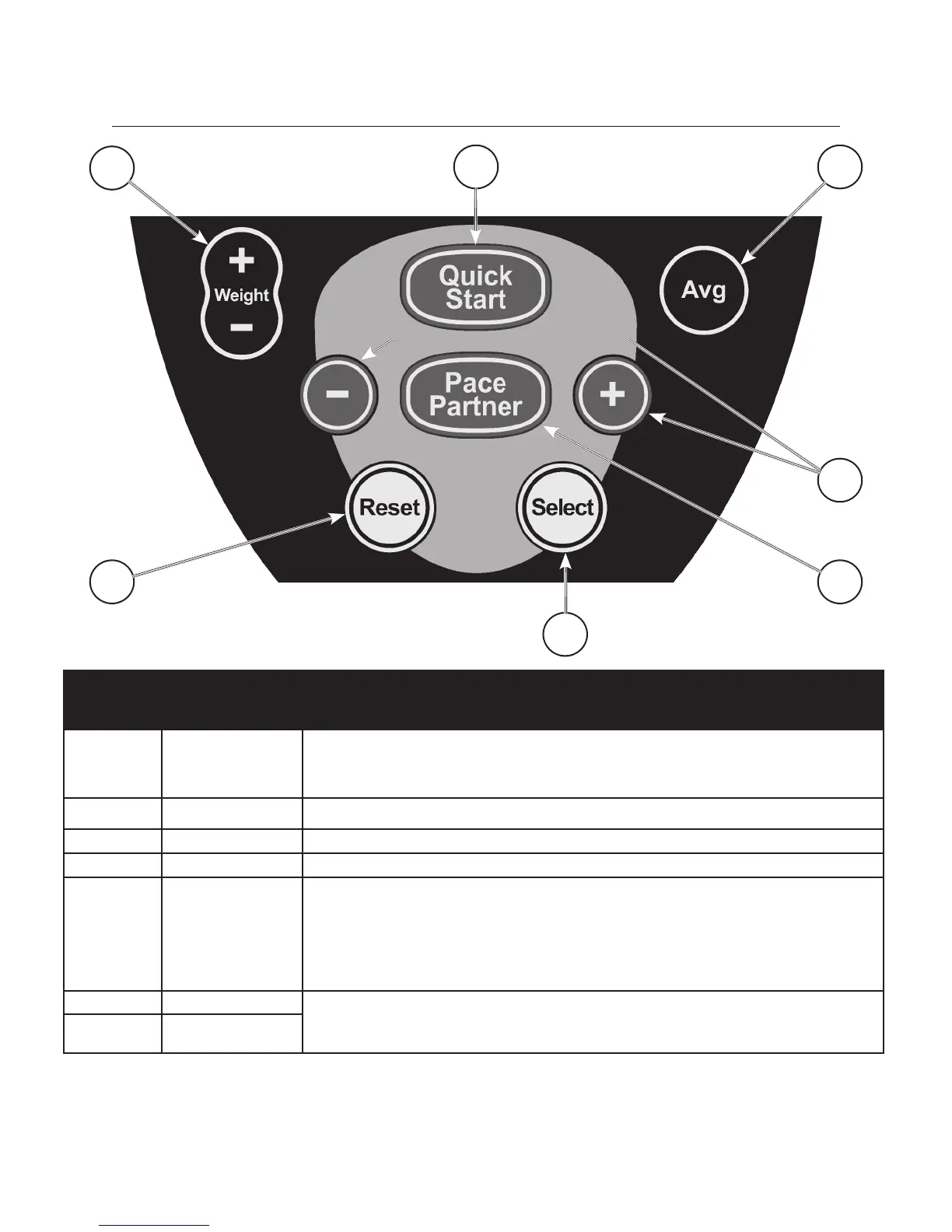
A WEIGHT + and
WEIGHT -
To enter the user’s weight for the exercise session, push (or press and hold) the WEIGHT
+ or WEIGHT - buttons until the proper weight appears in the main console display, then
press the SELECT button. Press and hold the SELECT button to set a new default user
weight. Note: Entering user weight increases accuracy of calorie and METS outputs.
B QUICK START Press the QUICK START button to immediately start a basic exercise session.
C AVG Press the AVG button to display workout averages for steps per minute, watts and METS.
D RESET Pressing the RESET button clears the current workout and allows the user to restart.
E SELECT The SELECT button has two functions.
1. It allows the user to choose either watts or METS for display in the WATTS/METS
DISPLAY, and choose either distance or total cumulative steps in DISTANCE/STEPS
DISPLAY. The displayed outputs are indicated with a small triangle in the lower section of
the window.
2. The SELECT button is also used to accept an entered parameter (e.g. user weight or
steps per minute during pace partner program set up.)
F PACE PARTNER The pace partner button and pace partner - and + buttons are used for the pace partner
exercise program. Please refer to the programs section of this manual for details on how to
use the pace partner exercise program.
G (PACE PARTNER )
- AND +
Console Operation
A
C
6666
D
B
E
F
G


 To Next Page