NUVO
®
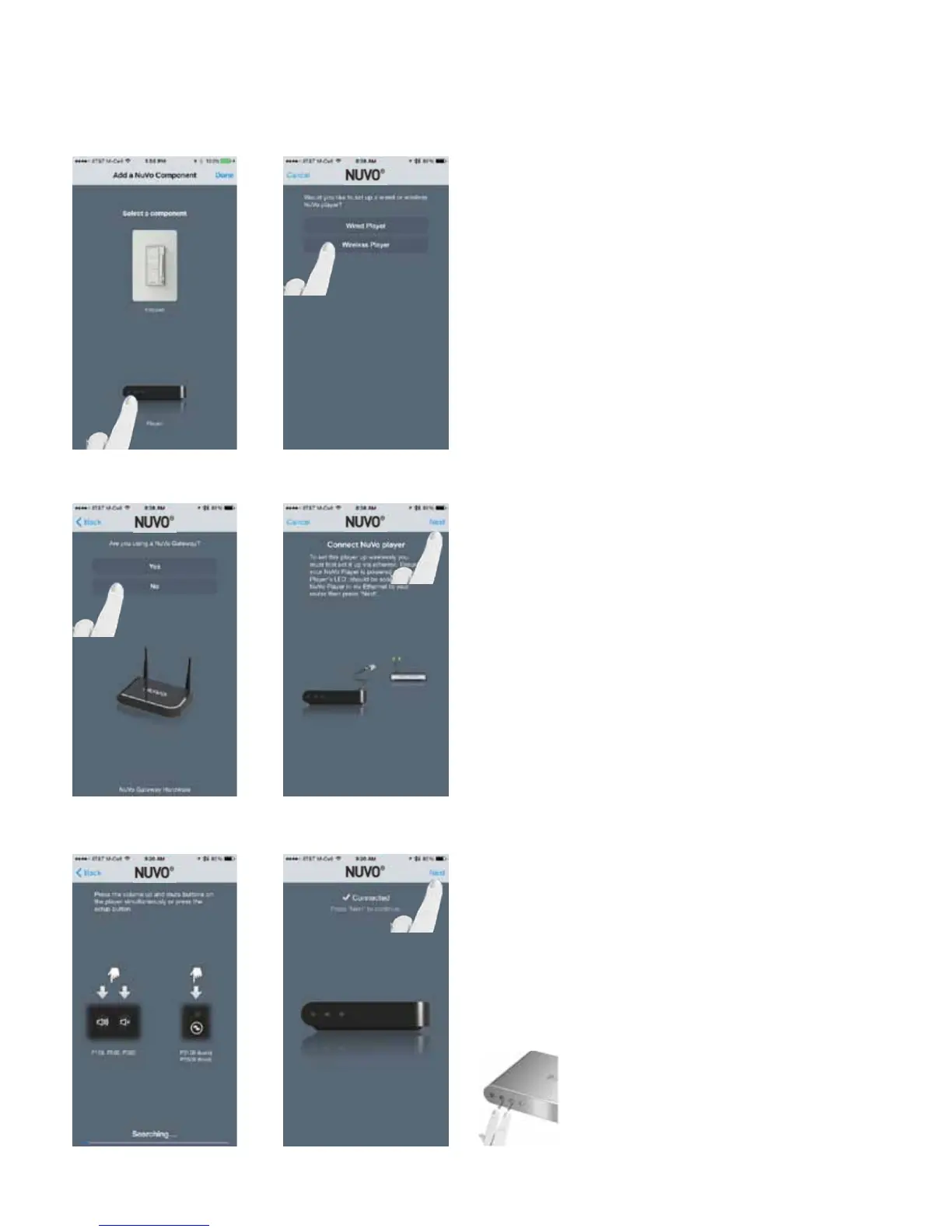
Select “Player” to add the component.
Then select “Wireless Player.” (Fig. 49, Fig. 50)
Fig. 49
Fig. 50
Answer “No” as the response to “Are you using a Nuvo Gate-
way?” (Fig. 51)
Ensure that the wireless zone is attached to an Ethernet
connection that is on the same network as the smart phone
or tablet running the Nuvo Player app, and press “Next.”
(Fig. 52)
Press the VOLUME UP and MUTE buttons simultaneously on
the wireless player to initiate the binding process. (Fig. 53)
Once bound, the wireless player will show Connected. Then
press “Next.” (Fig. 54)
Fig. 51
Fig. 52
Fig. 53
Fig. 54
24



 To Next Page