NUVO
®
Download the app to your device from the iTunes App Store or the Google Play Marketplace. Make sure your device is con-
nected to the same network as the Nuvo Player Port folio System. Open the app and select “Set up my new system” from
the initial screen, as shown in Fig. 33.”Control my system” is used to connect a new iOS or An droid device to an existing
system.
Connect NV-GW100-xx to Ethernet.
Open the Nuvo Player app on a tablet or smart phone con-
nected to the same network
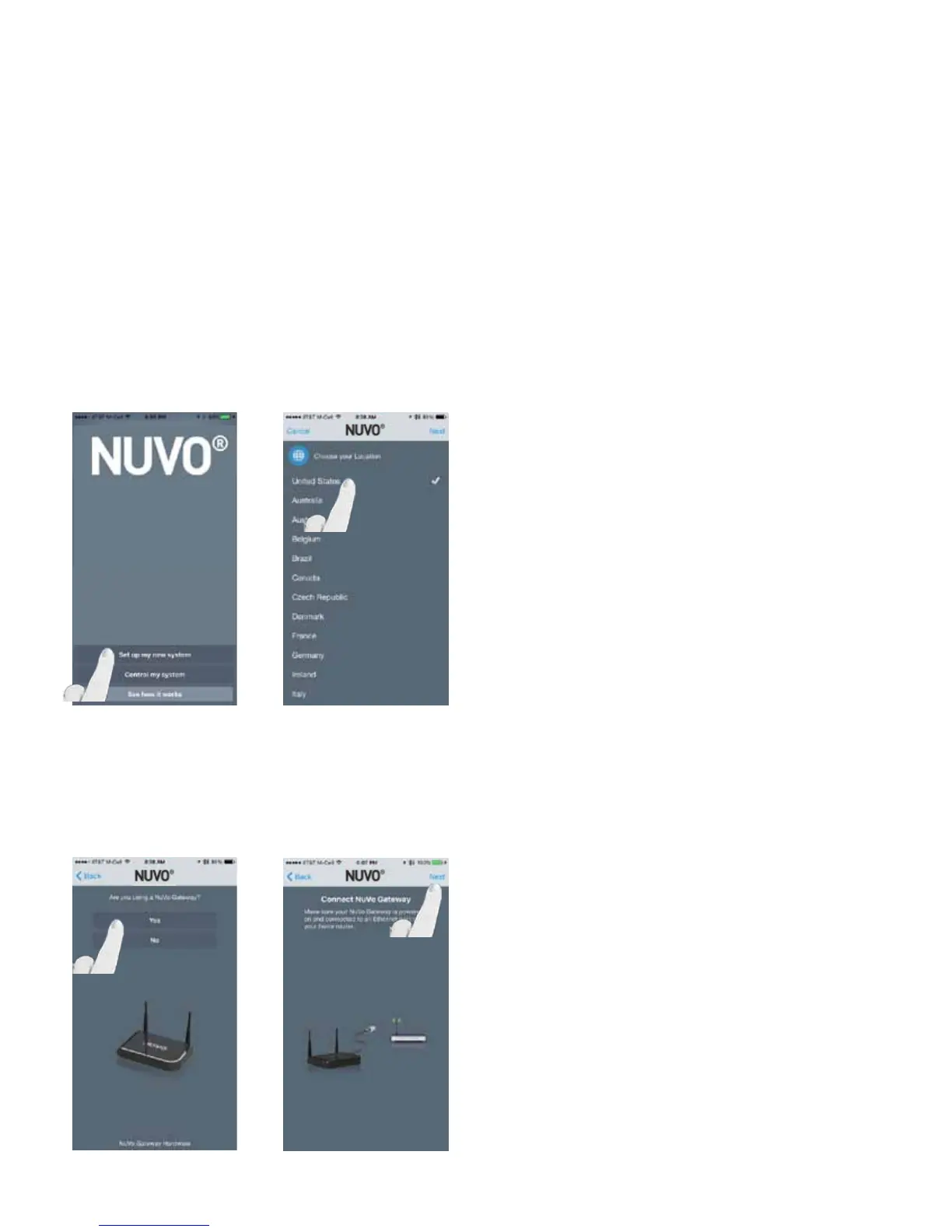
Select “Set up my new system.” (Fig. 33)
Select your location and press “Next.” (Fig. 34)
Fig. 33
Answer “Yes” as the response to “Are you using a Nuvo Gate-
way?” (Fig. 35)
Make sure the Nuvo Gateway is powered on and connected
to Ethernet and select “Next. (Fig. 36)
Fig. 34
2.2 New Wireless System Setup - Using a Nuvo NV-GW100-xx Gateway
Fig. 35
Fig. 36
20


 To Next Page