NUVO
®
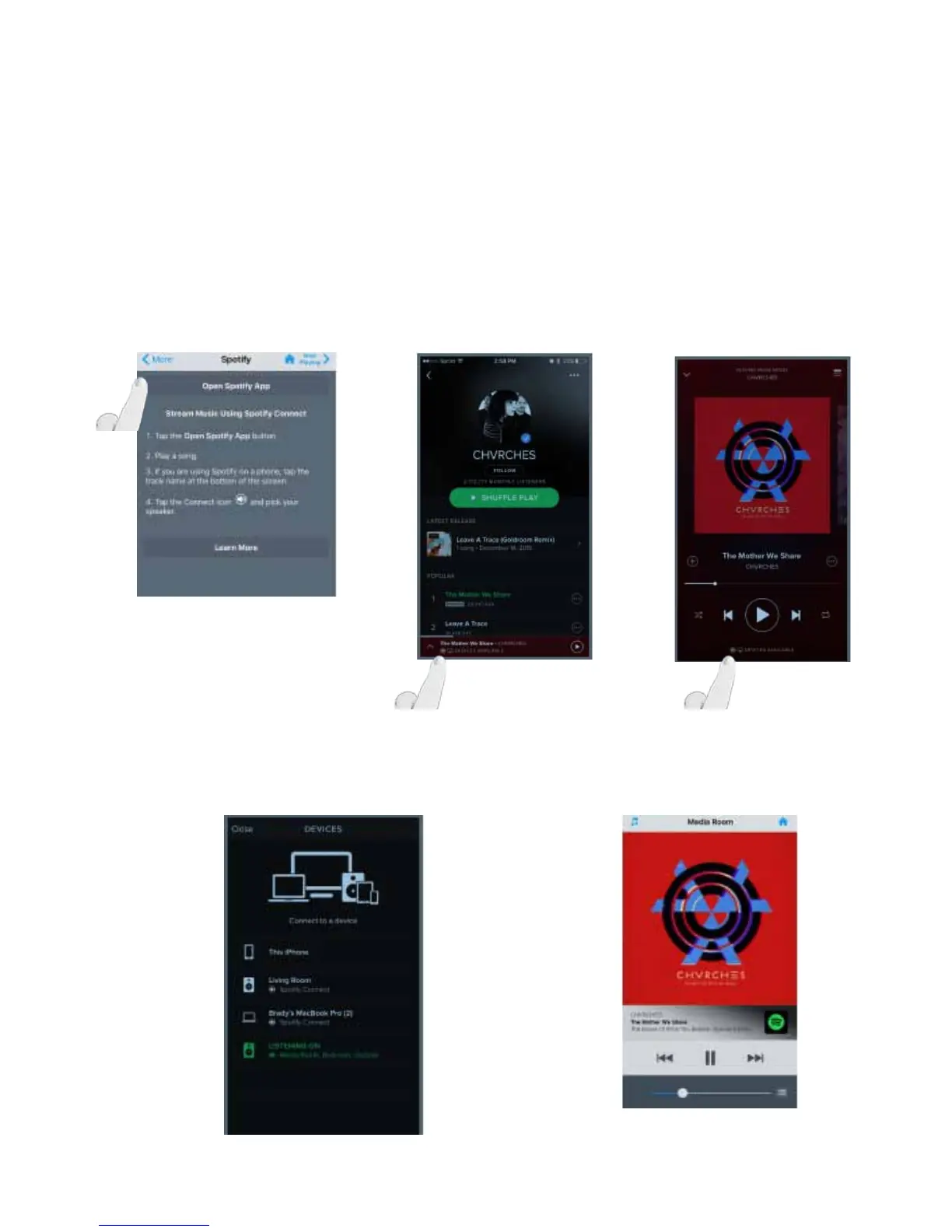
The Spotify service works by using Spotify Connect. Music, Playlists and Radio stations are selected within the Spotify App
then directed to the NUVO Player zones (rooms) by using the Spotify Picker. Spotify will be launched by selecting the Spo-
tify logo under the available music services on the NUVO Player 3.1 or above Controller app Fig 151, You may also launch
the Spotify app directly, it is not required to open it through the NUVO Controller. Once the Spotify app is open and music
has been selected, look to the bottom of the screen to see the Spotify Picker. Figs 152, 153
Fig. 151 Fig. 152
4.10 Using Spotify Connect
Once the Spotify Picker is activated, all available Player Portfolio zones will be displayed Fig 154. Select the zone/room you
would like the audio to be routed to. The following screen will be displayed on the Player Portfolio Controller app when the
room or group of rooms playing Spotify are selected Fig155.
Fig. 154 Fig. 155
Fig. 153
46



 To Next Page