NUVO
®
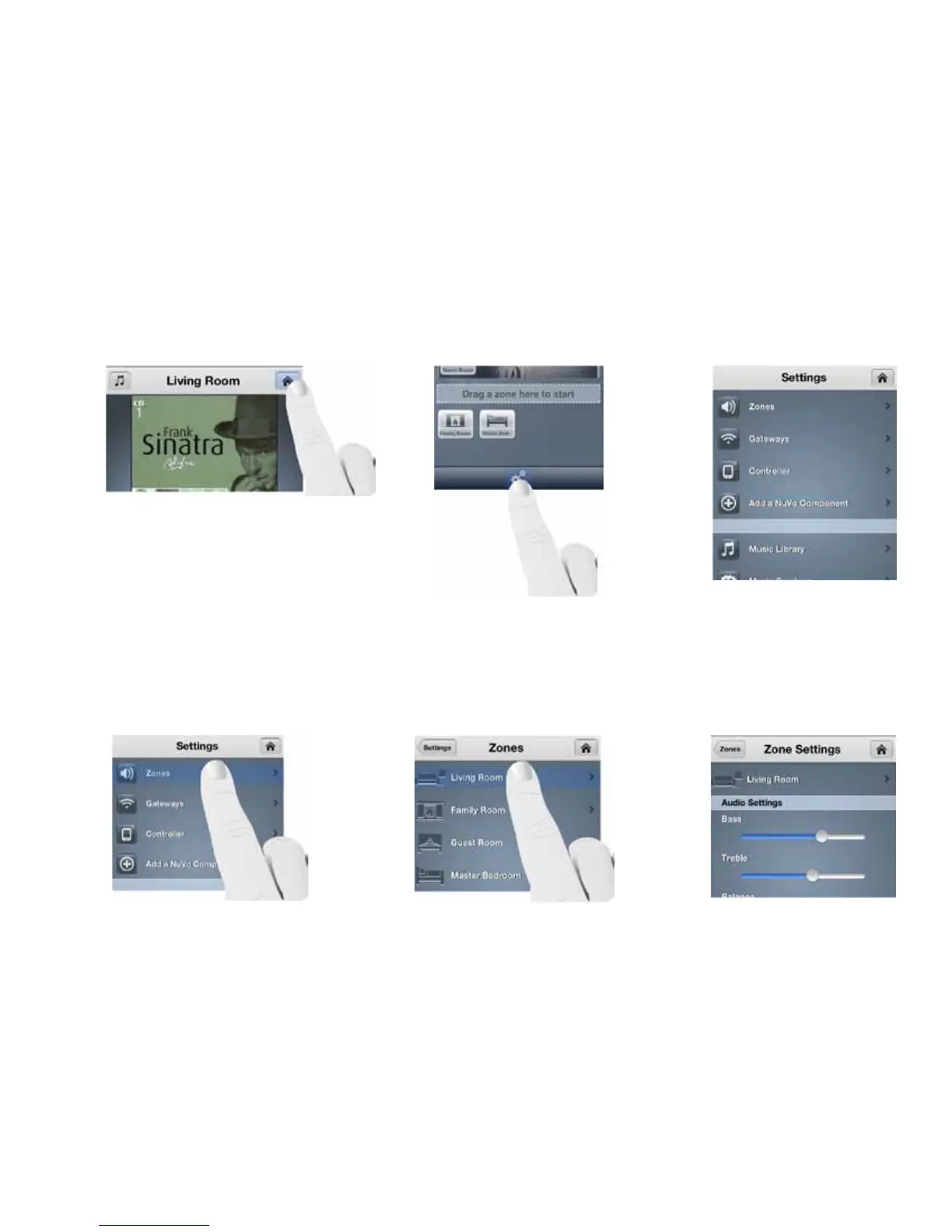
The Settings menu has several selections important to the system’s control and operation. Settings is accessed through
pressing the gear icon located at the bottom of the Dashboard. On the smaller format devices such as the iPhone, iPod
Touch, or Android phones, if you are on the “Now Playing” screen or browsing musical selections, the Home icon at the top
of the screen will always return the app to the Dashboard, as shown in Fig. 115. From there, touch the Settings button, as
shown in Fig. 116 to access the Settings menu, as shown in Fig. 117.
Fig. 115 Fig. 116
Fig. 117
Fig. 118 Fig. 119
Selecting “Zones” in the Settings menu provides several controls for audio playback and functionality, as shown in Fig.
118. When the “Zones” button is touched , the app will display the choice of zones within the system, as shown in Fig. 119.
When one of the zones is selected, its individual settings and controls will be available, as shown in Fig. 120.
Fig. 120
4.0 The Settings Menu
4.1 Zones
39



 To Next Page