NUVO
®
The NVP100-xx and NVP200-xx have a “quick change” function for toggling be-
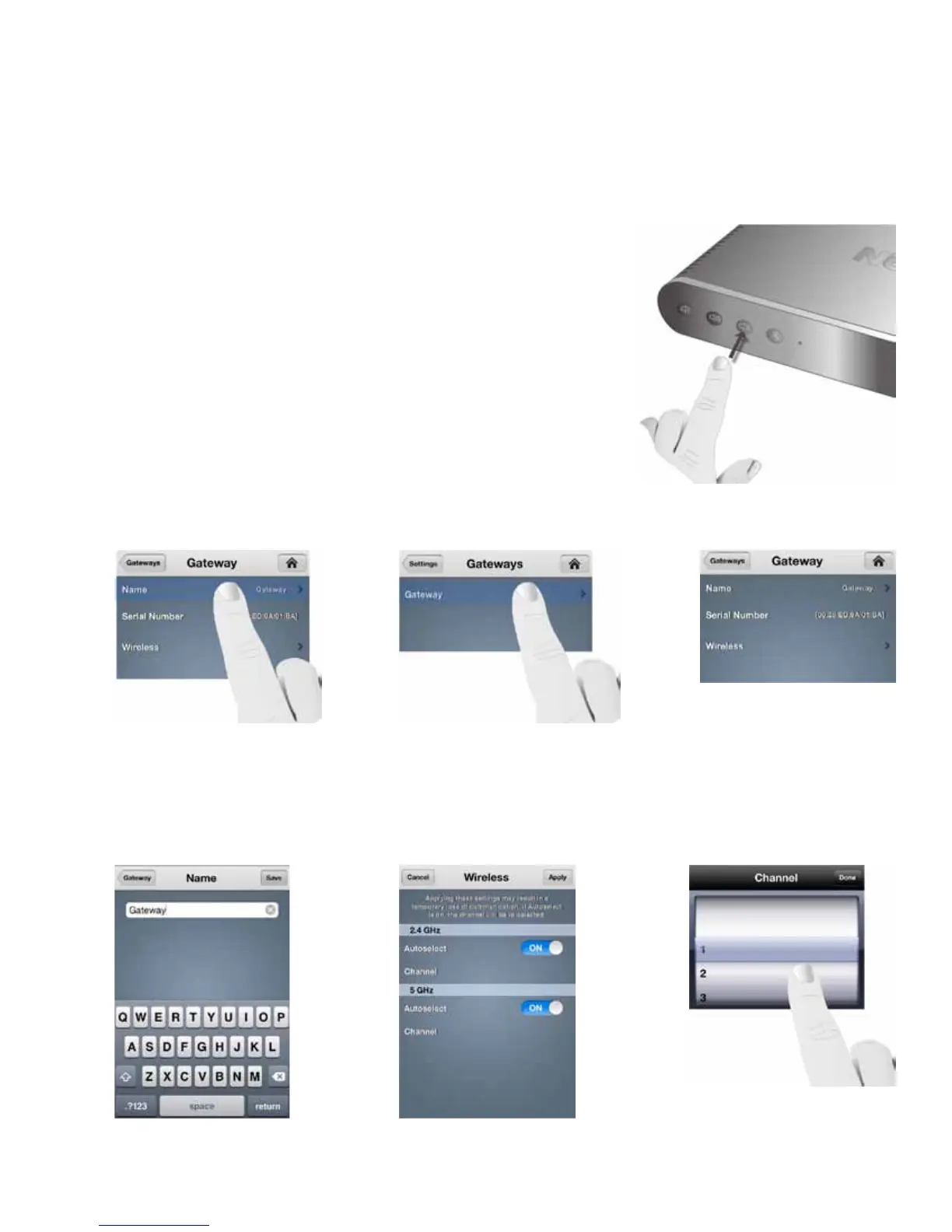
tween 2.4 and 5 GHz communication. Simply press and hold the front panel MUTE
button for about six seconds, until you see the LED flash, as shown in Fig. 125.
Let go of the button. The LED will flash red momentarily as the zone is recon-
necting at the new frequency. When the process is complete, the LED will return
to a solid white state. At that point the zone will be fully operational.
The Gateway selection allows you to view and change important settings to the
Gateway(s) operation. When “Gateway” is selected, as shown in Fig. 126, the app will
show the Gateways present in the system, as shown in Fig. 127. The Gateway page
will show “Name,” “Serial Number,” and “Wireless,”as shown in Fig. 128.
When “Name” is selected, a screen with a keyboard will allow the name of the chosen Gateway to be edited, as shown in
Fig. 129. This is useful if you are using more than one Gateway in a system. “Wireless” shows the current channel selec-
tion for 2.4 and 5 GHz broadcast, as shown in Fig. 130. The default is “Autoselect,” but when that feature is turned off and
“Channel” is selected, a manual channel select choice will appear, as shown in Fig. 131.
Fig. 125
Fig. 126
Fig. 127
Fig. 131
Fig. 129 Fig. 130
4.2 Gateways
Fig. 128
41



 To Next Page