NUVO
®
Fig. 69
Fig. 70
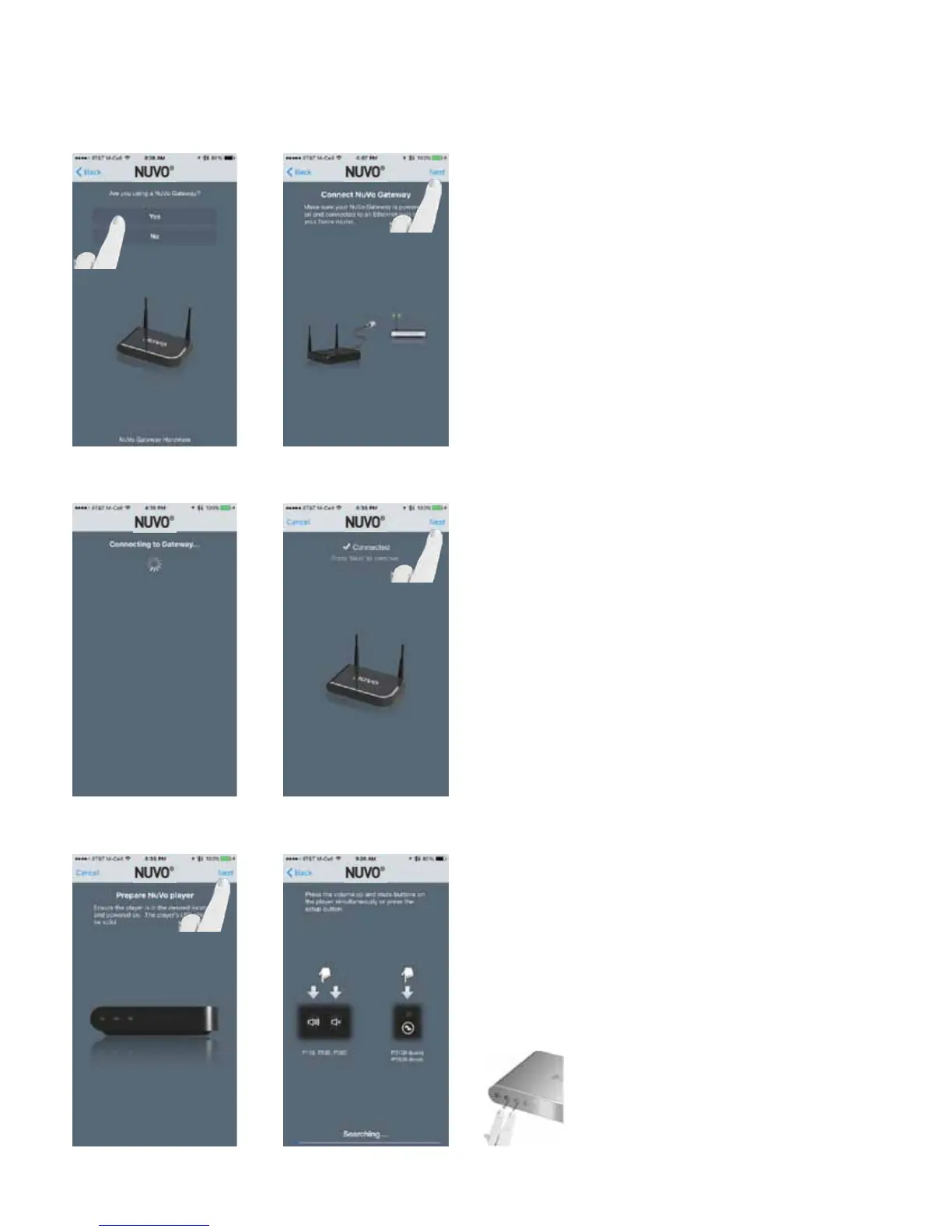
Answer “Yes” as the response to “Are you using a Nuvo Gate-
way?” (Fig. 69)
Make sure the Nuvo Gateway is powered on and connected
via Ethernet, then select “Next.” (Fig. 70)
Fig. 71
Fig. 73
Press “Next” on the Gateway Connection confirmation
screen. If the “Connected” message doesn’t appear, check
network connections and repeat steps. (Fig. 71, Fig. 72)
Prepare the Nuvo player to be joined to the Gateway and
press “Next.” (Fig. 73)
Press the VOLUME UP and MUTE buttons simultaneously on
the wireless player to initiate the binding. NOTE: The blue
LED on the Gateway will begin to flash. (Fig. 74)
Fig. 72
Fig. 74
28


 To Next Page