14 | nuwavenow.com
CLEANING & MAINTENANCE
1. Turn off and unplug the OxyPure.
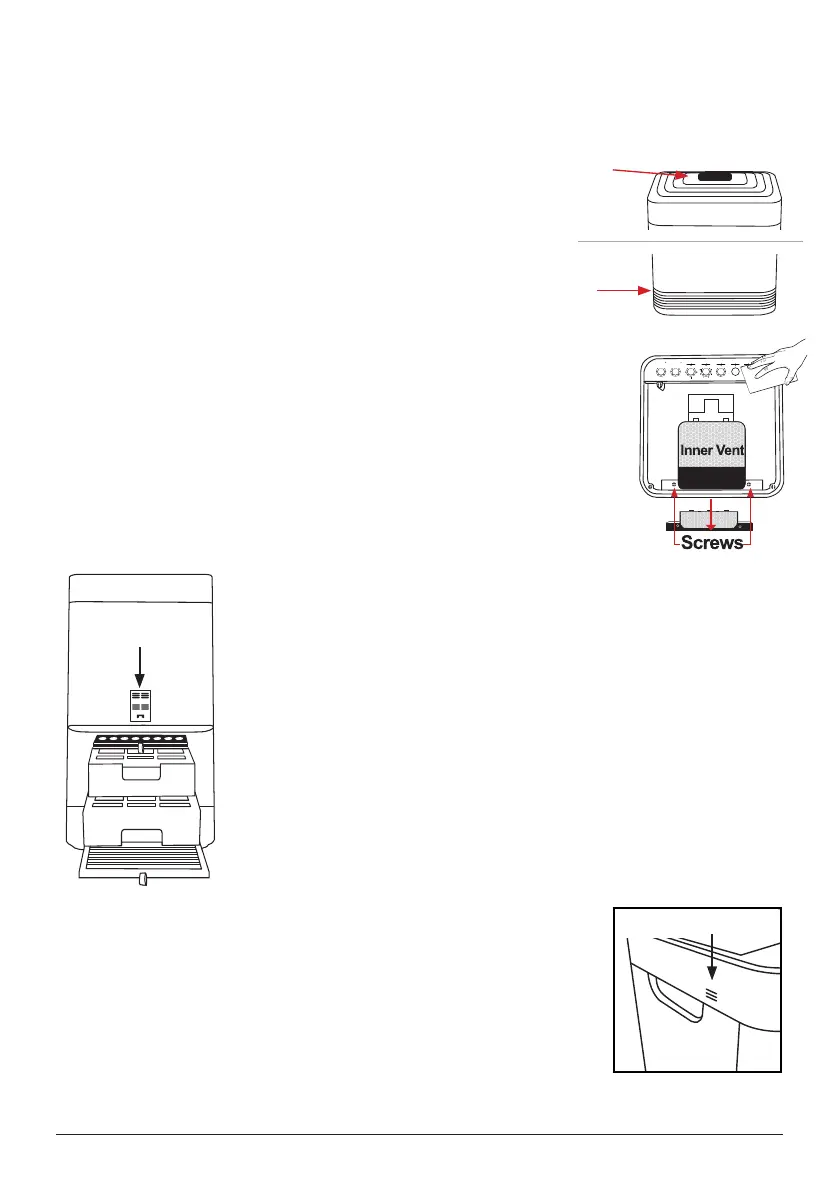
2. Use a vacuum with a brush attachment to remove any dust
and debris.
3. If needed, use a paper towel or cloth slightly dampened to
remove heavier buildup. Do not use any harsh abrasives
or cleaning pads on the Top Vent or any other part of the
OxyPure.
To clean fan area or check for a foreign object.
1. Remove the screws as shown and set on the magnetic
strip.
2. Lift off the vent as shown.
3. Can wipe the side walls with a cloth or duster.
4. Replace the vent and screws
Note: Careful to unscrew at the small inner vent, as not to
void the warranty.
CLEANING THE TOP VENT AND INFLOW VENT
Depending on the environment the Oxypure is placed in, more frequent cleaning may be
needed.
CLEANING THE FILTER SENSOR
The Filter Sensor is located on the back, above the Filter Slot Cover.
1. Open the panel (Sensor Cover).
2. Using a dry cotton swab or small, soft brush, gently remove any
dirt or dust from the Sensor.
3. For heavier buildup on the Sensor, wipe it with a slightly wet
cotton swab.
4. Remove any moisture with a dry cotton swab.
• The Filter Sensor requires regular cleaning (approx. every 3
months) for the OxyPure to operate efciently.
• If your OxyPure is set up in an area with high dust accumulation,
more frequent cleaning of the Filter Sensor is needed.
• DO NOT use the cotton swab on any part or area other than the
Filter Sensor.
CLEANING THE ODOR SENSOR OPENING
The Odor Sensor is located on the upper right side corner of the
OxyPure underneath the small grill opening. Dust and debris may
accumulate.
1. Use a vacuum brush attachment and gently brush the grill.
• DO NOT tamper or spray inside or near the odor sensor. This may
cause the sensor to malfunction and void the warranty.
Odor Sensor
ODOR
NO
ODOR
STRONG
ODOR
CLEAN FILTER 2/3
AIR
SLEEP MODE
AUTO
ULTIMATE
CLEAN
FAN
SPEED
TIMER TURBO
HR CLEAN DIRTYHRHIGHLOW
WIFI
ECO MODE
WIFI
RESET FILTER
MUTE
Top Vent
Inflow Vent
TOP
BOTTOM
Sensor Cover










 To Next Page