Using DGX-2 System in KVM Mode
DGX-2 System User Guide
78
11.7.1 Guest OS Drive
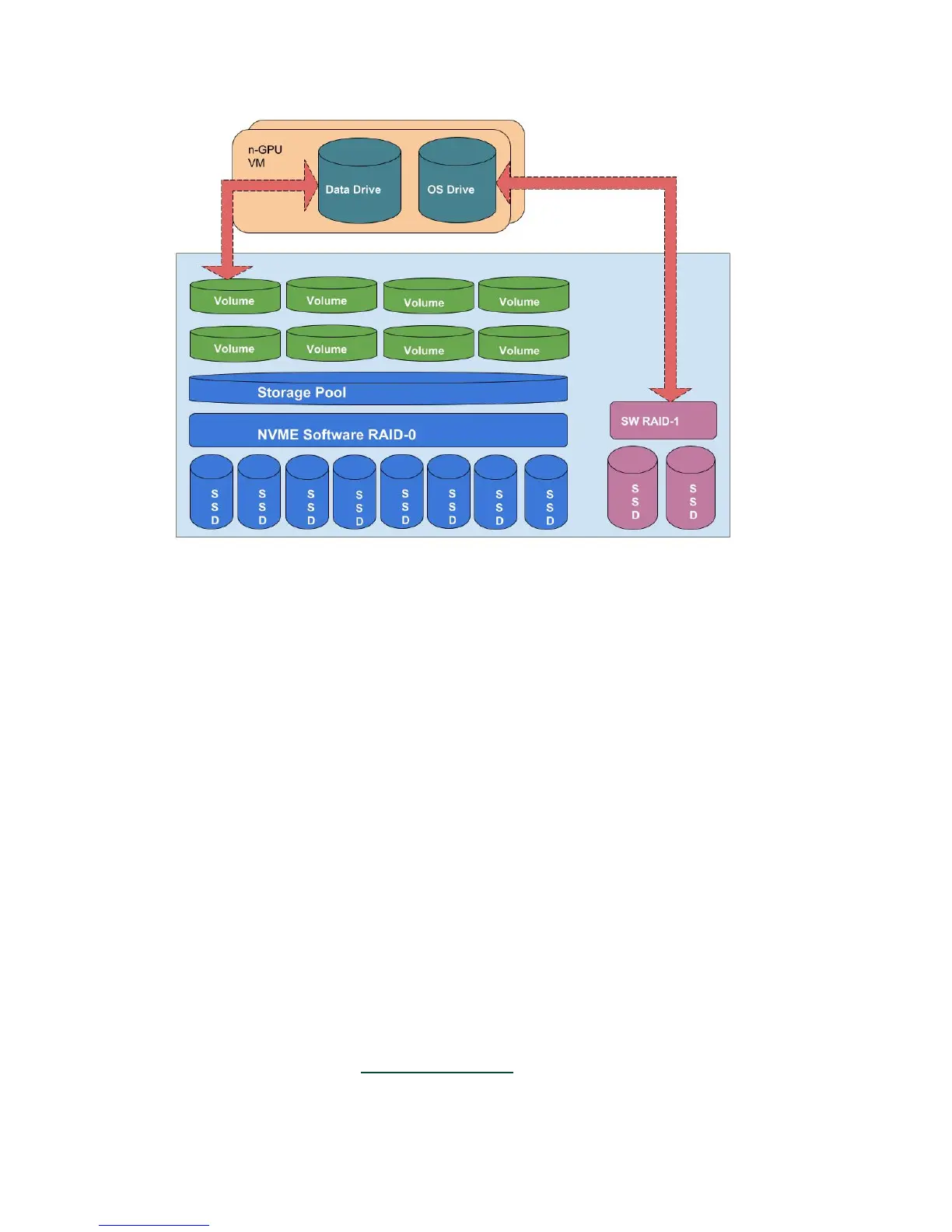
DGX-2 KVM Host software uses the existing RAID-1 volume as the OS drive of each
Guest (/dev/vda1) which by default is 50 GB. Since the OS drive resides on the RAID-1
array of the KVM Host, its data shall always be persistent.
Using the nvidia-vm tool, a system administrator can change the default OS drive size.
11.7.2 Data Drives
The DGX-2 KVM host software assigns a virtual disk to each guest GPU VM, referred to
here as the Data Drive. It is based on filesystem directory-based volumes and can be
used either as scratch space or as a cache drive.
DGX-2 software sets up a storage pool on top of the existing RAID-0 volume on the
KVM Host for Data Drives on the Guests. The Data drive is automatically carved, by
nvidia-vm tool, out of the Storage Pool and allocated to each GPU VM as a Data Drive
(/dev/vdb1) which is automatically mounted on /raid. The Data Drive size is pre-
configured according to the size of the GPU VM. For example, a 16-GPU VM gets a very
large Data Drive (See the Resource Allocation
section for size details).













 To Next Page