Page 9 of 22
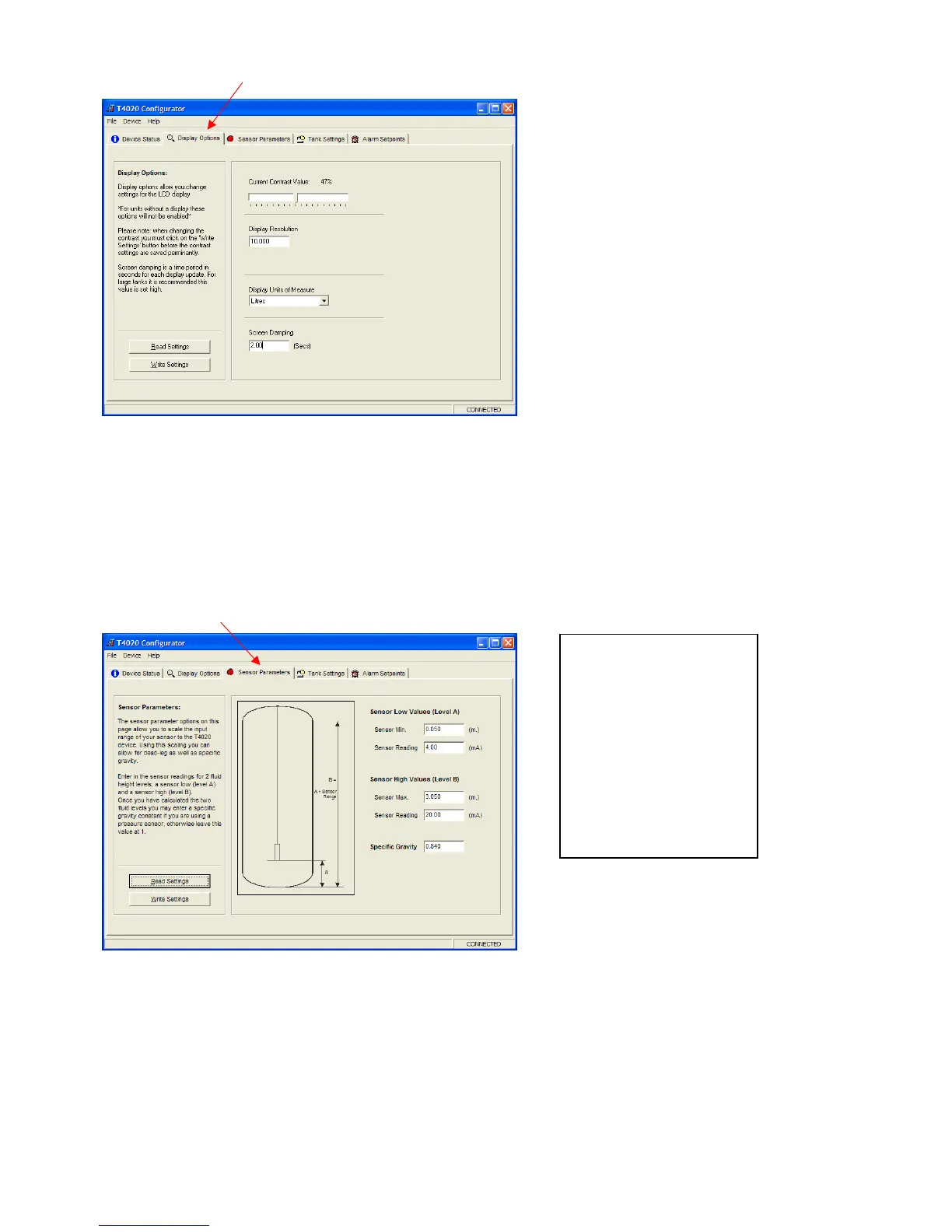
Click on the Display Options tab.
Current Contrast Value, default is 47%. Set as required.
Number of Significant figures is 5. On the T5020, there is the option to choose Resolution of Display, e.g. 50
Litres or 10 Litres etc. Set as required. 10.00 for instance.
Display Units of Measure, set to Litres unless otherwise requested.
Screen Damping, makes the screen more stable, suggest 2 Seconds.
When this screen is complete, Click Write Settings.
Click on the Sensor Parameters tab. Note: Set to Suit the Sensor, NOT THE TANK.
Sensor Min, set to 0.050m (50mm) as standard.
Sensor (Min) Reading set to 4.00mA
This would mean for example a 2.0m Sensor, would be set as a Sensor Min 0.050m to a Sensor Max 2.050m.
and a 3m Sensor would be Sensor Min 0.05m and Sensor Max 3.050m etc.
Sensor Max, set to Sensor 0.050m plus the Sensor length as shown in example above.
Sensor (Max) Reading set to 20.00mA
Enter the Specific Gravity of contents.
When this screen is complete, Click Write Settings.


 To Next Page