Page 10 of 22
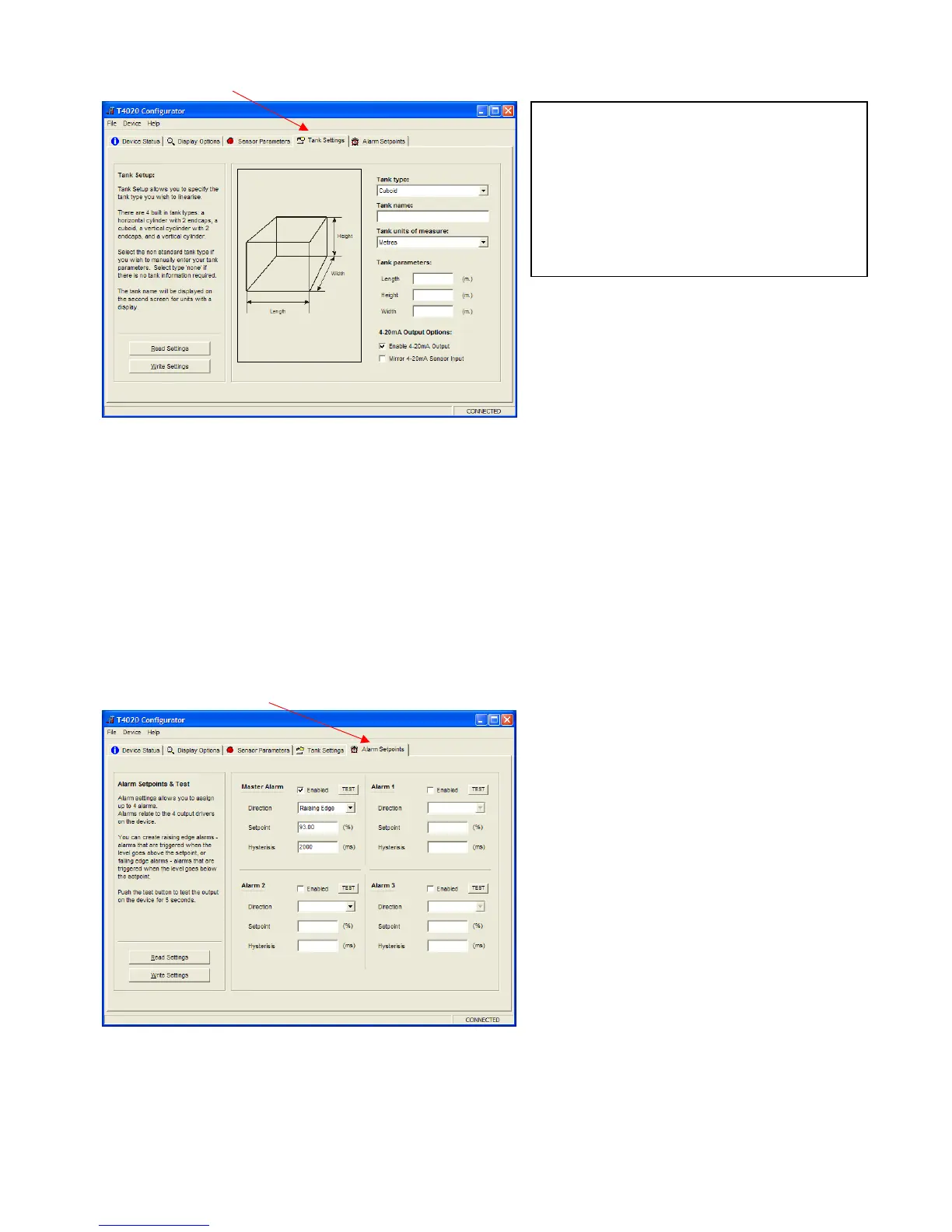
Click on the Tank Settings tab.
The next step is to set the tank shape up. Enter the tank type from the scroll down menu, a name for the tank
and the measurements.
Ensure that the Enable 4-20mA Output is ticked.
Please make sure the Mirror Output box is NOT ‘Checked’ (ticked). If it is we need to discuss.
The Mirror input may be used when a second Gauge is set exactly the same as the first. Alternatively, the
second Gauge can be set to have the Sensor Parameters the height of the primary tank and this will work over
the full 4-20 milliamp range of the first gauge output. No sensor offset required.
When this screen is complete, Click Write Settings.
Click on the Alarm Setpoints tab.
Set the Alarm settings as required (High is normally 95% Rising).
Set the “Direction” to “Rising” or “Falling”. This will result in energising the Relays (R5 Option Board) if fitted
in that ‘form’.
Rising at 95% on the M alarm will output 24vdc when the level increases to 95%.
When this screen is complete, Click Write Settings.
Note: that the tank can be taller than the
sensor range due to specific gravity.
For example, the tank being 2.2m tall. If we say
this is Diesel (DERV), then 2.2 x 0.835 = 1.837
affective range on the sensor. This means we
can use a 2.0m sensor in a 2.2m tank.
A 3.0m sensor will work fine as well


 To Next Page