Your Xda
O
2
user guide 4
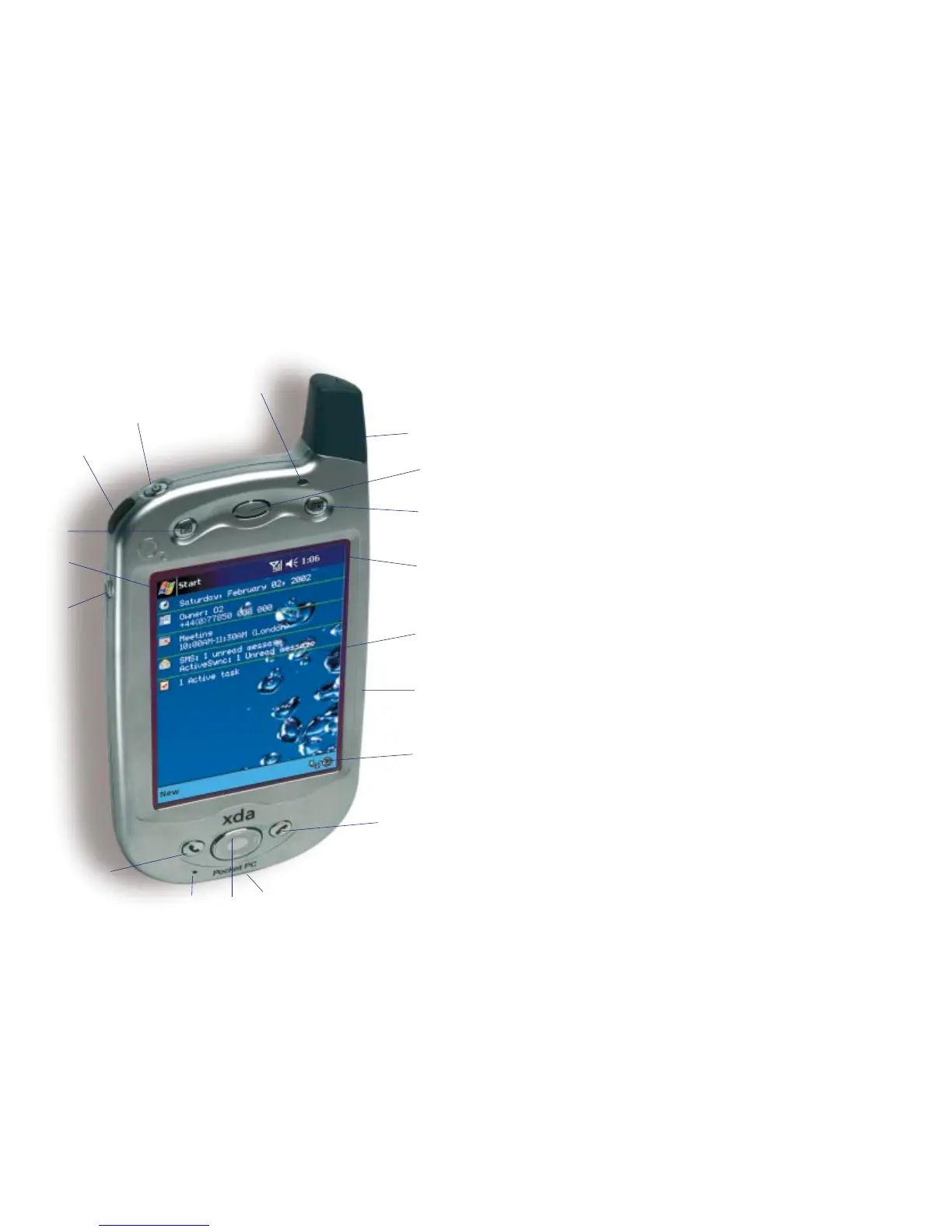
Your Xda has hardware buttons and scroll functions that control actions,
and a stylus for selecting items and entering information.
Front panel components
1 Antenna
2 Power light
For further information please refer to your Pocket PC Phone User Manual.
3 Power button
Press to turn on/off your Xda.
Backlight
Press and hold to turn the backlight on/off.
4 Infrared port
Enables you to exchange file(s) or data with other devices without cables/wires.
5 Contacts
Press for quick access to your contacts.
6 Speaker
7 Calendar
Press for quick access to your calendar.
8 Navigation bar
Displays the active program, signal strength and time.
For a full list of icons please refer to page 7.
9 Start menu
10 Volume
11 Touch screen display
For handwriting, drawing or to make a selection with the stylus.
12 SIM card holder
13 Command bar
14 Call key
Press to take a call or take you to the phone key pad. Press and hold to
activate/de-activate speakerphone during a call.
15 Navigational pad
To scroll through drop down menus or programme instructions.
16 Cancel call key
Press to end a call or press and hold to turn on/off your Xda’s phone connection.
17 Battery charger socket
18 Microphone
Speak here when making a call or voice recording.
7
8
11
12
13
15
16
17
18
14
10
9
5
3
1
2
6
4
3O
2
user guide



 To Next Page