Add Your Device & Configure Wi-Fi
There are 3 methods for connection. Auto Discovery (Bluetooth), EZ Mode (Easy-connect) and AP
Mode.
BEFORE PROCEEDING, MAKE SURE YOUR DEVICE IS CONNECTED TO THE WI-FI
NETWORK, YOUR ROUTER IS CONFIGURED AT 2.4 GHZ, AND THE BLUETOOTH
FUNCTION IS ENABLED
Auto Discovery (Bluetooth)
Press for 3 seconds after the screen unlock, will be flashing rapidly to enter Wi-Fi connection
status.
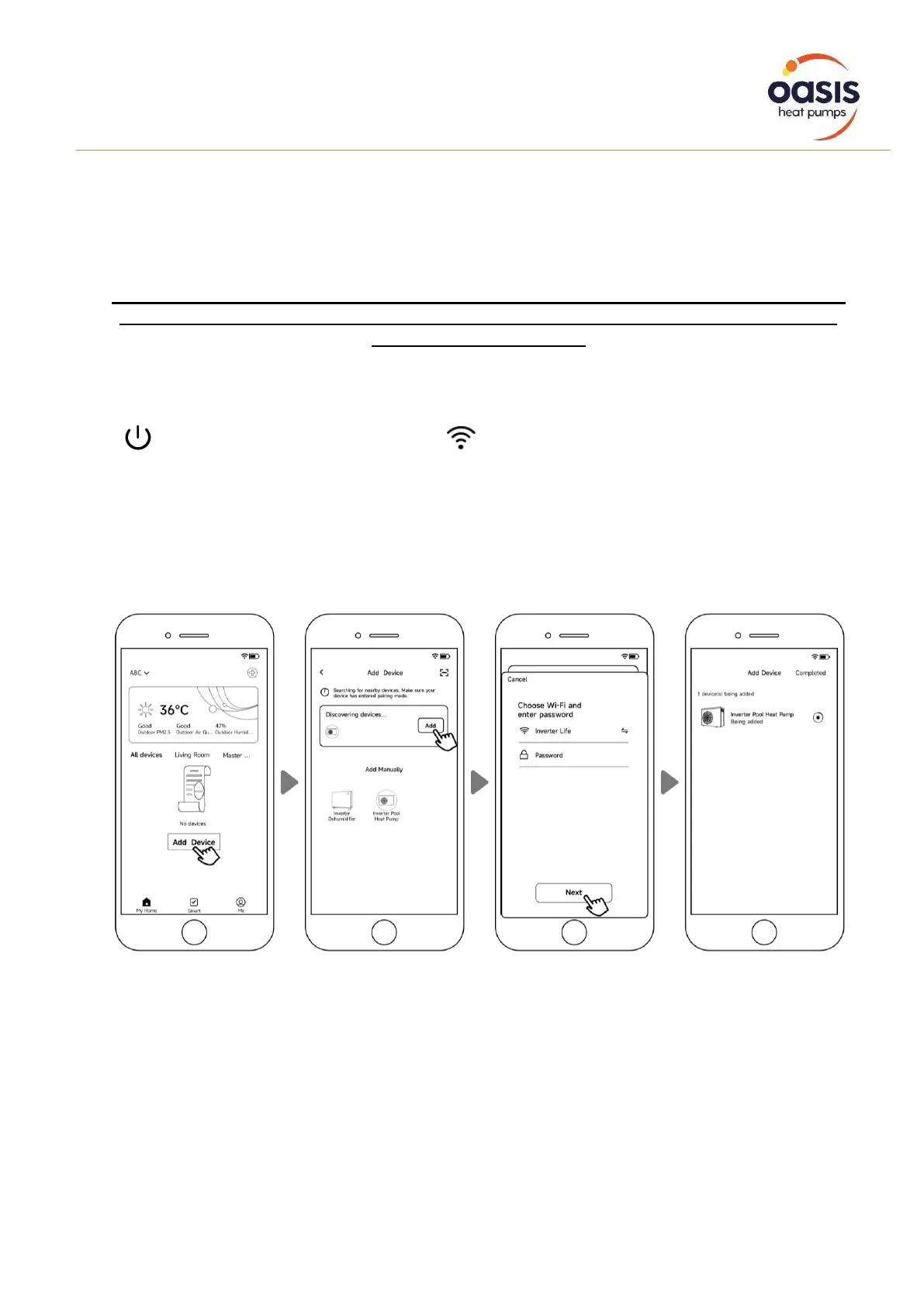
Click "Add Device", wait for the app to search for the device and then click “add”, then follow the
instructions below to finish the device connection.
Note: It will take some time to scan, please be patient. Only Wi-Fi modules with Bluetooth functions can
use this method.


 To Next Page