8-36 Key Operator Mode
Key Operator Mode
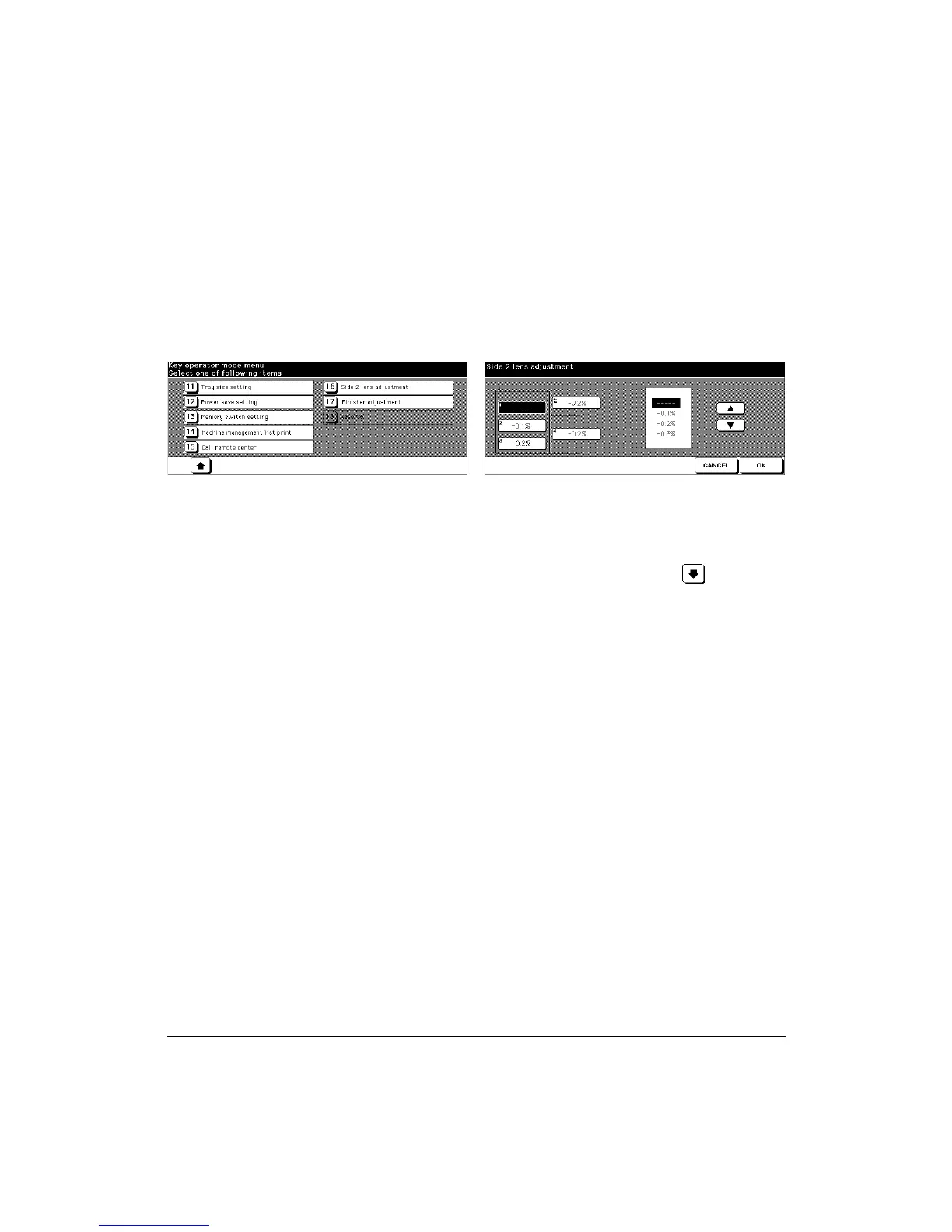
Side 2 Lens Adjustment [16]
Use this function to set the adjustment data of the magnification ratio for each tray as
Side 2.
Key Operator Mode Screen 2 Side 2 Lens Adjustment Screen
1 Press [HELP] to display the Help Screen, then touch Key Operator Mode.
Enter a 4-digit Key Operator password, then touch OK to display the Key Operator
Mode Screen. (See note.)
2 To display menus [11] to [17] of the Key Operator Mode Screen, touch Lower
arrow key.
3 Touch [16] Side 2 lens adjustment to display the Side 2 Lens Adjustment Screen.
4 Touch to highlight the desired tray key, then touch arrow keys to select an adjustment
data.
The selected data will be displayed on the highlighted tray key.
5 Touch OK to complete the setting and return to the Key Operator Mode Screen.
6 If other Key Operator settings are required, select the desired item, from [1] to [17].
7 Touch PREVIOUS SCREEN to return to the Basic Screen and perform printing
operations.
NOTE: If an invalid password is entered, enter a valid 4-digit password.



 To Next Page