Maintenance & Supplies 7-5
Maintenance & Supplies
Loading Paper (continued)
Loading Paper in Tray 4 (Large Capacity Tray)
When displaying Thick 1 or Thick 2 on the tray key of the Basic Screen, be sure to load
the specified paper; otherwise mishandled paper may occur.
When displaying TAB on the tray key of the Basic Screen, see p. 7-8.
LCT (8.5 x 11)
LCT (11 X 17)
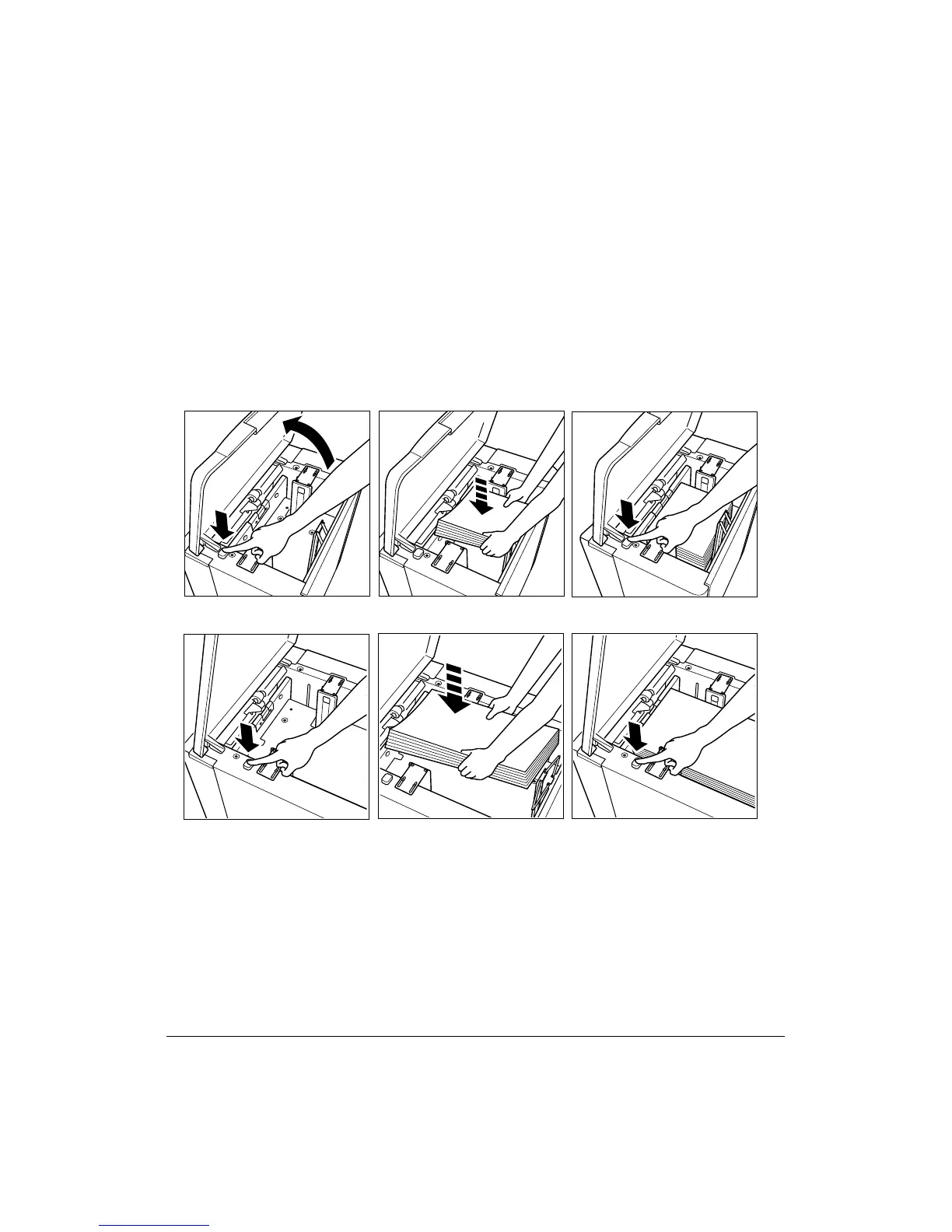
1 Open the LCT upper door.
2 Press the paper loading button to lower the bottom plate of the LCT.
3 Load the fixed size paper into the LCT with the paper curl turning downward.
4 Repeat the steps 2 and 3 until the bottom plate cannot go down any more.
Load size 8.5"x11" or A4 (service-adjustable) for LCT; or load size 11"x17", 8.5"x14",
8.5"x11", 8.5"x11"R, A3, B4, A4, A4R, or F4 for LCT(11 X 17).
Do not stack paper above the paper hook level.
5 Close the LCT upper door.



 To Next Page