2
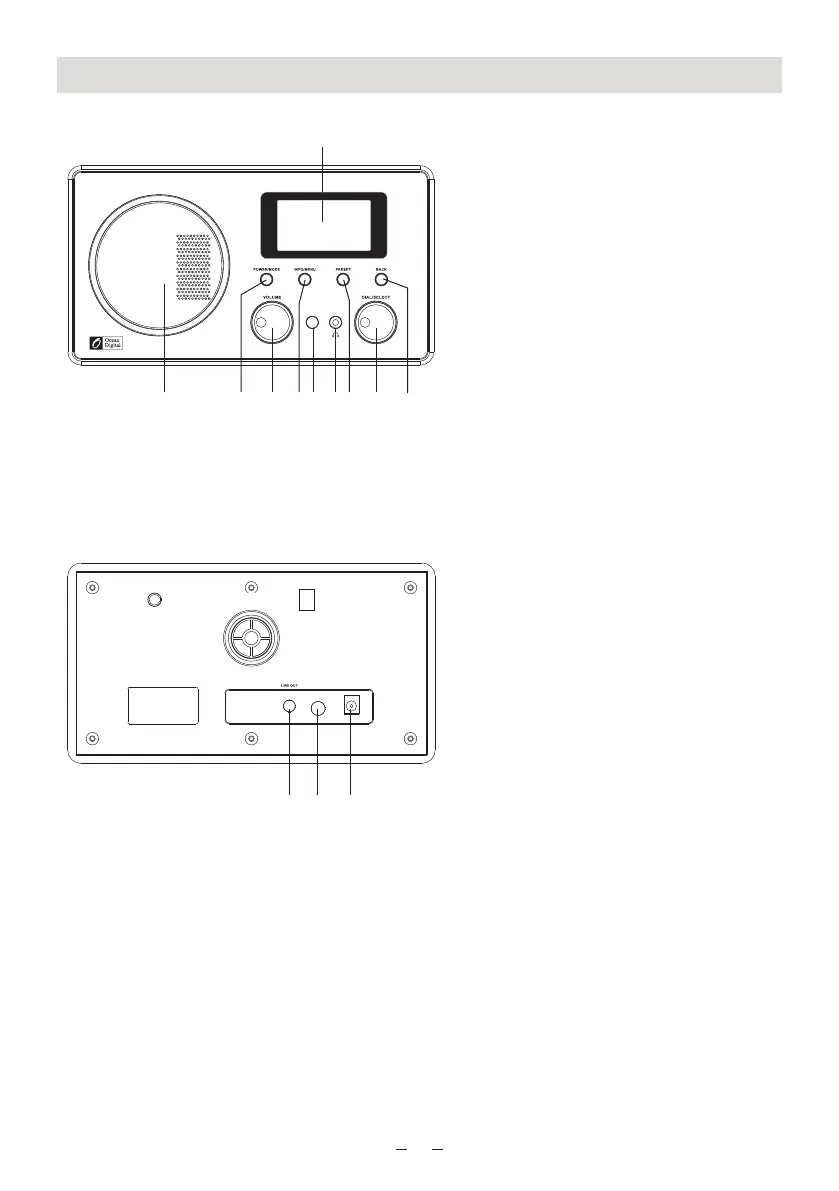
Location of Controls
11 12
13
2 3 4 5 6 7 8 9
10
1
1. LCD display
2. Speaker
3. Power/ Mode:
Press and hold the button to turn on the
radio, or turn it off (switch to Standby).
Press the button briefly to switch
between Internet Radio and Media
Player mode
4. Volume Control
5. Info/Menu:
<Internet Radio> mode:
- Press and hold the button to enter the
Internet radio menu
- Press the button briefly each time to
see more information for the playing
radio station
<Media Player> mode:
- Press and hold the button to enter into
Media player menu
- Press the button briefly each time to
see more information for the playing
track of song
6. Infrared Remote sensor
7. Earphone socket
8. Preset:
- Press and hold the button to enter the
“Save Preset” list
- Press the button briefly to “Recall the
Preset”
9. Dial/Select:
- Rotate the button to scroll up and
down on the menu
- Push down the button to confirm
selection
10. Back:
Press this button to return to
the previous mode
11. Line out socket:
Connect external powered speakers
with 3.5 mm plug or RCA adaptor
12. Aux-In socket
Connect with 3.5mm aux-in cable
13. DC IN 12V Socket:
Connect with the AC adaptor supplied
in the package
DC IN 1 2V
AUX I N















 To Next Page