3
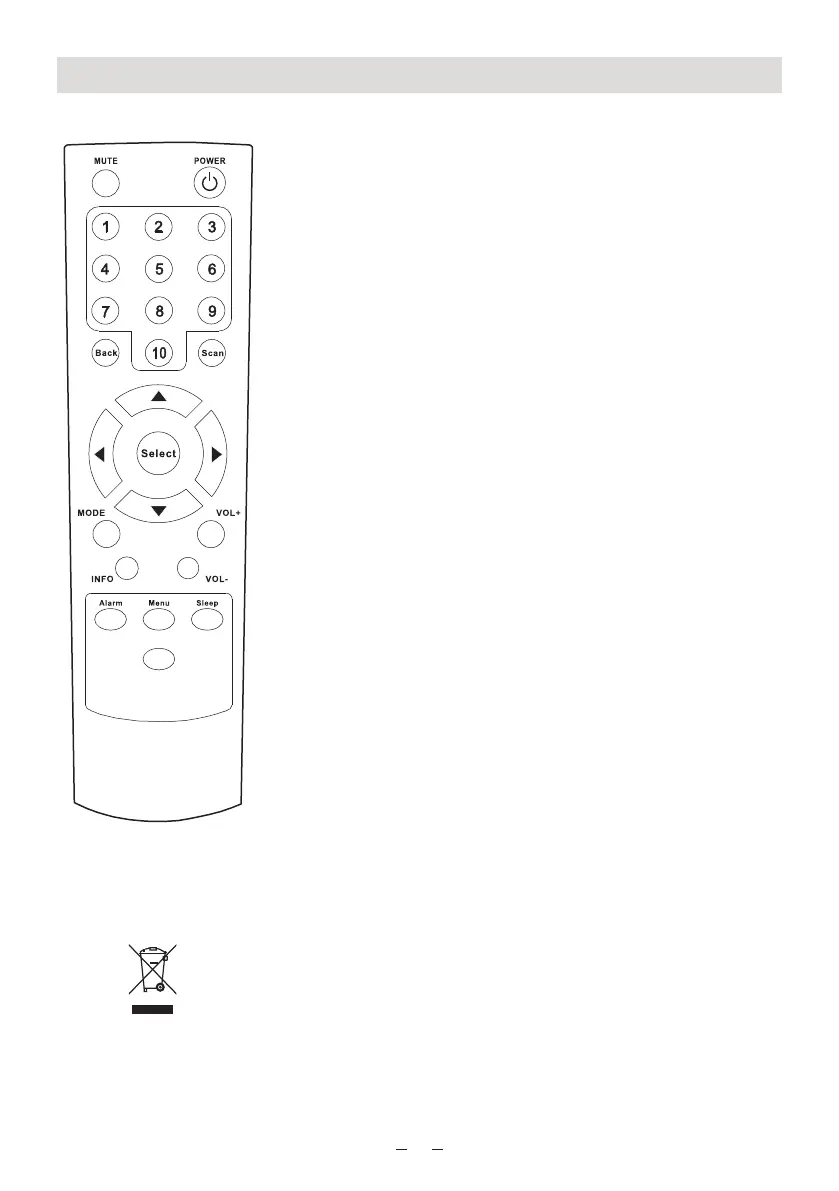
Remote controller
Power: Turn on the Radio or turn off the radio to Standby
Mute: Press to mute the voice
1-10: To store and recall 10 preset stations. Press and
hold the button to store the station. Press once to
recall the station.
Back: Return to previous mode or last display
Scan: Enter the menu of Internet radio of Media Player
p / qScroll up and down on the menu
t / uSelect the previous or next song under Media
Player
Select: Press to select an option
Mode: Switch between Internet Radio and Media Player
Info: To view the detailed information of the currently
playing radio station or music streamed from PC
+ VOL -: Use to adjust the volume
Alarm: To set the Alarm on the radio
Menu: Press to enter the main menu
Sleep: Set the sleep timer of the radio
Dimmer: Press to light the backlight, press again to disable it
If at any time in the future you should need to dispose of this product please
note that: Waste electrical products should not be disposed of with household
waste.
Please recycle where facilities exist. Check with your Local Authority or retailer
for recycling advice. (Waste Electrical and Electronic Equipment Directive)
Dimmer















 To Next Page